
Buyers who want colour-accurate work should pick the ASUS ProArt, while gamers chasing speed should pick a fast OLED model, and the Samsung dual 4K display suits buyers who want a pair of screens in a single panel. All five are 4K displays with HDR support, but they split sharply on panel type, refresh rate, and size. The OLED models run fast refresh rates, the IPS model carries factory calibration for accurate colour, and the Samsung stretches dual 4K across a single wide curved screen. Each pick below states its own panel type, ports, and measurements, so the guide that follows stays close to the listing details.
The ASUS ProArt is the only pick that states factory calibration, with Calman Verified colour and a Delta E under 2. The KOORUI, LG, and ASUS ROG models all run fast OLED panels with quick response times, while the Samsung matches that speed on a wide dual 4K canvas. USB-C appears on several picks, with power delivery on the ProArt and ROG models. The comparison below follows the listing details for every pick, from panel type to ports and measurements.
As an Amazon Associate, we earn from qualifying purchases.
Pick by Your Need
- Best overall: ASUS ProArt PA329CRV. Factory calibration with Calman Verified colour for colour-accurate work.
- Best OLED value: KOORUI 32-inch 4K OLED. An OLED panel built for fast play with a quick response time.
- Best dual-mode: LG UltraGear 32GX870A-B. Switches between 4K and Full HD modes for story games and speed-first play.
- Best ultrawide: Samsung Odyssey Neo G9 57-inch. Dual 4K resolution across a curved panel that replaces a pair of monitors.
- Best tandem OLED: ASUS ROG PG32UCDM3. Tandem QD-OLED with DisplayHDR 500 True Black and a proximity sensor.
Quick Answer
For colour work, the ASUS ProArt is the pick: factory calibration and wide colour coverage. For gaming, the KOORUI, LG, and ASUS ROG all run fast OLED panels, and the LG adds a dual-mode option. For a single screen that replaces a pair of monitors, the Samsung suits buyers who want a dual-screen setup.
Comparison Table
| Product | Best for | Key data from the listing | Trade-off |
|---|---|---|---|
| ASUS ProArt PA329CRV | Colour-accurate work | 32-inch 4K IPS panel | IPS panel, not OLED |
| KOORUI 32-inch 4K OLED | Fast OLED gaming | 240 Hz OLED panel | No factory calibration figure given |
| LG UltraGear 32GX870A-B | Dual-mode gaming | Dual-mode 4K and Full HD panel | Typical brightness of 275 nits sits below the stated peak |
| Samsung Odyssey Neo G9 | Wide dual-screen gaming | 57-inch dual 4K display | Stated width of 52.3 inches needs a wide desk |
| ASUS ROG PG32UCDM3 | Tandem OLED gaming | Tandem QD-OLED with 99.5% DCI-P3 | No height adjustment figure given |
Decision Guide
If colour accuracy leads the decision, choose the ASUS ProArt: Calman Verified calibration and wide colour coverage make it the work-first pick. If refresh rate leads, choose the KOORUI, the LG, or the ASUS ROG, the OLED gaming picks. If desk width is limited, skip the Samsung: its stated width runs past the width stated for the KOORUI and ROG models. Colour work also needs the right ports, so check the USB-C and DisplayPort listings against the computer on hand.
If HDR brightness matters, weigh the stated figures: the LG peaks at 1300 nits, while the ROG and KOORUI carry their own True Black ratings. If contrast matters, the KOORUI states a contrast ratio in its listing. If burn-in protection matters, the ROG is the only pick that states a proximity sensor, switching the screen to black when the user steps away. Brightness figures also vary by mode, so compare the stated peak against the typical figure before choosing.
If the setup needs a single cable for video and power, the ProArt and the ROG both deliver power over USB-C. If the desk already has a VESA arm, the KOORUI lists VESA mounting. If immersion matters, the Samsung is the only pick that states a curved panel, with a 1000R curve across its wide display. A curved panel also changes the viewing distance, so check the desk depth against the stated length figures.
1. ASUS ProArt PA329CRV 32-Inch 4K — Best for colour-accurate work

The ProArt is the work-first pick here: a 4K IPS panel with factory calibration verified by Calman and wide colour gamut coverage. The listing gives 32 inches in the title and 31.5 inches in the facts, so check the product page. Its USB-C link carries video alongside DisplayPort and HDMI. Daisy chain support lets another compatible display share the same video link, and the ergo stand adjusts the viewing position.
Pros
- Calman Verified factory calibration with Delta E under 2
- 98% DCI-P3 coverage on a 4K IPS panel
- 96 W USB-C power delivery for laptop charging
Cons
- No refresh rate figure is given, so fast-play buyers should look elsewhere
- Stated weight of 21.83 pounds suits a fixed desk
| Spec | From the listing |
|---|---|
| Size | 32 inches |
| Colour | BLACK |
| Length | 28.1 inches |
| Width | 9.45 inches |
| Height | 19.2 inches |
| Weight | 21.83 pounds |
The ProArt fits a buyer who puts colour trust first.
2. KOORUI 32-Inch 4K OLED — Best OLED value for fast play

The KOORUI pairs a 4K OLED panel with a fast refresh rate and a quick response time, matching the speed stated for the LG and ROG models. The listing states 99% DCI-P3 coverage with HDR True Black, so dark scenes hold absolute blacks. Connectivity covers dual HDMI 2.1, DisplayPort 1.4, USB-C, and USB-A/B ports. Adaptive Sync support keeps fast scenes free of tearing, and the stand offers tilt, swivel, pivot, and height adjustment for a flexible setup.
Pros
- 240 Hz refresh rate with a quick response time
- HDR True Black 400 with a high contrast ratio
- Tilt, swivel, pivot, and 110 mm height adjustment with VESA mounting
Cons
- USB-C port with no power delivery figure given
- Stated weight of 25.65 pounds, above the LG and ROG figures
| Spec | From the listing |
|---|---|
| Colour | Black |
| Size | 32 inches |
| Length | 8.89 inches |
| Width | 28.3 inches |
| Height | 23.3 inches |
| Weight | 25.65 pounds |
Buyers who want a dual-mode option should compare the LG below.
3. LG UltraGear 32GX870A-B OLED — Best dual-mode gaming display

The LG is the dual-mode pick here: 4K at 240 Hz for story-driven games, or Full HD at 480 Hz for speed-first play. Micro Lens Array+ technology sits behind the brightness, and the monitor carries NVIDIA G-SYNC Compatible validation and AMD FreeSync, so screen tearing is reduced. Buyers who want a screen for story games and speed-first play get both modes here. The dual-mode design suits buyers who switch between story games and speed-first play.
Pros
- Dual-mode play for story-driven and speed-first games
- 0.03 ms response time with G-SYNC Compatible and AMD FreeSync
- Peak brightness up to 1300 nits with Micro Lens Array+ technology
Cons
- No USB-C port is listed
- Full HD mode gives up 4K resolution to reach 480 Hz
| Spec | From the listing |
|---|---|
| Colour | Black |
| Length | 9.83 inches |
| Width | 28.11 inches |
| Height | 24.44 inches |
| Weight | 21.61 pounds |
| Response | 0.03 ms |
The Full HD mode suits speed-first play.
4. Samsung Odyssey Neo G9 57-Inch — Best single-screen dual setup
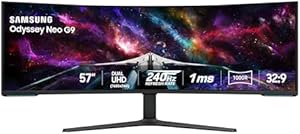
The Samsung replaces a pair of UHD monitors with a curved panel carrying dual 4K resolution. Its curved panel wraps the display, and the refresh rate runs at 240 Hz. Quantum Mini-LED backlighting drives the HDR picture, and AMD FreeSync keeps scenes stutter-free. The curved panel wraps the display, so the edges sit closer to the viewer than a flat panel.
Pros
- Dual 4K resolution across a 57-inch curved panel
- 1000R curve with the display wrapping around the viewer
- DisplayPort 2.1 input for high-bandwidth video
Cons
- 1 ms response time, slower than the OLED picks
- A stated weight of 41.9 pounds for the desk to hold
| Spec | From the listing |
|---|---|
| Size | 57-inch |
| Colour | Black & White |
| Length | 19.7 inches |
| Width | 52.3 inches |
| Height | 24.0 inches |
| Weight | 41.9 pounds |
The Samsung fits a buyer who wants a dual-screen setup in a curved panel.
5. ASUS ROG PG32UCDM3 32-Inch — Best tandem OLED for gaming

The ROG carries the tandem QD-OLED panel here: a 4K display with a fast refresh rate and a 0.03 ms response time. The listing gives conflicting height figures, 16.3 inches in the size field and 20.9 inches in the height field, so check the product page. Its BlackShield film raises panel hardness for better scratch resistance, and OLED Care Pro watches with a Neo Proximity Sensor that turns the screen black when nobody is in front of it. For HDR, it carries DisplayHDR True Black and wide colour coverage.
Pros
- Tandem QD-OLED panel with a 240 Hz refresh rate
- 99.5% colour gamut coverage
- USB-C delivers 90 W alongside G-SYNC Compatible validation
Cons
- No tilt, swivel, or pivot figure is given
- USB-C power delivery sits below the figure stated for the ProArt
| Spec | From the listing |
|---|---|
| Colour | BLACK |
| Length | 10.9 inches |
| Width | 28.3 inches |
| Height | 20.9 inches |
| Weight | 19.18 pounds |
| Panel | QD-OLED |
The tandem panel and proximity sensor set it apart from the KOORUI and LG.
Shopping Checklist
- Measure the desk first, then compare the stated width and depth of each finalist before ordering.
- Check the stated panel size and refresh rate against the graphics card output.
- Confirm the ports on the listing — HDMI, DisplayPort, and USB-C — match the cables on hand.
- Check the stated weight and VESA mounting before choosing an arm or stand.
- Read the return window on the product page before ordering, in case the panel does not fit the desk.
- Compare finalists side by side on panel type and refresh rate before deciding.
FAQ
Which monitor here suits colour work best?
The ASUS ProArt is the work-first pick: Calman Verified calibration, a Delta E under 2, and wide colour coverage. Its USB-C link also handles laptop charging. Colour work also benefits from the wide colour gamut, so check the stated coverage before ordering.
What refresh rate do the gaming picks here run at?
The OLED gaming picks run at 240 Hz for fast play. The LG adds a Full HD mode for speed-first play. The Samsung matches that refresh rate on its wide curved panel, while the ProArt suits colour work over speed.
How wide is the Samsung dual 4K monitor?
The Samsung states a width of 52.3 inches, so measure the desk before ordering. A single curved panel covers the width of a pair of monitors. The KOORUI, LG, and ROG models state narrower widths.
Final Verdict
The ASUS ProArt is the pick for colour work, with factory calibration and wide colour coverage. The KOORUI, LG, and ASUS ROG share fast OLED speed, and the choice among them turns on dual-mode play, value, or the tandem panel with a proximity sensor. The Samsung covers the dual-screen niche with its wide dual 4K curved panel. Measure the desk, match the ports, and compare the stated brightness and refresh rate figures before ordering. Start with the main use, then match the panel, ports, and measurements to the desk.
Product and ASIN Reference
| Product | ASIN |
|---|---|
| ASUS ProArt PA329CRV | B0B8YSL9RD |
| KOORUI 32-inch 4K OLED Gaming Monitor | B0F8MXBB4S |
| LG 32GX870A-B | B0F14PFFPS |
| Samsung 57″ Odyssey Neo G9 (G95NC) | B0CDQM55C9 |
| ASUS ROG PG32UCDM3 | B0G31KVQ1H |
Prime covers fast, free delivery on eligible items. See whether a Prime free trial is available for your account.
Check Prime on Amazon →
Write Your Review
No reviews yet. Be the first to share your experience!