
If you want a standalone gaming laptop docking station, pick the NIMO external GPU dock, the only one of these five listings that is actually a docking station; the other four are gaming laptops bundled with a docking station or docking storage, so choose one of those only if you are really shopping for a new laptop with dock extras included. That split shapes every comparison below, and each laptop is labelled plainly as a mismatch for this keyword.
Read the five listings as two different purchases. The NIMO unit adds an external graphics processor to a device you already own, using USB4 or OCuLink. The other four instead replace your current machine entirely, with 15.6 inch to 18 inch displays and a docking element mentioned in the product name rather than described as a separate hub.
As an Amazon Associate, we earn from qualifying purchases.


Pick by Your Need
- Best true docking station: NIMO External GPU Docking Station. The only standalone dock here, with USB4 and OCuLink.
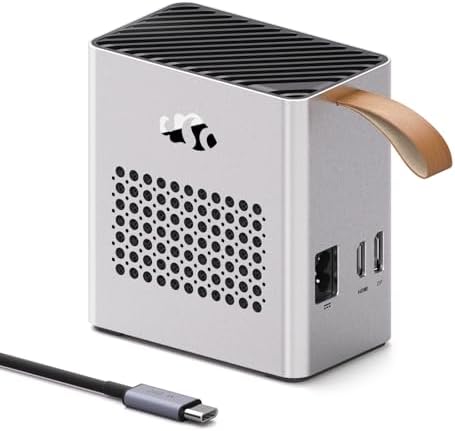
- Best laptop bundle for a named port: Acer Nitro V 15. Its listing names a Thunderbolt 4 port and a bundled 128GB docking station.
- Best for the largest screen: GIGABYTE A18. The listing states an 18 inch display, the largest here.
- Best for the most stated memory: MSI Cyborg A15 AI. The listing states 32GB of DDR5 memory, tied with the GIGABYTE A18 for the most stated here.
- Best 17 inch class laptop bundle: HP Omen 17. The listing states a 17.3 inch display and a 1TB docking station set.
Quick Answer
For a docking station itself, choose the NIMO External GPU Docking Station, which connects over USB4 at up to 80Gbps or OCuLink and carries a Radeon RX 7600M XT with 8GB of GDDR6 memory. If you actually need a whole gaming laptop, the Acer Nitro V 15 is the smallest and lightest stated bundle here, while the GIGABYTE A18 gives the largest stated display at 18 inches.
Comparison Table
| Product | Best for | Key stated figure | Trade-off | Buy |
|---|---|---|---|---|
| Acer Nitro V 15 | Laptop buyers who want Thunderbolt 4 | 15.6 inch display, 14.26 x 9.44 x 0.93 inches | A laptop, not a standalone dock | View on Amazon |
| MSI Cyborg A15 AI | Laptop buyers who want 32GB of memory | 15.6 inch display, 32GB DDR5 stated | A laptop, not a standalone dock | View on Amazon |
| GIGABYTE A18 | Laptop buyers who want the largest screen | 18 inch display, 32GB DDR5 stated | A laptop, and the heaviest stated here at 10.0 pounds | View on Amazon |
| HP Omen 17 | Laptop buyers who want a 17.3 inch screen | 17.3 inch display, 16GB DDR5 stated | A laptop, not a standalone dock | View on Amazon |
| NIMO External GPU Docking Station | Owners adding external graphics to an existing device | 4.53 x 2.48 x 4.74 inches, 3.8 pounds | Adds graphics only; no display, keyboard or storage stated | View on Amazon |
Decision Guide
Check the product page for current details before ordering. Start with the product type, because no screen figure can turn a laptop into a dock. If you already own a device with USB4 or OCuLink and need more graphics capacity, choose the NIMO dock: its stated footprint is 4.53 x 2.48 x 4.74 inches and its stated graphics memory is 8GB of GDDR6. If you need a replacement computer as well, compare the four laptops on stated screen size and memory instead.
If you need 32GB of stated memory, choose the MSI or the GIGABYTE, since the Acer and HP each state 16GB. If you need a named Thunderbolt 4 port, choose the Acer, the only listing that names it.
1. Acer Nitro V 15 with Bundled Dock — Best laptop bundle with Thunderbolt 4
This listing is a gaming laptop, not a standalone gaming laptop docking station, so consider it only if you want a new computer with a bundled 128GB 9H docking station included. Its angle is size and port naming: the listing states a 15.6 inch Full HD display at 1920 x 1080 at 165Hz, an Intel Core i5-13420H with 8 cores and 12 threads reaching up to 4.6 GHz, and a Thunderbolt 4 port. Its stated figures of 14.26 x 9.44 x 0.93 inches and 4.66 pounds are the smallest and lightest among the four laptops.
| Spec | From the listing |
|---|---|
| Colour | Black |
| Configuration | 16GB RAM, 512GB SSD |
| Length | 14.26 inches |
| Width | 9.44 inches |
| Weight | 4.66 pounds |
2. MSI Cyborg A15 AI with Docking Storage — Best laptop bundle for stated memory
This listing is also a gaming laptop, not a standalone gaming laptop docking station, and its docking element appears in the storage description, where the name counts 3TB as a 2TB SSD plus a 1TB docking station portion. Its angle is stated memory and processor tier: the listing gives 32GB of DDR5 RAM, an AMD Ryzen 9 270, an NVIDIA GeForce RTX 5060 with 8GB of GDDR7 memory, and a 15.6 inch 1080P IPS display at 144Hz.
| Spec | From the listing |
|---|---|
| Colour | Black |
| Configuration | 32GB DDR5, 2TB SSD |
| Length | 19.0 inches |
| Width | 12.4 inches |
| Weight | 7.0 pounds |
3. GIGABYTE A18 with Docking Station Set — Best laptop bundle for screen size
This listing is a gaming laptop, not a standalone gaming laptop docking station, and its name describes the storage as 3TB made up of a 2TB drive plus a 1TB docking station set. Its angle is screen size: the listing states an 18 inch WQXGA display at 165Hz, the largest stated screen here, paired with an AMD Ryzen 7 260 with 8 cores and 16 threads, from 3.8 GHz up to 5.1 GHz. It also states 32GB of DDR5 RAM and a 2TB PCIe SSD.
| Spec | From the listing |
|---|---|
| Colour | Black |
| Configuration | 32GB, 2TB PCIe SSD |
| Length | 19.0 inches |
| Width | 13.5 inches |
| Weight | 10.0 pounds |
4. HP Omen 17 with Docking Station Set — Best laptop bundle for core count
This listing is a gaming laptop, not a standalone gaming laptop docking station, and its storage is described as 2TB in total, split between a 1TB SSD and a 1TB docking station set. Its angle is the stated processor configuration: the listing gives an AMD Ryzen AI 9 365 with 10 cores and 20 threads, the highest stated counts here, alongside 16GB of DDR5 RAM and a GeForce RTX 5060 with 8GB of GDDR7 memory. The display is stated at 17.3 inches, Full HD, at 144Hz. Skip it if you wanted a dock for a laptop you already own, because this purchase replaces it instead.
| Spec | From the listing |
|---|---|
| Colour | Black |
| Configuration | 16GB, 1TB SSD |
| Length | 19.0 inches |
| Width | 13.5 inches |
| Weight | 9.0 pounds |
5. NIMO External GPU Docking Station — Best true docking station
This is the one listing that matches the keyword directly: a standalone external GPU docking station that adds graphics capacity to a compatible laptop, mini PC, business notebook or handheld you already own. The listing states an AMD Radeon RX 7600M XT with 8GB of GDDR6 memory and up to 120W of graphics power, fed by a 240W PSU, and two connection routes, USB4 at up to 80Gbps or OCuLink based on PCIe 4.0 x4. Its stated size is 4.53 x 2.48 x 4.74 inches at 3.8 pounds, far smaller than any laptop listing, because it carries no screen or storage of its own.
| Spec | From the listing |
|---|---|
| Colour | Silver |
| Graphics | AMD Radeon RX 7600M XT, 8GB GDDR6 |
| Length | 4.53 inches |
| Width | 2.48 inches |
| Weight | 3.8 pounds |
Shopping Checklist
- Decide first whether you need a dock for a device you own or a replacement laptop, because four of these listings are laptops.
- Measure your desk space and compare it against the stated dimensions of your finalist.
- Check the stated connection type, USB4, OCuLink or Thunderbolt 4, against the ports on your own device.
- Check the stated memory, storage and graphics figures on the listing rather than relying on the product name alone.
- Note the return window for the docking station you pick.
- Compare your finalists side by side on screen size, weight and stated configuration.
FAQ
How do I tell a real docking station from a laptop bundle in these listings?
Look at what the product itself is. The NIMO listing is an enclosure with a graphics processor, a 240W PSU and USB4 or OCuLink connections, and it needs a separate host device. The other four each state a display size and a processor, which makes them complete laptops, and three of them also state a keyboard, while the GIGABYTE listing states no keyboard.
Which connection type should I look for on my own laptop?
Match the dock to a port your device actually has. The NIMO listing names USB4 at up to 80Gbps and OCuLink based on PCIe 4.0 x4, and states compatibility with laptops, mini PCs and handhelds equipped with one of those connections. If your device has neither, this dock has no stated way to connect.
Does the docking storage in the laptop listings work as a separate dock?
Based on the listing details, no separate dock specification is given for the Acer, MSI, GIGABYTE or HP products. Their listings describe the docking element only as part of the product name or storage total, and state no port list, power figure or connection type for it.
Final Verdict
Only one of these five listings is a gaming laptop docking station in the plain sense: the NIMO external GPU dock, with USB4 at up to 80Gbps, OCuLink, and a Radeon RX 7600M XT carrying 8GB of GDDR6 memory in a 4.53 x 2.48 x 4.74 inch enclosure. The other four are gaming laptops that mention a docking station or docking set in their names, so they answer a different need, namely replacing your computer. Among those four, the Acer is the smallest stated, the GIGABYTE has the largest stated screen at 18 inches, and the MSI and GIGABYTE state the most memory at 32GB. Choose by product type first, then by the stated figures.
Prime covers fast, free delivery on eligible items. See whether a Prime free trial is available for your account.
Check Prime on Amazon →Types of Docking Stations and USB-C Hubs
Docking stations and USB-C hubs are grouped mainly by port variety and by power-delivery capability.
Basic USB-C hubs add extra ports from one host port, usually relying on the host's own power budget. Docking stations go further, often adding pass-through laptop charging alongside multiple display and peripheral connections from a single cable. Single-cable docks connect a laptop with one cord for power, data, and displays at once, replacing a desk full of separate cables. Multi-monitor docks are built to drive two or more external displays, which not every laptop's single port can do unassisted.
A dock's total bandwidth is shared across every connected device, so running multiple high-resolution monitors plus fast storage from one dock can hit a bandwidth ceiling well before any single device's own rated speed is reached.
Frequently Asked Questions
What's the benefit of a single-cable docking station?
It connects a laptop with one cord for power, data, and displays at once, replacing a desk full of separate cables with a single connection point.
Can a dock run out of bandwidth with multiple devices connected?
Yes - a dock's total bandwidth is shared across every connected device, so running multiple high-resolution monitors plus fast storage from one dock can hit a bandwidth ceiling before any single device's own rated speed is reached.
What's the difference between a basic USB-C hub and a full docking station?
A basic hub mainly adds extra ports from one host port, while a docking station typically goes further, often adding pass-through laptop charging alongside multiple display and peripheral connections.
Related Guides
No internal links were supplied for this post, so this section lists none.
Product and ASIN Reference
| Product | ASIN | Buy |
|---|---|---|
| Acer Nitro V 15 | B0G6RSHFTT | View on Amazon |
| MSI Cyborg A15 AI | B0H5P5956V | View on Amazon |
| GIGABYTE A18 | B0HHRYZDC3 | View on Amazon |
| HP Omen 17 | B0GT4LNXBB | View on Amazon |
| NIMO External GPU Docking Station | B0HFWH22TC | View on Amazon |









Write Your Review
No reviews yet. Be the first to share your experience!