
If you own a Ryzen 3000 or 5000 series processor, start with one of the two AM4 DDR4 boards here; if you are building around a Ryzen 7000, 8000 or 9000 series processor, choose one of the two AM5 DDR5 boards instead. Four products are motherboards with WiFi 6E in the name or connectivity list, while the fifth, the slinkdsco antenna, is not a motherboard at all and is covered plainly as an accessory below.
Socket and memory generation decide this choice first, because an AM4 board cannot take an AM5 processor and a DDR5 board cannot take DDR4 memory. We compared the listings on stated socket, memory, power, M.2 count, dimensions, and WiFi 6E wording.
As an Amazon Associate, we earn from qualifying purchases.
Pick by Your Need
- Best overall: ASUS ROG Strix B550-F Gaming WiFi II. AM4 and DDR4, with WiFi 6E stated in its connectivity list.
- Best for AM5 builders: ASUS B650E MAX Gaming WiFi W. AM5, DDR5, PCIe 5.0 and 3 M.2 slots in ATX.
- Best compact: GIGABYTE B850M Gaming X WIFI6E. Smallest stated dimensions here, 9.6 inches by 9.6 inches, mATX.
- Best for Ryzen 5000 on DDR4: MSI B550 Gaming WIFI6E. It states 4 DDR4 DIMMs, PCIe 4.0 x16 and dual M.2.
- Best as an add-on only: slinkdsco External WiFi 6 6E Antenna. A tri-band antenna for an existing board, not a motherboard.
Quick Answer
For AM4 with DDR4, the ASUS ROG Strix B550-F Gaming WiFi II is the most complete listing here, with WiFi 6E, 2.5 Gb Ethernet and a 12+2 power design stated together. For AM5 with DDR5, the ASUS B650E MAX adds PCIe 5.0 and a third M.2 slot, while the GIGABYTE board suits a smaller mATX case. The slinkdsco antenna fits none of these roles: it is an accessory, not a board.
Comparison Table
| Product | Best for | Key stated figure | Trade-off |
|---|---|---|---|
| MSI B550 Gaming WIFI6E | AM4 builders keeping DDR4 | 4 DDR4 DIMM slots | WiFi 6E in name only; no standard number stated |
| ASUS ROG Strix B550-F Gaming WiFi II | AM4, stated WiFi 6E | 12+2 teamed stages | AM4 and DDR4 only; no Ryzen 7000 to 9000 support |
| GIGABYTE B850M Gaming X WIFI6E | Compact AM5 builds | 9.6 by 9.6 inches, mATX | 2 M.2 slots only; WiFi 6E in name, not facts |
| slinkdsco External WiFi 6 6E Antenna | Antenna for an existing board — not a motherboard | 9 dBi gain, tri-band | Accessory only; no socket or slots |
| ASUS B650E MAX Gaming WiFi W | AM5, more M.2 storage | 3 M.2 slots, PCIe 5.0 | Largest stated dimensions here |
Decision Guide
If you need to reuse DDR4 and a Ryzen 3000 or 5000 series processor, choose between the two AM4 boards. The MSI board states 4800+ MHz memory speeds (1DPC 1R) and a PCIe 4.0 x16 slot at 64 GB/s, while the ROG Strix states a 12+2 power design against the MSI board’s 8+2+1, plus WiFi 6E and Intel 2.5 Gb Ethernet. If stated wireless support matters most, pick the ROG Strix; if stated M.2 cooling matters more, the MSI listing gives more detail there.
If you need AM5 for a Ryzen 7000, 8000 or 9000 series processor with DDR5, choose by size and storage: the GIGABYTE board is mATX with 2 M.2 slots, while the ASUS B650E MAX is ATX with 3 M.2 slots and PCIe 5.0.
If you need WiFi 6E stated as a connectivity feature, not only in a name, the two ASUS boards are the ones whose facts state it directly; no standard number is stated for the MSI or GIGABYTE boards beyond their names. If you need a complete motherboard, do not choose the slinkdsco antenna, which only adds an antenna to hardware you already have. Compare your case’s stated form factor support — ATX for three boards here, mATX for the GIGABYTE — before ordering. Check the product page for current details before ordering.
1. MSI B550 Gaming WIFI6E Motherboard — Best for Ryzen 5000 on DDR4

This ATX board uses the AMD B550 chipset and AM4 socket, with support stated for Ryzen 5000, 5000 G-Series, 4000 G-Series and 3000 series processors. Its angle against the ROG Strix board is storage and memory detail: 4 DDR4 DIMM slots, 4800+ MHz speeds (1DPC 1R), and 2 M.2 connectors — one Gen4 x4 at 64 Gbps with an M.2 Shield Frozr, one Gen3 x4 at 32 Gbps. Dimensions are stated at 13.39 by 2.76 by 10.63 inches. WiFi 6E is in the name; no wireless standard, LAN speed or weight is stated.
Pros
- 8+2+1 Duet Rail Power System, DrMOS 50 A stated
- 2 M.2 connectors; Gen4 x4 slot has an M.2 Shield Frozr
- PCIe 4.0 x16 slot with Steel Armor, 64 GB/s stated
Cons
- No wireless standard number stated despite WIFI6E in the name
- No weight stated
| Spec | From the listing |
|---|---|
| Socket | AM4, AMD B550 |
| Memory | 4 DDR4 DIMMs, 4800+ MHz (OC) |
| Power | 8+2+1 Duet Rail, DrMOS 50 A |
| M.2 | 1 Gen4 x4 64 Gbps, 1 Gen3 x4 32 Gbps |
| Dimensions | 13.39 x 2.76 x 10.63 inches |
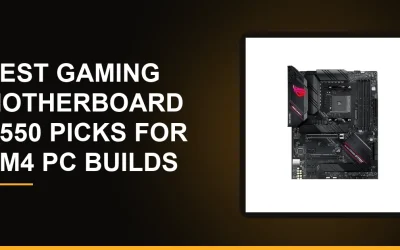
2. ASUS ROG Strix B550-F Gaming WiFi II — Best overall

This ATX board also uses AM4 and DDR4, for Ryzen 3000 and 5000 series plus 5000 and 4000 G-series processors, but states networking more fully than any other board here. On-board WiFi 6E (802.11ax) and Intel 2.5 Gb Ethernet are stated, along with Bluetooth v5.2, dual M.2 slots, USB 3.2 Gen 2 Type-C, HDMI 2.1 and DisplayPort 1.2. Power is stated as 12+2 teamed stages. Dimensions are 13.39 by 10.75 by 2.76 inches; weight is stated at 2.2 pounds, the heaviest stated here.
Pros
- WiFi 6E (802.11ax) and Intel 2.5 Gb Ethernet both stated
- 12+2 teamed stages with a ProCool connector stated
- BIOS Flashback, HDMI 2.1, DisplayPort 1.2 stated
Cons
- AM4 and DDR4 only; no stated DDR5 or Ryzen 7000 to 9000 support
- Heaviest stated weight here at 2.2 pounds
| Spec | From the listing |
|---|---|
| Socket | AM4, Ryzen 3000 and 5000 series |
| Wireless | WiFi 6E (802.11ax), Bluetooth v5.2 |
| Power | 12+2 teamed stages |
| M.2 | Dual slots; generation not stated |
| Size and weight | 13.39 x 10.75 x 2.76 inches; 2.2 pounds |
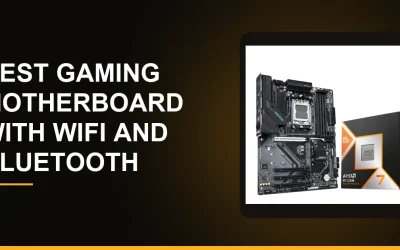
3. GIGABYTE B850M Gaming X WIFI6E — Best compact
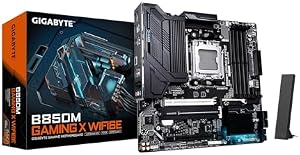
This is the only mATX board here, stated at 9.6 by 9.6 by 1.0 inches, with a stated weight of 2.0 pounds. It uses AMD Socket AM5 and supports Ryzen 9000, 8000 and 7000 series processors with DDR5 across 4 DIMM slots, serving the newer platform in a smaller footprint than the ATX B650E MAX. Power is stated as 10+2+2 phases, storage as 2 M.2 slots with PCIe 5.0. WIFI6E is in the name; no wireless standard, LAN speed or memory speed is stated.
Pros
- Smallest stated dimensions here, 9.6 by 9.6 inches, mATX
- AM5 support stated for Ryzen 9000, 8000, 7000 series
- 10+2+2 phases; fully covered MOSFET heatsinks stated
Cons
- Only 2 M.2 slots, one fewer than the ASUS B650E MAX
- No wireless standard number stated despite WIFI6E in the name
Skip it if your plan calls for ATX with 3 M.2 slots; this listing states mATX with 2.
| Spec | From the listing |
|---|---|
| Socket | AMD Socket AM5 |
| Memory | DDR5, 4 DIMM slots |
| Power | 10+2+2 phases |
| M.2 | 2 slots stated |
| Size | mATX; 9.6 x 9.6 x 1.0 inches |
4. slinkdsco External WiFi 6 6E Antenna — Best as an add-on only

This product is not a gaming motherboard. It is an external tri-band antenna with a magnetic base and an RP-SMA connector, listed for a desktop, a WiFi gaming motherboard or a PCIe WiFi Bluetooth card you already own. Its stated figures are 9 dBi gain, bands at 2.4 GHz, 5.8 GHz and 6 GHz, support for WiFi 6 and WiFi 6E, and a dual cable of 6.5 feet. No socket, slots, dimensions or weight are stated, because none belong to an antenna.
Pros
- Tri-band coverage stated: 2.4 GHz, 5.8 GHz, 6 GHz
- WiFi 6 and WiFi 6E support stated, 9 dBi gain
- Dual 6.5 feet cables, RP-SMA male connectors stated
Cons
- An antenna, not a motherboard: no socket or memory slots
- Requires an existing board or card, not supplied here
Skip it if you need a motherboard itself; this listing is an antenna only.
| Spec | From the listing |
|---|---|
| Type | External tri-band antenna, magnetic base |
| Gain | 9 dBi |
| Bands | 2.4, 5.8, 6 GHz |
| Connector | RP-SMA male, dual 6.5 feet cable |
| Socket and slots | The listing does not state it |
5. ASUS B650E MAX Gaming WiFi W — Best for AM5 builders

This ATX board uses the AMD AM5 socket for Ryzen 9000, 8000 and 7000 series processors with DDR5, and states the broadest connectivity of the AM5 pair. Wi-Fi 6E is stated directly, alongside a PCIe 5.0 x16 slot, a PCIe 5.0 M.2 slot, Realtek 2.5 Gb Ethernet and rear USB 10 Gbps Type-A and Type-C ports. Storage is stated as 3 M.2 slots, one more than the GIGABYTE board and either AM4 board here. Power is stated as 8+2+1 phases on a 6-layer PCB; the board has a white PCB. Dimensions are stated at 14.0 by 4.0 by 12.0 inches, the largest here; no weight is stated.
Pros
- Wi-Fi 6E stated directly; Realtek 2.5 Gb Ethernet stated
- 3 M.2 slots, the highest count in this group
- PCIe 5.0 x16 and PCIe 5.0 M.2 slots stated
Cons
- No weight stated
- AM5 and DDR5 only; no stated AM4 or DDR4 support
| Spec | From the listing |
|---|---|
| Socket | AM5, Ryzen 9000, 8000, 7000 series |
| Memory | DDR5; slot count not stated |
| Power | 8+2+1 phases, 6-layer PCB |
| M.2 | 3 slots, including PCIe 5.0 |
| Networking | Wi-Fi 6E; Realtek 2.5 Gb Ethernet |
Shopping Checklist
Work through these steps using only stated figures.
- Confirm your processor’s socket, AM4 or AM5, against the board’s stated socket.
- Check stated memory type and slot count, DDR4 or DDR5, against your memory.
- Measure your case’s stated support against the board’s form factor, ATX or mATX.
- Count the M.2 slots stated and compare that count with your build plan.
- Check how WiFi 6E is stated, in the facts or only in the name.
- Check the return window on the product page; compare finalists side by side.
FAQ
Does WiFi 6E in a product name mean the same as WiFi 6E in the connectivity list?
Not in these listings. The two ASUS boards state Wi-Fi 6E in their connectivity facts, the ROG Strix adding 802.11ax, while the MSI and GIGABYTE boards carry WIFI6E in their names only, with no standard number in their facts. Treat the stated facts as the record.
Can I use DDR4 memory and an AM4 processor on an AM5 board?
Based on the listing details, no. The AM5 boards state DDR5 and Ryzen 7000, 8000 and 9000 series support, while DDR4 and the Ryzen 3000 and 5000 series belong to the AM4 boards. Match socket, series and memory type before ordering.
Is the slinkdsco antenna a substitute for one of these motherboards?
No. The listing describes an external tri-band antenna with an RP-SMA connector for a desktop, a WiFi motherboard or a PCIe WiFi card. It states no socket or slots, so it only adds an antenna to existing hardware.
Final Verdict
Choose the ROG Strix board for AM4 with DDR4 and WiFi 6E stated in the connectivity list, or the MSI board if its stated M.2 cooling and memory figures suit your parts better. Choose the ASUS B650E MAX for AM5 with 3 M.2 slots and PCIe 5.0, or the GIGABYTE board for AM5 in an mATX case. Keep the slinkdsco antenna in its own category: based on the listing details, it is an accessory, not a fifth motherboard.
Prime covers fast, free delivery on eligible items. See whether a Prime free trial is available for your account.
Check Prime on Amazon →Related Guides
No internal links were supplied for this post, so this section contains no links.
Product and ASIN Reference
| Product | ASIN |
|---|---|
| MSI B550 Gaming WIFI6E Motherboard | B0H3XG8GBT |
| ASUS ROG Strix B550-F Gaming WiFi II | B09GP7P1XS |
| GIGABYTE B850M Gaming X WIFI6E | B0DQLHLVLK |
| slinkdsco External WiFi 6 6E Antenna | B0CQH57G8R |
| ASUS B650E MAX Gaming WiFi W | B0F25ML4CK |

Write Your Review
No reviews yet. Be the first to share your experience!