
If you map many game commands to the mouse itself, choose the Razer Naga V2 HyperSpeed or the Redragon MMO mouse for the highest stated button counts, and choose the Logitech G502 HERO, CORSAIR SCIMITAR RGB ELITE, or acer wired mouse if you prefer a wired connection. All five products here are gaming mice, and every listing states a programmable button count, so none is a mismatch for the core type. The differences are how many buttons you get, where they sit, and whether the mouse is wired or wireless.
Button count alone does not describe how the buttons are arranged, though. Two of these mice put a large bank on the side, and one combines a side bank with macro editing and profiles. We compared the listings on stated button counts, sensor ranges, dimensions, weights, and connection types.
As an Amazon Associate, we earn from qualifying purchases.
Pick by Your Need
- Best overall: Razer Naga V2 HyperSpeed. It states 19 programmable buttons and two wireless modes.
- Best for MMO side buttons: CORSAIR SCIMITAR RGB ELITE. Its 12 side buttons sit on a repositionable key slider.
- Best for weight tuning: Logitech G502 HERO. It accepts up to five 3.6 g weights.
- Best wired with fewest buttons: acer Wired Gaming Mouse. It states 8 programmable buttons and four DPI presets.
- Best for stored profiles: Redragon Gaming Mouse. It states 5 memory profiles and 19 buttons.
Quick Answer
For the most buttons in a wireless body, pick the Razer Naga V2 HyperSpeed, with 19 buttons and up to 400 hours on Bluetooth. For a wired side-button bank, pick the CORSAIR SCIMITAR RGB ELITE with 17 buttons, or the Logitech G502 HERO for 11 buttons plus weights.
Comparison Table
| Product | Best for | Key stated figure | Trade-off |
|---|---|---|---|
| Logitech G502 HERO | Wired play with weight tuning | 11 programmable buttons; five 3.6 g weights | Fewer buttons than the 17- and 19-button models |
| Razer Naga V2 HyperSpeed | Wireless play with many commands | 19 programmable buttons; 4.71 inches long | Battery must be replaced; no wired mode stated |
| CORSAIR SCIMITAR RGB ELITE | MMO and MOBA side-button layouts | 17 buttons, including 12 side buttons | Largest stated footprint in this group |
| acer Wired Gaming Mouse | A smaller button set with DPI presets | 8 programmable buttons; 12 RGB backlit modes | Lowest button count here |
| Redragon Gaming Mouse | Macro editing with stored profiles | 19 buttons, including 12 side buttons | No dimensions are stated |
Decision Guide
Start with the number of commands you map. For the highest stated count, choose the Razer Naga V2 HyperSpeed or the Redragon Gaming Mouse, since both state 19 buttons. If a side bank is the priority, the CORSAIR SCIMITAR RGB ELITE and the Redragon both state 12 side buttons; the other three state no separate side-button count.
Next, decide on the connection. The Razer is the only wireless model here, stating HyperSpeed Wireless at 2.4 GHz and Bluetooth, with up to 400 hours on Bluetooth and 250 hours on HyperSpeed. The other four are wired, so choose the Razer for a wireless link and one of the others for a cable.
Then compare size where stated. The CORSAIR states the largest footprint at 6.89 by 4.49 inches; the acer states 4.7 by 2.9 inches and the Razer 4.71 by 2.96 inches. The Logitech states 1.57 inches for length, 2.95 inches for width, and 5.2 inches for height, a different measurement set than the others, so compare those figures as printed. The Redragon states no dimensions.
Weight varies widely as stated: the acer is the heaviest at 0.3 pounds, the Logitech and CORSAIR state 0.27 pounds, the Razer 0.21 pounds, and the Redragon 0.01 pounds, far below the others as printed. For later adjustment, the Logitech accepts five 3.6 g weights and the Redragon eight 2.4 g weights; the other three state none. Check the product page for current details before ordering.
Finally, look at the sensor range. The Logitech states up to 25,600 DPI, the CORSAIR a native 18,000 DPI in 1 DPI steps, the acer up to 12,800 DPI, and the Redragon 100 to 12,400 DPI. The Razer names a Focus Pro 30K sensor in its title but states no DPI range.
1. Logitech G502 HERO Wired Gaming Mouse — Best for Weight Tuning

The G502 HERO is the wired option for a mid-range button count plus weight adjustment, setting it apart from the two 19-button models. Its listing states 11 programmable buttons and a HERO sensor tracking up to 25,600 DPI with zero smoothing, filtering, or acceleration, the highest stated DPI here. It also states a metal spring tensioning system in the main buttons and LIGHTSYNC RGB lighting requiring Logitech Gaming Software. At 0.27 pounds, it matches the CORSAIR on stated weight.
Pros
- Highest DPI figure here, up to 25,600 DPI
- Up to five 3.6 g weights for balance configuration
- Metal spring tensioning system stated for the main buttons
Cons
- Wired only; no wireless connection is stated
- 11 buttons, fewer than the 17- and 19-button models
| Spec | From the listing |
|---|---|
| Programmable buttons | 11 |
| Sensor | HERO sensor, up to 25,600 DPI |
| Adjustable weights | Up to five 3.6 g weights |
| Dimensions | 1.57 x 2.95 x 5.2 inches |
| Weight | 0.27 pounds |
| Color | Black |
2. Razer Naga V2 HyperSpeed Wireless Mouse — Best Wireless Option

The Naga V2 HyperSpeed is the only wireless mouse here, tying the Redragon for the highest stated count at 19 programmable buttons. Its listing states two connection modes, HyperSpeed Wireless at 2.4 GHz and Bluetooth, with up to 400 hours on Bluetooth and 250 hours on HyperSpeed. It also states HyperScroll technology with free-spin and tactile modes. At 4.71 inches long and 0.21 pounds, it is lighter than the Logitech, CORSAIR, and acer as stated.
Pros
- 19 programmable buttons, tied for the highest count
- Two wireless modes, 2.4 GHz HyperSpeed and Bluetooth
- Battery life stated up to 400 hours on Bluetooth
Cons
- Replaceable battery must be changed when spent
- No wired connection mode is stated
| Spec | From the listing |
|---|---|
| Programmable buttons | 19 |
| Connection | HyperSpeed Wireless (2.4 GHz) and Bluetooth |
| Battery life | Up to 400 hours Bluetooth; 250 hours HyperSpeed |
| Dimensions | 4.71 x 2.96 x 1.71 inches |
| Weight | 0.21 pounds |
| Color | Black |
3. CORSAIR SCIMITAR RGB ELITE Wired Mouse — Best for MMO Side Buttons
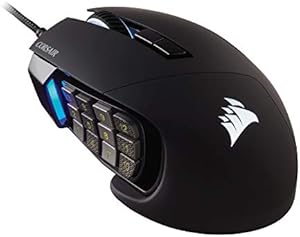
The SCIMITAR RGB ELITE is built around its side panel: the listing states 17 fully programmable buttons, including 12 side buttons repositioned with a patented key slider system. That adjustable bank is unique here, since the Redragon also states 12 side buttons but not that they move. Its sensor is a custom PixArt PMW3391 optical sensor at a native 18,000 DPI, adjustable in 1 DPI steps, and the listing states 50 million click-rated Omron switches and a braided cable. It is also the largest mouse here as stated, at 6.89 by 4.49 inches.
Pros
- 12 side buttons on a repositionable key slider
- 18,000 DPI sensor adjustable in 1 DPI steps
- Switches stated as rated for 50 million clicks
Cons
- Largest stated footprint at 6.89 x 4.49 inches
- Wired only; no wireless mode is stated
| Spec | From the listing |
|---|---|
| Programmable buttons | 17, including 12 side buttons |
| Sensor | PixArt PMW3391 optical, native 18,000 DPI |
| Switch rating | Omron switches, 50 million clicks |
| Dimensions | 6.89 x 4.49 x 0.1 inches |
| Weight | 0.27 pounds |
| Color | Black |
4. acer Wired Gaming Mouse — Best for a Smaller Button Set

The acer mouse states the smallest programmable set here at 8 buttons, with buttons and macros customized through a driver and a rapid fire function repeating the left click. Its listing describes a contoured right-hand shape with thumb support, stated as an ergonomic grip for medium hands. It states four DPI presets of 1200, 2400, 3200, and 6400, adjustable up to 12,800 DPI via the driver, plus 1000 Hz polling and 12 RGB modes. At 0.3 pounds it is the heaviest stated mouse here. Skip it if you need a large side-button bank, because no side-button count is stated.
Pros
- Four DPI presets, 1200 to 6400, plus driver adjustment
- 12 RGB backlit modes, the most named here
- Polling rate stated at 1000 Hz
Cons
- Lowest button count in the group at 8
- Heaviest stated weight at 0.3 pounds
| Spec | From the listing |
|---|---|
| Programmable buttons | 8 |
| DPI | Four presets, 1200/2400/3200/6400; up to 12,800 via driver |
| Polling rate | 1000 Hz |
| Dimensions | 4.7 x 2.9 x 0.1 inches |
| Weight | 0.3 pounds |
| Color | Black |
5. Redragon Gaming Mouse MMO — Best for Stored Profiles

The Redragon ties the Razer for the highest stated count, with 19 macro programmable buttons remapped through macro editing, including 12 side buttons. Storage and tuning separate it from the Razer: the listing states 5 memory profiles, 2 working modes, and up to eight removable 2.4 g weights, three more than the Logitech states. Its DPI range is 100 to 12,400, with polling from 125 Hz to 1000 Hz, and it states 16.8 million color combinations across 4 lighting modes. The listing states no dimensions, and its stated 0.01 pounds sits far below the other four as printed.
Pros
- 19 macro programmable buttons, including 12 side buttons
- 5 memory profiles and 2 working modes stated
- Up to eight removable 2.4 g weights
Cons
- No dimensions are stated in the listing
- Stated weight of 0.01 pounds is far below the others as printed
| Spec | From the listing |
|---|---|
| Programmable buttons | 19 macro programmable, including 12 side buttons |
| DPI | Adjustable 100 to 12,400 |
| Polling rate | 125 Hz to 1000 Hz |
| Memory profiles | 5 |
| Dimensions | The listing does not state it |
| Weight | 0.01 pounds |
Shopping Checklist
Before you order, work through these steps against the figures above:
- Count the commands you want, then match that to a stated button count.
- Measure your desk space against each finalist’s stated length and width.
- Check whether the listing states a side-button count, and whether those buttons reposition.
- Check the stated connection type, wired or wireless, and the battery figures if wireless.
- Check the stated weight and any removable weights offered.
- Review the return window, then compare the finalists’ stated buttons.
FAQ
How many programmable buttons do I actually need?
Base it on how many commands you map at once. The listings range from 8 buttons on the acer to 19 on the Razer and the Redragon, with the Logitech at 11 and the CORSAIR at 17. A few extra commands suit the smaller counts; long macro sets need the larger ones.
Does it matter where the extra buttons are placed?
Yes, because placement decides how many buttons you can reach without shifting your grip. The CORSAIR and the Redragon state 12 side buttons, and the CORSAIR adds a key slider that repositions them. The other three state a total count only.
Should I choose a wired or a wireless model here?
Four of these five mice are wired; only the Razer states wireless connections, with 2.4 GHz HyperSpeed and Bluetooth plus battery figures of up to 400 hours on Bluetooth and 250 hours on HyperSpeed. Choose the Razer for a cable-free connection, and a wired model if you do not want to replace a battery.
Final Verdict
All five listings deliver the keyword’s core feature, so the choice turns on count, placement, and connection. The Razer leads on stated buttons and wireless flexibility, while the CORSAIR is the wired pick for an adjustable side bank. The Logitech suits weight tuning and the highest stated DPI, the Redragon adds profiles and the most removable weights, and the acer suits a smaller, preset-driven set.
Prime covers fast, free delivery on eligible items. See whether a Prime free trial is available for your account.
Check Prime on Amazon →Related Guides
No internal links were supplied for this post, so this section lists none.
Product and ASIN Reference
| Product | ASIN |
|---|---|
| Logitech G502 HERO Wired Gaming Mouse | B07GBZ4Q68 |
| Razer Naga V2 HyperSpeed Wireless MMO Gaming Mouse | B0BGJT87N2 |
| CORSAIR SCIMITAR RGB ELITE Wired MMO MOBA PC Gaming Mouse | B0FWR3P1FT |
| acer Wired Gaming Mouse | B0FCMHJBMW |
| Redragon Gaming Mouse | B0D3PNVQWK |
Write Your Review
No reviews yet. Be the first to share your experience!