
Four of these five listings are genuine cluster hardware: a 2U rack kit with a built-in Gigabit switch, two desktop enclosures housing four boards each, and a six-layer stackable case. The fifth listing, Raspberry Pi Super Cluster from Packt Publishing, is a strict mismatch: a printed book, not a kit, that holds no boards. The GeeekPi case states the highest board count, six layers; the KLAYERS kit is the only listing with a switch built in.
The differences that matter are stated board counts, whether a switch is built in or only housed, plus cooling and access. Two listings also carry gaps: the KLAYERS listing gives no dimensions and no weight figure, and one UCTRONICS listing states two different dimension sets. Every grade below is flagged again in the verdict and reference table.
As an Amazon Associate, we earn from qualifying purchases.



Pick by Your Need
- Best for a rack shelf: KLAYERS Multi-Node Cluster Kit. 2U of 10-inch rack space, with a built-in Gigabit switch.
- Best for most boards: GeeekPi 6-Layers Cluster Case. Six Pi boards stated, the highest count in this set.
- Best desktop enclosure: UCTRONICS Upgraded Complete Enclosure. Four boards, four SSDs and a switch, with slide-out baseplates.
- Best four-board case with SSD bays: UCTRONICS Cluster Case, 4 Layers. Four Pi installations and up to four 2.5-inch SSDs stated.
- Best to avoid for hardware: Raspberry Pi Super Cluster by Packt Publishing. A strict mismatch: a book, not a kit.
Quick Answer
Four listings match the keyword: the KLAYERS rack kit, both UCTRONICS enclosures and the GeeekPi stackable case are all cluster hardware. The GeeekPi states the most boards at six; the UCTRONICS units state four each; the KLAYERS listing gives no board count. One listing does not match: Raspberry Pi Super Cluster is a Packt Publishing book and a strict mismatch, so leave it off any hardware shortlist and check the product page before buying.
Comparison Table
| Product | Form | Boards stated | Switch | Cooling stated | Grade | Buy |
|---|---|---|---|---|---|---|
| KLAYERS Multi-Node Cluster Kit | 2U rack kit | not stated | Built-in Gigabit switch | not stated | Match | View on Amazon |
| UCTRONICS Cluster Case, 4 Layers | Desktop rack case | 4 | not stated | 2 cooling fans (product name) | Match | View on Amazon |
| Raspberry Pi Super Cluster (Packt) | Book | not stated | not stated | not stated | Strict mismatch | View on Amazon |
| GeeekPi 6-Layers Cluster Case | Stackable case | 6 | not stated | Heatsinks included | Match | View on Amazon |
| UCTRONICS Upgraded Complete Enclosure | Desktop enclosure | 4 | Space for a switch | Fans with PoE HAT | Match | View on Amazon |
Decision Guide
Start with where the cluster will live. The KLAYERS kit is the only rack unit here: it occupies 2U of 10-inch rack space and connects nodes through a built-in Gigabit Ethernet switch. The other three hardware listings are desktop units; the UCTRONICS Upgraded Complete Enclosure is the closest here to a complete desktop cluster build.
Board count is the clearest stated separator. The GeeekPi case states six layers, the highest count here; both UCTRONICS enclosures state four. The KLAYERS listing gives no node count, dimensions or weight figure, so confirm capacity and fit on the product page first.
The GeeekPi case includes heatsinks; the UCTRONICS Upgraded enclosure states that you can power your fans while using a PoE HAT. The four-layer UCTRONICS case carries its two cooling fans in the product name (product name) only, and the KLAYERS listing gives no cooling detail.
One listing carries inconsistencies to verify. The four-layer UCTRONICS case states 4.13 by 4.84 by 7.12 inches in its facts, while its spec table lists 7.12 by 4.13 by 7.12 inches: the middle dimension differs. Its layer height is also given as both 40mm and 4.57 inches, figures that do not agree. Treat both as unsettled and check the product page before relying on either.
1. KLAYERS Multi-Node Cluster Kit for Pi 4/5 — Best Rack-Mounted Cluster Kit
This multi-node cluster kit is built around a 2U, 10-inch rack format, with a full aluminum alloy frame and a built-in Gigabit Ethernet switch for node-to-node data communication. Nodes can be installed, maintained and removed independently without affecting the others. It is the only listing with a switch stated as part of the kit.
| Spec | From the listing |
|---|---|
| Rack space | 2U of 10-inch rack |
| Interconnect | Built-in Gigabit Ethernet switch |
| Frame | Aluminum alloy |
| Dimensions | The listing does not state it |
| Weight | The listing does not state it |
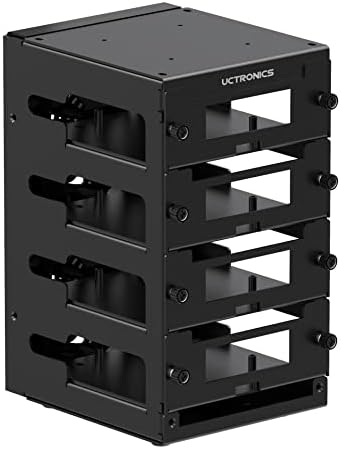
2. UCTRONICS Cluster Case, 4 Layers, for Pi 5/4B — Best Four-Board Desktop Case
This metal desktop rack case supports up to four Pi installations and up to four 2.5-inch SSDs of 7mm thickness, and is compatible with Raspberry Pi 4B+, 3B, 3B+, 2B and B+ boards. Side openings leave room for HDMI, audio and power connections, and each layer fits mini PoE hats. The case is not pre-assembled; mounting plates use M4 hand screws for tool-free removal. Its two cooling fans appear in the product name (product name) only.
| Spec | From the listing |
|---|---|
| Color | Raspberry Pi Cluster Case |
| Length | 7.12 inches |
| Width | 4.13 inches |
| Height | 7.12 inches |
| Weight | The listing does not state it |
3. Raspberry Pi Super Cluster by Packt Publishing — Best strict Mismatch — A Book, Not a Kit
This listing is a strict mismatch: Raspberry Pi Super Cluster is a Packt Publishing book, not a cluster kit, case or rack. It holds no boards and provides no switch, cooling or enclosure. Its listing gives no facts, and its spec table lists only a printed book’s dimensions and weight. For cluster hardware, skip it and check a hardware listing’s product page instead.
| Spec | From the listing |
|---|---|
| Length | 7.5 inches |
| Width | 0.29 inches |
| Height | 9.25 inches |
| Weight | 0.51 pounds |
4. GeeekPi 6-Layers Cluster Case with Heatsinks — Best for the Most Boards
This stackable enclosure puts six Pi boards together in six layers, the highest stated board count in this set, and includes heatsinks for the boards. It is compatible with Raspberry Pi 4 Model B, 3 Model B+, and 3 and 2 Model B, with access to all ports and slots of each board, including SD card, GPIO, USB and HDMI. The listing states that the Pi board is not included.
| Spec | From the listing |
|---|---|
| Color | Brown |
| Length | 3.54 inches |
| Width | 1.57 inches |
| Height | 7.09 inches |
| Weight | 0.22 pounds |
5. UCTRONICS Upgraded Complete Enclosure for Pi Cluster — Best Complete Desktop Enclosure
This upgraded enclosure houses four Raspberry Pi boards, four 2.5-inch SSDs and an Ethernet switch in one case, and can serve as a desktop NAS. It fits Pi 5, 4B, 3B+ and 3B and other B models, supports the official PoE+ HAT, and lets you power your fans while using one. Each baseplate slides in and out on captive screws for quick access.
| Spec | From the listing |
|---|---|
| Color | black |
| Length | 8.82 inches |
| Width | 6.54 inches |
| Height | 3.11 inches |
| Weight | 1.96 pounds |
Shopping Checklist
- Measure your shelf or desk space first, and check stated dimensions against it.
- Count the boards you plan to stack, and match that against the stated layer or node count.
- Check whether a switch is built in, only housed, or missing entirely.
- Confirm what the kit leaves out: boards are not included with the GeeekPi case.
- Compare two or three finalists side by side on board count, cooling and access.
- Check the return window on the product page, especially where a listing’s stated dimensions conflict.
FAQ
What does a Raspberry Pi cluster kit actually include?
It depends on the listing. A cluster kit or case provides the frame or enclosure for stacking several boards, and some add a built-in switch, heatsinks or SSD bays. Boards are usually a separate purchase: the GeeekPi listing states outright that the Pi board is not included. Check the stated contents on the product page before assuming completeness.
How many boards should a cluster case hold?
Match the case to the cluster you plan to run. Stated counts here run from four boards in both UCTRONICS enclosures to six in the GeeekPi case, while the KLAYERS rack kit gives no count. Spare layers leave room to grow; an exact-fit case keeps the build smaller.
Does a cluster case need a switch and cooling?
A cluster needs its nodes connected, so a switch matters: one listing here builds a Gigabit switch in, one houses a separate switch, and others state neither, so you supply your own. Cooling is stated just as unevenly, from included heatsinks to fans paired with a PoE HAT.
Final Verdict
For a rack shelf, the KLAYERS kit is the natural pick: the only listing with a built-in Gigabit switch and a stated 2U fit, though its missing board count, dimensions and weight need confirming first. For the most boards on a desk, the GeeekPi case states six layers with heatsinks included. The UCTRONICS Upgraded Complete Enclosure is the most self-contained desktop option, with slide-out access throughout, while the four-layer UCTRONICS case matches its board count but carries conflicting dimensions. The Packt listing remains a strict mismatch, a book rather than a kit, so leave it out of any hardware order.
Prime covers fast, free delivery on eligible items. See whether a Prime free trial is available for your account.
Check Prime on Amazon →Product and ASIN Reference
| Product | ASIN | Grade | Buy |
|---|---|---|---|
| KLAYERS Multi-Node Cluster Kit | B0HFCLVK34 | Match | View on Amazon |
| UCTRONICS Cluster Case, 4 Layers | B0B3WTQSGL | Match | View on Amazon |
| Raspberry Pi Super Cluster (Packt Publishing) | 1783286199 | Strict mismatch — a book, not a kit | View on Amazon |
| GeeekPi 6-Layers Cluster Case | B085XTDDKD | Match | View on Amazon |
| UCTRONICS Upgraded Complete Enclosure | B09S11Q684 | Match | View on Amazon |
Types of Raspberry Pi Setups
Raspberry Pi boards and their accessories are grouped mainly by generation/model and by what add-ons a given project needs.
Newer Pi generations generally add more processing power and faster memory/storage interfaces than older models, at a similar price point. Starter kits bundle a board with a case, power supply, and storage card for a ready-to-run setup. Camera modules connect through the Pi's dedicated camera port rather than USB, usually offering lower latency than a generic USB webcam. HATs (Hardware Attached on Top) plug into the Pi's GPIO pins to add specific hardware functions without custom wiring.
Sustained workloads, like running an always-on server task, benefit from active cooling more than light, intermittent use, which a passive case can usually handle without thermal throttling.
Frequently Asked Questions
Does a Raspberry Pi need active cooling?
It depends on the workload - light, intermittent use is usually fine with a passive case, while sustained, always-on tasks benefit from active cooling to avoid thermal throttling.
What's a HAT, and why would a Raspberry Pi need one?
A HAT (Hardware Attached on Top) is an add-on board that plugs into the Pi's GPIO pins to add specific hardware functions, like displays or sensors, without custom wiring.
Is a Raspberry Pi camera module better than a USB webcam for the Pi?
It connects through the Pi's dedicated camera port rather than USB, which usually offers lower latency than a generic USB webcam for Pi-based projects.









Write Your Review
No reviews yet. Be the first to share your experience!