
Pick the OKN AX5400 if your router offers the 6 GHz band, the TP-Link Archer TX3000E or BZIZU AX200 card for a dual-band Wi-Fi 6 desktop, the TP-Link Archer T2E for a basic dual-band upgrade without Bluetooth, and the GLOTRENDS WA01 only if you already own a separate M.2 wireless module.
A PCIe card also puts antennas outside the case. The trade-offs: tri-band reach against dual-band simplicity, a magnetized base against card-mounted antennas, and one board holding a module you supply.
As an Amazon Associate, we earn from qualifying purchases.


Pick by Your Need
- Best tri-band pick: OKN WiFi 6E AX5400 PCIe Card. The only complete card here with a 6 GHz band, at 2400 Mbps.
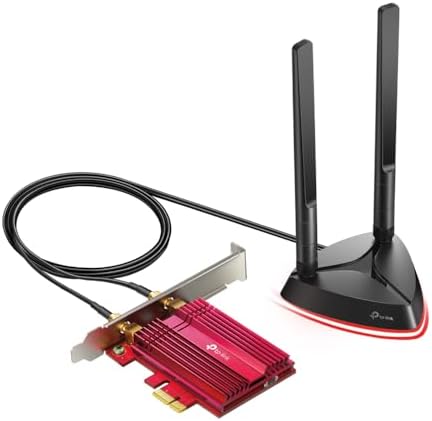
- Best with movable antennas: TP-Link Archer TX3000E. Two antennas on a magnetized base you can place on the desktop.
- Best compact card: BZIZU WiFi 6 PCIe Card AX200. At 2.75 inches and 0.26 pounds, the smallest complete Wi-Fi 6 card here.
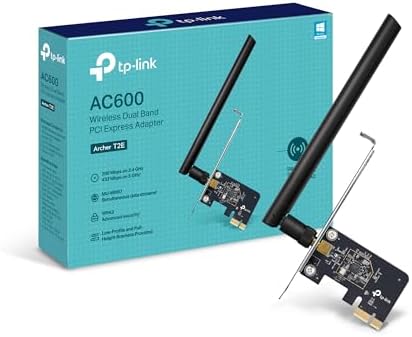
- Best basic dual-band upgrade: TP-Link Archer T2E. Dual-band Wi-Fi, MU-MIMO, and WPA3, with no Bluetooth named.
- Best for module owners: GLOTRENDS WA01 Adapter. Converts an M.2 Key E module to PCIe X1; no module included.
Quick Answer
Choose the OKN AX5400 for tri-band Wi-Fi 6E with Bluetooth 5.3, or the Archer TX3000E or BZIZU AX200 for dual-band Wi-Fi 6 near 2400 Mbps on 5 GHz. Choose the Archer T2E for a lighter AC600 upgrade, and the WA01 only as a carrier board for a module you have.
Comparison Table
| Product | Best For | Wi-Fi Standard | Stated Speed | Bluetooth | Buy |
|---|---|---|---|---|---|
| OKN WiFi 6E AX5400 | Tri-band desktops | 802.11ax / Wi-Fi 6E | 574 + 2400 + 2400 Mbps at 2.4, 5, and 6 GHz | 5.3 | View on Amazon |
| TP-Link Archer TX3000E | Movable antenna placement | 802.11ax / Wi-Fi 6 | 2402 Mbps at 5 GHz, 574 Mbps at 2.4 GHz | 5.3 | View on Amazon |
| BZIZU AX200 Card | Compact builds | 802.11ax / Wi-Fi 6 | 2400 Mbps at 5 GHz, 574 Mbps at 2.4 GHz | 5.2 | View on Amazon |
| TP-Link Archer T2E | Basic dual-band upgrade | AC600 dual band, standard not stated | AC600 in the name, per-band split not stated | not stated | View on Amazon |
| GLOTRENDS WA01 | M.2 module owners | Supports Wi-Fi 4/5/6/6E/7 modules | Set by the module fitted, not stated | Through the fitted module | View on Amazon |
One listing conflict needs flagging. For the TX3000E, the product name gives AX3000 and up to 2400 Mbps, the spec-table size field gives up to 3 Gbps, while the bullet text gives 2402 Mbps on 5 GHz and 574 Mbps on 2.4 GHz. This article uses the per-band bullet numbers elsewhere.
Decision Guide
Start with the band your router broadcasts. With a 6 GHz band, only the OKN AX5400 among the complete cards can use it, with 7 channels at 160 MHz and 14 at 80 MHz in its listing. If the router stops at 5 GHz, the TX3000E or BZIZU AX200 matches it at 2402 or 2400 Mbps.
Next, check slot and case. The BZIZU listing names PCIe x1, x4, x8, and x16 slots explicitly; the other complete cards fit standard PCIe slots. Slim cases need the low-profile bracket the OKN, BZIZU, TX3000E, and T2E listings each name.
Then weigh antennas and Bluetooth. The TX3000E puts its antennas on a magnetized base you can place anywhere on your desktop; the OKN and BZIZU mount two 5 dBi antennas and the T2E carries one. The OKN and TX3000E list Bluetooth 5.3; the BZIZU lists 5.2, with its Bluetooth routed over a cable to a motherboard F_USB port. The T2E names no Bluetooth.
Finally, separate complete cards from the carrier board: the WA01 takes its standard, speed, and Bluetooth version from a module you fit yourself.
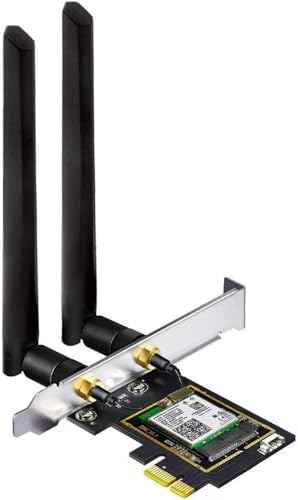
1. OKN WiFi 6E AX5400 PCIe Card — Best Tri-Band Pick
This is the only complete card here that reaches 6 GHz: 2400 Mbps on that band, 2400 Mbps on 5 GHz, and 574 Mbps on 2.4 GHz from the Intel AX210 chipset, plus Bluetooth 5.3, WPA3, MU-MIMO, and OFDMA. The trade-off is operating system reach: support is limited to 64-bit Windows 10 and 11, and 6 GHz use may call for Windows 11 or a Windows 10 developer version.
| Spec | From the listing |
|---|---|
| Chipset | Intel AX210 |
| Wi-Fi standard | 802.11ax, Wi-Fi 6 and Wi-Fi 6E |
| Dimensions | 4.72 x 3.15 x 0.79 inches |
| Weight | 0.2 pounds |
| Bluetooth | 5.3 |
2. TP-Link Archer TX3000E WiFi 6 Card — Best Movable Antenna Base
The Archer TX3000E separates itself with placement: its two antennas mount on a magnetized base, so they can sit anywhere on your desktop. Its bullet text states 2402 Mbps on 5 GHz and 574 Mbps on 2.4 GHz over 802.11ax, with OFDMA, MU-MIMO, and Bluetooth 5.3. The trade-off: at 1.0 pound it is the heaviest item here, and a driver install is required from the website or included CD.
| Spec | From the listing |
|---|---|
| Wi-Fi standard | 802.11ax, Wi-Fi 6 |
| Stated speed | 2402 Mbps at 5 GHz, 574 Mbps at 2.4 GHz |
| Dimensions | 3.75 x 4.76 x 0.85 inches |
| Weight | 1.0 pounds |
| Bluetooth | 5.3 |
3. BZIZU WiFi 6 PCIe Card AX200 — Best Compact Card
The BZIZU card is the small option: 2.75 inches long and 0.26 pounds, yet it states 2400 Mbps on 5 GHz and 574 Mbps on 2.4 GHz from the AX200 chipset. It includes two detachable 5 dBi antennas, both bracket sizes, and WPA3 with MU-MIMO and OFDMA. The trade-off is Bluetooth: version 5.2 rather than 5.3, and it works only after connecting the supplied cable to the motherboard F_USB port. Skip it if your motherboard has no free internal USB header.
| Spec | From the listing |
|---|---|
| Chipset | Intel AX200 |
| Wi-Fi standard | 802.11ax, Wi-Fi 6 |
| Dimensions | 2.75 x 0.78 x 3.14 inches |
| Weight | 0.26 pounds |
| Bluetooth | 5.2 |
| Antennas | Two detachable 5 dBi |
4. TP-Link Archer T2E AC600 Card — Best Basic Dual-Band Upgrade
The Archer T2E is the step-down option: AC600 dual-band Wi-Fi with MU-MIMO and WPA3, but no Wi-Fi 6, no 6 GHz band, and no Bluetooth named in the listing. At 0.11 pounds it is the lightest card here, with one high-gain antenna and both bracket sizes for mini tower cases. The trade-off is ceiling: its AC600 class sits well below the 2400 Mbps 5 GHz figures of the Wi-Fi 6 cards, so it suits a desktop needing a link more than throughput.
| Spec | From the listing |
|---|---|
| Wi-Fi class | AC600 dual band |
| Dimensions | 4.76 x 3.09 x 0.85 inches |
| Weight | 0.11 pounds |
| Bluetooth | The listing does not state it |
| Brackets | Standard and low-profile |
5. GLOTRENDS WA01 M.2 to PCIe Adapter — Best for Module Owners
This product does not match the keyword type the way the other four do, and it should not be bought as a finished Wi-Fi card: the WA01 is an adapter board that converts an M.2 Key E module to a PCIe X1 slot, and no wireless module is included. With a module fitted, it supports Wi-Fi 4, 5, 6, 6E, and 7 plus Bluetooth up to 5.4, and the kit adds 6 dBi RP-SMA antennas with two 15 cm pigtails. Wi-Fi runs over PCIe X1 while Bluetooth runs over USB, so that cable must reach a motherboard port. Skip it if you want a card that works on its own; CNVio2 and CNVio modules such as the AX211 and AX201 are listed as incompatible.
| Spec | From the listing |
|---|---|
| Interface | M.2 Key E to PCIe X1 |
| Weight | 0.33 pounds |
| Dimensions | The listing does not state it |
| Antennas | 6 dBi RP-SMA, with 2 x 15 cm pigtail cables |
| Bluetooth path | USB interface, cable to motherboard USB port |
Buying Checklist
- Check router bands first: a 6 GHz card only helps if the router broadcasts 6 GHz.
- Check a PCIe slot is free and clear of the graphics card.
- Measure case clearance; check if you need the low-profile bracket.
- Check for a free internal USB header for cabled Bluetooth.
- Check that Windows is 64-bit and matches the listing support range.
- Compare finalists on speed, antennas, and Bluetooth version.
FAQ
Do I need a Wi-Fi 6E router to use the 6 GHz band?
Yes. The OKN listing frames the 6 GHz band as unlocking a Wi-Fi 6E router and names Windows conditions for using it. On a dual-band router, the card still connects at 2400 Mbps on 5 GHz and 574 Mbps on 2.4 GHz.
Will these cards fit a slim desktop case?
The OKN, BZIZU, TX3000E, and T2E listings each name a low-profile bracket, so check it against your case height. For the BZIZU, also check slot room, since it fits x1 through x16 slots.
Why does the GLOTRENDS WA01 not list a speed?
Because the WA01 is a carrier board, not a complete adapter, its speed comes from the M.2 module fitted to it. The listing supports modules across Wi-Fi 4 through Wi-Fi 7, so the board alone gives no single stated speed.
Final Verdict
With a Wi-Fi 6E router, the OKN AX5400 is the complete pick, adding a 2400 Mbps 6 GHz band and Bluetooth 5.3. For dual-band routers, the Archer TX3000E wins on antenna placement and the BZIZU AX200 on size, both near 2400 Mbps on 5 GHz. The T2E covers a basic upgrade at the lowest weight, and the WA01 serves only readers who already own a compatible M.2 module.
Prime covers fast, free delivery on eligible items. See whether a Prime free trial is available for your account.
Check Prime on Amazon →Types of Routers and WiFi Adapters
Routers and WiFi adapters are grouped mainly by coverage approach and by connection type.
Single-unit routers broadcast from one central point, simplest to set up but with coverage that fades with distance and walls. Mesh WiFi systems use multiple linked units spread through a space to extend consistent coverage further than a single router can reach alone. Travel routers are compact and often battery-powered, meant to create a personal network from a hotel or public connection rather than cover a whole home. PCIe and USB WiFi adapters add or upgrade wireless capability on a desktop PC that lacks it built in.
WiFi band and standard (like dual-band or newer generations) affect both speed and how well a signal handles interference from other nearby networks, so checking what a router or adapter supports matters as much as its advertised maximum speed.
Frequently Asked Questions
What's the benefit of a mesh WiFi system over a single router?
A mesh system uses multiple linked units spread through a space to extend consistent coverage further than a single router can reach alone, which helps in larger homes or ones with thick walls.
What's a travel router used for?
It's a compact, often battery-powered router meant to create a personal network from a hotel or public connection, rather than cover a whole home like a standard router.
Does WiFi standard matter as much as advertised speed?
Yes - the band and standard a router or adapter supports affect both speed and how well the signal handles interference from nearby networks, which matters as much as the advertised maximum speed.
Related Guides
- Choosing a Wi-Fi 6E Router for a Desktop PC
- PCIe Slots Explained: x1, x4, x8, and x16
- Bluetooth Headers and Internal USB Ports
- Desktop Antenna Placement for Wi-Fi Reception
Product and ASIN Reference
| Product | ASIN | Buy |
|---|---|---|
| OKN WiFi 6E AX5400 PCIe WiFi Card for Desktop PC (Intel AX210) Bluetooth 5.3, WPA3, 802.11AXE Tri Band Wireless Adapter with MU-MIMO, OFDMA, Ultra-Low Latency, Supports Windows 11, 10 (64bit) | B07X462KRK | View on Amazon |
| TP-Link WiFi 6 PCIe WiFi Card for PC,AX3000 Dual Band Magnetized Base BT5.3 Up to 2400Mbps, 802.11 AX Dual Band Wireless Adapter, MU-MIMO, Low Latency, Support Win11,10 (64bit) – Archer TX3000E | B07ZV2CJL2 | View on Amazon |
| BZIZU WiFi 6 PCIe Card – Intel AX200, 3000Mbps Dual Band, Bluetooth 5.2 Low-latency gaming, 4K streaming, Windows 11/10, WPA3, MU-MIMO, dual 5dBi antennas, low-profile bracket | B0F13F1SXZ | View on Amazon |
| TP-Link PCIe WiFi Card AC600 for Desktop PC-Dual Band Wireless Network Card High-Gain Antenna, MU-MIMO, WPA3, Low Profile, Supports Windows 10/11 (Archer T2E) | B094T99RZ4 | View on Amazon |
| GLOTRENDS WA01 M.2 E Key to PCIe X1 WiFi Bluetooth Adapter for M.2 WiFi 4/5/6/6e/7/Coral TPU Module, with 6-dBi SMA Antenna Kits | B09ZDPP43X | View on Amazon |










Write Your Review
No reviews yet. Be the first to share your experience!