
Pick the 100-inch VIVOHOME screens for the largest stated picture in this group, the 72-inch VIVOHOME for the smallest stated overall width, or the Pyle 72-inch model if you want a viewing area shaped differently from the widescreen models. Every screen here is a manual pull-down design with a self-locking mechanism, and every one mounts on a wall or a ceiling, so the real differences are size, viewing area, casing colour, and what mounting hardware the listing includes.
Four of the five screens come from VIVOHOME and state a 16:9 format, matte white surfaces, and a 160° viewing angle. The Pyle screen takes a different route: its viewing area measures 56.6 inches wide by 42.5 inches high, and its listing gives no viewing-angle figure and no format label. Reading the stated dimensions before you order matters more than the headline diagonal, because two screens can share a 72-inch diagonal and still present very different picture shapes and casing widths.
As an Amazon Associate, we earn from qualifying purchases.
Pick by Your Need
- Best overall: VIVOHOME 100 Inch Black. A 100-inch diagonal with an 87 by 49 inch viewing area and wall or ceiling mounting.
- Best for small rooms: VIVOHOME 72 Inch Black. The smallest stated overall width here at 69.3 inches, with a stated viewing distance of about 6.6 ft.
- Best mid-size option: VIVOHOME 80 Inch White. An 80-inch diagonal and a 75 inch overall width that sits between the 72-inch and 100-inch models.
- Best alternative shape: Pyle 72 Inch. A viewing area of 56.6 by 42.5 inches, a different proportion from the 16:9 screens in this group.
- Best in a white casing at full size: VIVOHOME 100 Inch White. The same stated 100-inch picture and 92 inch overall width as the black version, in a white finish.
Quick Answer
For most living rooms, the 100-inch VIVOHOME in black or white gives the largest stated viewing area, 87 by 49 inches, with a stated viewing distance of 9.2 ft. For a bedroom or a narrow wall, the 72-inch VIVOHOME black screen states the smallest overall width, 69.3 inches, and includes two types of screws. The Pyle 72-inch screen suits viewers whose content fits its 56.6 by 42.5 inch viewing area rather than a 16:9 picture.
Comparison Table
| Product | Best for | Diagonal (inches) | Viewing area (inches) | Overall width (inches) | Trade-off | Buy |
|---|---|---|---|---|---|---|
| VIVOHOME 100 Inch Black | Largest picture, black casing | 100 | 87 x 49 | 92 | Screws and L-bracket not included | View on Amazon |
| VIVOHOME 72 Inch Black | Narrow walls and bedrooms | 72 | 63 x 35.4 | 69.3 | Smallest viewing area among the 16:9 models | View on Amazon |
| Pyle 72 Inch | Non-widescreen picture shape | 72 | 56.6 x 42.5 | not stated | No viewing angle or format stated | |
| VIVOHOME 80 Inch White | Mid-size rooms, white casing | 80 | 70 x 40 | 75 | Screws and L-bracket not included | View on Amazon |
| VIVOHOME 100 Inch White | Largest picture, white casing | 100 | 87 x 49 | 92 | Screws and L-bracket not included | View on Amazon |
Decision Guide
Start with the wall, not the diagonal. Among the four listings that state an overall width, the figures run from 69.3 inches for the 72-inch VIVOHOME black screen to 92 inches for both 100-inch VIVOHOME screens, with the 80-inch white model at 75 inches. The Pyle listing gives no overall width, so if your wall space is tight and you are considering the Pyle, confirm the casing width on the product page before ordering. If your clear wall width is under 70 inches, the 72-inch VIVOHOME black is the one model here whose stated overall width fits that space.
Next, match the stated viewing distance to your seating. The four VIVOHOME listings each state a viewing distance: about 6.6 ft for the 72-inch, 7.2 ft for the 80-inch, and 9.2 ft for both 100-inch screens. The Pyle listing does not state a viewing distance, so its diagonal alone cannot tell you where to sit. If your seats sit roughly 9 ft from the wall, the 100-inch models match their stated figure; if your seats are closer to 6.5 ft away, the 72-inch VIVOHOME black matches its stated figure instead.
Then check the picture shape. The four VIVOHOME screens state a 16:9 format with viewing areas of 63 by 35.4 inches, 70 by 40 inches, and 87 by 49 inches. The Pyle viewing area, 56.6 inches wide by 42.5 inches high, is taller relative to its width than any of those, which suits content framed in a less wide shape. If your projector mostly shows widescreen films, the 16:9 screens align with that format on paper; if you show a mix that includes squarer content, the Pyle shape is the different option in this group.
Finally, check what is in the box for mounting. The 72-inch VIVOHOME black listing states it comes equipped with two types of screws. The 80-inch and both 100-inch VIVOHOME listings state that screws and the L-bracket are not included, so you would need to source mounting hardware separately for those three. The Pyle listing describes two top loops that hook onto screws, nails, or bolts, and advises checking the product page for what hardware comes with it.
VIVOHOME 100 Inch Black Screen
Badge: Best overall
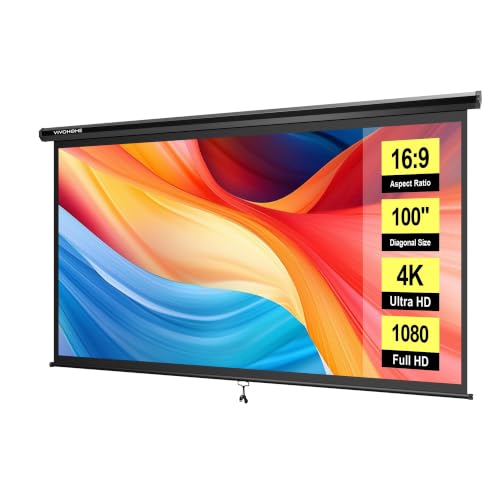
This is one of the two largest screens in the group, with a stated 100-inch diagonal, an 87 by 49 inch viewing area in 16:9, and a stated viewing distance of 9.2 ft. Its overall size is stated as 92 by 57.5 inches, so it needs the widest clear wall here alongside the white version. The listing states a matte white surface, a 160° viewing angle, support for 3D, 1080P, 4K, and 8K images, and a metal casing over a 3-layer PVC fabric surface. The trade-off is mounting hardware: the listing states that screws and the L-bracket are not included, and it notes a slight odor on first opening that fades after airing out.
| Spec | From the listing |
|---|---|
| Diagonal size | 100 inches, 16:9 |
| Viewing area | 87 x 49 inches |
| Overall size | 92 x 57.5 inches |
| Stated viewing distance | 9.2 ft |
| Viewing angle | 160° |
| Colour | Black |
VIVOHOME 72 Inch Black Screen
Badge: Best for small rooms
This is the smallest VIVOHOME here, with a stated 72-inch diagonal, a 63 by 35.4 inch viewing area in 16:9, and a stated viewing distance of around 6.6 ft. Its overall size is stated as 69.3 by 44.9 inches, the smallest overall width among the listings that state one. Two details separate it from its larger relatives: the listing states an 8mm metal casing, a pull cord for high-mounted operation, and two types of screws included for mounting. The trade-off is picture size: its 63-inch viewing width is the narrowest among the three VIVOHOME sizes, and the listing notes a slight odor on first opening that fades after airing out.
| Spec | From the listing |
|---|---|
| Diagonal size | 72 inches, 16:9 |
| Viewing area | 63 x 35.4 inches |
| Overall size | 69.3 x 44.9 inches |
| Stated viewing distance | About 6.6 ft |
| Viewing angle | 160° |
| Colour | Black |
Pyle 72 Inch Manual Screen
Badge: Best alternative shape
The Pyle takes a different approach from the four VIVOHOME screens: its stated viewing area is 42.5 by 56.6 inches, which the listing presents as a 56.6-inch-wide picture that is taller relative to its width than the 16:9 models. It is a manual pull-down screen with a self-locking mechanism, a matte white surface, and a black masking border, and it mounts by two top loops that hook onto screws, nails, or bolts. One conflict to note: a separate dimension line in its listing gives 65 inches length, 4.8 inches width, and 5.2 inches height, which does not line up with the stated viewing area, so check the product page for which figure describes the casing. The trade-off is information: its listing gives no viewing angle, no format label, and no viewing distance, where the VIVOHOME listings state all three.
| Spec | From the listing |
|---|---|
| Diagonal size | 72 inches |
| Viewing area | 42.5 x 56.6 inches |
| Viewing angle | The listing does not state it |
| Format | The listing does not state it |
| Mounting | Two top loops for screws, nails, or bolts |
| Colour | White |
VIVOHOME 80 Inch White Screen
Badge: Best mid-size option
The 80-inch VIVOHOME sits between the 72-inch and 100-inch models in every stated figure: an 80-inch diagonal, a 70 by 40 inch viewing area in 16:9, an overall size of 75 by 48 inches, and a stated viewing distance of 7.2 ft. It shares the family specification of a matte white surface, a 160° viewing angle, stated support for 3D, 1080P, 4K, and 8K images, a metal casing, and a 3-layer PVC fabric surface. Its casing colour is white, and in this group the 80-inch size is listed only in white. The trade-off matches the 100-inch models: the listing states that screws and the L-bracket are not included, and it notes a slight odor on first opening that fades after airing out. Skip it if your wall cannot fit a 75-inch overall width, because the 72-inch black model is the narrower stated option.
| Spec | From the listing |
|---|---|
| Diagonal size | 80 inches, 16:9 |
| Viewing area | 70 x 40 inches |
| Overall size | 75 x 48 inches |
| Stated viewing distance | 7.2 ft |
| Viewing angle | 160° |
| Colour | White |

VIVOHOME 100 Inch White Screen
Badge: Best in a white casing at full size
On stated figures, this screen matches the black 100-inch VIVOHOME point for point: a 100-inch diagonal, an 87 by 49 inch viewing area in 16:9, an overall size of 92 by 57.5 inches, and a stated viewing distance of 9.2 ft. It states the same matte white surface, 160° viewing angle, support for 3D, 1080P, 4K, and 8K images, metal casing, and 3-layer PVC fabric surface. The only stated difference between the two 100-inch models is the casing colour, black on one and white on this one, so the choice between them comes down to which casing colour you prefer next to your wall or ceiling. The trade-off is the same as the black version: screws and the L-bracket are not included, per the listing, and a slight odor may be noticeable on first opening. Skip it if a white casing does not suit your room, because the black version states identical size figures.
| Spec | From the listing |
|---|---|
| Diagonal size | 100 inches, 16:9 |
| Viewing area | 87 x 49 inches |
| Overall size | 92 x 57.5 inches |
| Stated viewing distance | 9.2 ft |
| Viewing angle | 160° |
| Colour | White |


Buying Checklist
- Measure your clear wall or ceiling width first, and compare it with the stated overall widths: 69.3 inches, 75 inches, and 92 inches for the VIVOHOME models.
- Check the stated viewing area, not just the diagonal, and note that the Pyle viewing area is shaped differently from the 16:9 VIVOHOME screens.
- Match your seating distance to the stated viewing distances where a listing gives one: about 6.6 ft, 7.2 ft, or 9.2 ft.
- Confirm what mounting hardware is included before ordering, because three of the VIVOHOME listings state that screws and the L-bracket are not included.
- Check the casing colour in the listing, black or white, against the wall or ceiling where the screen will hang.
- Compare two or three finalists side by side on diagonal, viewing area, and overall width before you decide.
FAQ
How much wall width do these screens need?
The VIVOHOME listings state overall widths of 69.3 inches for the 72-inch model, 75 inches for the 80-inch model, and 92 inches for both 100-inch models. The Pyle listing does not state an overall width, so check its product page for the casing width before relying on a tight wall measurement. Measure the clear space first, including room for the casing ends.
Do all five screens show a 16:9 picture?
No. The four VIVOHOME listings each state a 16:9 format, with viewing areas from 63 by 35.4 inches up to 87 by 49 inches. The Pyle listing states a viewing area of 56.6 by 42.5 inches and gives no format label, so its picture is taller relative to its width than the VIVOHOME screens.
Are mounting screws included with these screens?
It depends on the model. The 72-inch VIVOHOME black listing states that two types of screws are included, while the 80-inch and both 100-inch VIVOHOME listings state that screws and the L-bracket are not included. The Pyle listing describes top loops that hook onto screws, nails, or bolts, so check its product page for the exact hardware in the box.
Final Verdict
We compared the five listings on stated diagonal, viewing area, overall width, and mounting hardware, and the group splits cleanly by size. The two 100-inch VIVOHOME screens state the largest viewing area, 87 by 49 inches, and differ from each other only in casing colour on the stated figures. The 72-inch VIVOHOME black is the fit for narrow walls and closer seating, and it is the one VIVOHOME here that states screws are included. The 80-inch white model covers the middle ground at a 75-inch overall width, while the Pyle offers a different picture shape for viewers who do not need a 16:9 screen.
Prime covers fast, free delivery on eligible items. See whether a Prime free trial is available for your account.
Check Prime on Amazon →Related Guides
 Best Gaming Mouse Wrist Support: 5 Picks Compared GuideCompare five gaming mouse wrist support options by stated size, weight, fill, and base…Read next →
 Best HP Omen Gaming Laptops: Five Picks Compared CloselyCompare five HP Omen gaming laptops by display, GPU, memory and storage, from 15-inch…Read next →
 Best Handheld Consoles With Detachable ControllersFive retro handheld consoles compared on detachable joysticks and grips, screen size, storage and…Read next →
Product and ASIN Reference
| Product | ASIN | Buy |
|---|---|---|
| VIVOHOME 100 Inch 16:9 Pull Down Projector Screen, Black | B08MJPBMW5 | View on Amazon |
| VIVOHOME 72 Inch 16:9 Pull Down Projector Screen, Black | B0GRXBWCWY | View on Amazon |
| Pyle Manual Pull-Down Projector Screen, 72-inch | B00EVVNZTC | |
| VIVOHOME 80 Inch 16:9 Pull Down Projector Screen, White | B08ML3BFD4 | View on Amazon |
| VIVOHOME 100 Inch 16:9 Pull Down Projector Screen, White | B07ZCJY4SY | View on Amazon |










Write Your Review
No reviews yet. Be the first to share your experience!