
If you want a complete laptop platform, choose the Apple MacBook Pro M6 with 16GB of memory for general pro work, the 32GB version for heavier on-device AI work, or the HP OmniBook 3 for a larger Windows screen on a Snapdragon platform. The LOTEYIKE and BONTEC entries in this roundup are monitor risers, not laptops, and they only make sense if you already own a laptop and want to raise it above the desk. That split matters, because the keyword points at a computing platform, and two of the five products in this set supply no computing at all.
We compared the five listings side by side on the numbers each one actually gives: processor cores, memory, storage, display size and brightness, battery life, ports, platform dimensions, height settings, and support weight. The two MacBook Pro models share most of their hardware and differ mainly in memory, the HP OmniBook 3 trades memory and storage for a larger 16-inch 2K display and a Windows setup, and the two risers trade computing for a raised mesh platform with three height settings. Read the mismatch notes in the riser sections before you decide, because a riser cannot replace a laptop, and a laptop does not need a riser to work.
As an Amazon Associate, we earn from qualifying purchases.
Pick by Your Need
- Best overall: Apple MacBook Pro M6 with 16GB memory and 1TB storage. It pairs a 12-core CPU and 12-core GPU with a 14.2-inch Liquid Retina XDR display and up to 24 hours of battery life.
- Best for heavier on-device AI work: Apple MacBook Pro M6 with 32GB memory and 1TB storage. It keeps the same 12-core CPU, 12-core GPU, and display, and doubles the unified memory to 32GB.
- Best for a larger Windows screen: HP OmniBook 3 with a Snapdragon C platform. It offers a 16-inch 2K display, an 8-core processor running up to 3.0 GHz, 4GB of memory, and 128GB of UFS storage.
- Best add-on riser, not a laptop: LOTEYIKE 2-pack monitor riser. It raises a monitor, laptop, or printer on a 14.6 x 9.3 inch platform with three height settings and a stated support weight of up to 44 lbs.
- Best add-on riser with a drawer and pen holder, not a laptop: BONTEC 2-pack monitor stand. It raises a monitor or laptop on a 14.5 x 9.1 inch platform with the same three height settings and the same stated support weight of up to 44 lbs.
Quick Answer
The MacBook Pro M6 with 16GB of memory is the pick for most pro work, because it combines a 12-core CPU, a 12-core GPU, a 14.2-inch Liquid Retina XDR display, and up to 24 hours of battery life in one machine. The 32GB version is the pick when on-device AI workloads and larger memory headroom matter more than anything else, while the HP OmniBook 3 is the pick for a larger 16-inch Windows screen. The LOTEYIKE and BONTEC risers are not laptops, so treat them as desk accessories that raise a device you already own.
Comparison Table
| Product | Best for | Key numbers | Trade-off |
|---|---|---|---|
| Apple MacBook Pro M6, 16GB and 1TB | General pro work and on-device AI | 12-core CPU, 12-core GPU, 16GB memory, 1TB storage, 14.2-inch display, up to 24 hours of battery life | Half the memory of its 32GB sibling |
| Apple MacBook Pro M6, 32GB and 1TB | Heavier on-device AI work | 12-core CPU, 12-core GPU, 32GB memory, 1TB storage, 14.2-inch display, up to 24 hours of battery life | Same 1TB storage as the 16GB model, with no storage step up |
| HP OmniBook 3, Snapdragon C | Larger Windows screen | 16-inch 2K display, 8-core processor up to 3.0 GHz, 4GB memory, 128GB UFS storage | 4GB of memory and 128GB of storage are the lowest figures among the three laptops |
| LOTEYIKE 2-pack monitor riser | Raising a screen or laptop you already own | 14.6 x 9.3 inch platform, heights of 3.9, 4.7, and 5.5 inches, up to 44 lbs support weight | Not a laptop: no processor, memory, storage, display, or battery |
| BONTEC 2-pack monitor stand | Raising a screen with drawer and pen storage | 14.5 x 9.1 inch platform, heights of 3.9, 4.7, and 5.5 inches, up to 44 lbs support weight | Not a laptop: no processor, memory, storage, display, or battery |
Decision Guide
Start by separating the two kinds of products in this roundup, because that single choice shapes everything else. If you need a machine that runs apps, stores files, and connects to displays, your choice is one of the three laptops. If you already own a laptop or a monitor and only want to change its height on the desk, your choice is one of the two risers, and the laptop sections do not apply to you. Mixing the two groups leads to the wrong purchase, so settle this first.
If you need on-device AI work, compare the two MacBook Pro models on memory. Both list a 12-core CPU, a 12-core GPU, a Dual 16-core Neural Engine in the M6 chip, and a claim of AI tasks up to 13x faster than M1, with a Neural Accelerator built into each GPU core. Both also list Apple Intelligence, Siri AI features, and support for processing LLM prompts and custom agents on the device. The difference is memory: 16GB in one model and 32GB in the other, with 1TB of storage in both. If your AI workloads, browser tabs, and pro apps push memory use higher, the 32GB model gives you more headroom on the same chip and the same display.
If you need a larger screen and a Windows setup, look at the HP OmniBook 3. Its 16-inch diagonal 2K display is larger than the 14.2-inch display on either MacBook Pro, and it runs Windows 11 Home on a Snapdragon C platform with the C1-10-100 processor, 8 cores, and speeds up to 3.0 GHz. The trade is clear in the numbers: 4GB of memory and 128GB of UFS storage, against 16GB or 32GB of memory and 1TB of storage on the MacBook Pro models. A larger screen does not make up for less memory and storage if you keep many apps open or store large files locally, so weigh the display against those two figures before you choose.
If you need long battery life away from a plug, the MacBook Pro models are the only ones in this set that give a battery figure at all. Both list up to 24 hours of battery life, and both state that performance stays the same whether the machine is plugged in or not. The HP OmniBook 3 listing used here gives no battery-life figure, so you cannot compare it on that point, and the two risers have no battery because they are not electronic devices. If unplugged run time is a deciding factor, that gap in the HP listing is something to check on the product page.
If you need ports and external displays, compare the connection lists. Each MacBook Pro lists three Thunderbolt 4 or 5 ports, a MagSafe 3 charging port, an SDXC card slot, an HDMI port, a headphone jack, and the Apple-designed N1 wireless chip for Wi-Fi 7 and Bluetooth 6, with support for up to two external displays with M6. The HP OmniBook 3 listing used here names no ports, so its connection options cannot be compared from the facts in this roundup. If you connect two external displays, card readers, or wired accessories every day, the MacBook Pro connection list is the one you can verify here.
If you need a raised screen rather than a new computer, compare the two risers on platform size and extras. The LOTEYIKE platform measures 14.6 x 9.3 inches and the BONTEC platform measures 14.5 x 9.1 inches, a difference of a fraction of an inch in each direction. Both offer the same three height settings of 3.9, 4.7, and 5.5 inches, the same stated support weight of up to 44 lbs, and a 2-pack quantity, so one riser can raise two screens or serve two desks. The BONTEC adds a drawer, a pen holder, and cable management, while the LOTEYIKE lists leg spacing of 12 inches and 7 inches for storing supplies underneath. Measure your monitor base or laptop footprint against the platform size first, because a device wider than the platform will overhang it.
If you need a camera and audio for calls, only the MacBook Pro models give those figures. Both list a 12MP Center Stage camera, three studio-quality mics, and six speakers with Spatial Audio and support for Dolby Atmos. The HP OmniBook 3 listing used here gives no camera, microphone, or speaker figures, and the risers have no camera or audio at all. If video calls are a daily task, the MacBook Pro is the only option in this set with stated camera and audio hardware you can compare.
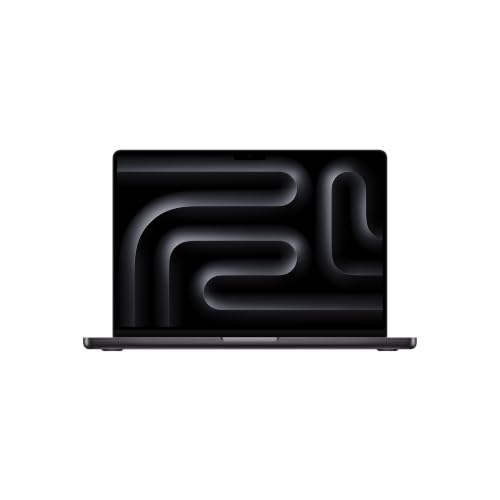
Apple MacBook Pro M6, 16GB and 1TB
Badge: Best overall laptop platform
This MacBook Pro pairs a 12-core CPU and a 12-core GPU in the M6 chip with 16GB of unified memory and 1TB of storage, and it lists a Dual 16-core Neural Engine with a Neural Accelerator built into each GPU core for on-device AI tasks. Its 14.2-inch Liquid Retina XDR display lists 1600 nits of peak brightness, up to 1000 nits of sustained brightness, and a 1,000,000:1 contrast ratio, and the listing states up to 24 hours of battery life with the same performance plugged in or unplugged. Three Thunderbolt 4 or 5 ports, a MagSafe 3 charging port, an SDXC card slot, an HDMI port, and a headphone jack round out the connection list, with support for up to two external displays. The trade-off against its sibling is memory: 16GB is half the 32GB in the other MacBook Pro model, so skip it if your AI workloads or pro apps regularly need more memory headroom than 16GB provides.
| Spec | From the listing |
|---|---|
| Display | 14.2-inch Liquid Retina XDR |
| Memory | 16GB unified memory |
| Storage | 1TB |
| Battery life | Up to 24 hours |
| Peak brightness | 1600 nits |
| Ports | Three Thunderbolt 4 or 5 ports |
Apple MacBook Pro M6, 32GB and 1TB
Badge: Best for heavier on-device AI work
This MacBook Pro keeps the same M6 hardware as its 16GB sibling, with a 12-core CPU, a 12-core GPU, a Dual 16-core Neural Engine, and a Neural Accelerator built into each GPU core, and it doubles the unified memory to 32GB while holding storage at 1TB. The listing repeats the same AI claims, including tasks up to 13x faster than M1, on-device processing of LLM prompts and custom agents, and Apple Intelligence features across apps. Its 14.2-inch Liquid Retina XDR display also lists 1600 nits of peak brightness, up to 1000 nits of sustained brightness, and a 1,000,000:1 contrast ratio, and battery life is again listed at up to 24 hours. The trade-off is that storage does not step up with memory: you get 32GB of memory but the same 1TB of storage as the 16GB model, so skip it if you expected a larger drive to come with the larger memory figure.
| Spec | From the listing |
|---|---|
| Display | 14.2-inch Liquid Retina XDR |
| Memory | 32GB unified memory |
| Storage | 1TB |
| Processor | 12-core CPU and 12-core GPU |
| Battery life | Up to 24 hours |
| Camera | 12MP Center Stage camera |
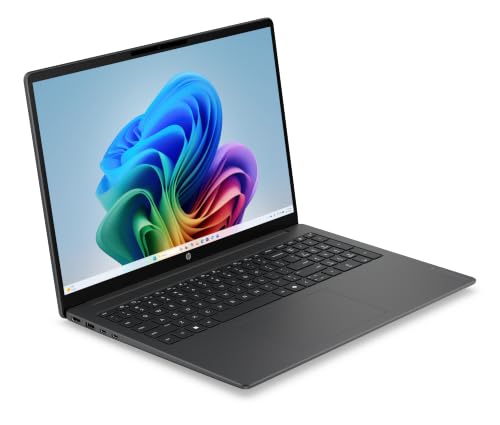
HP OmniBook 3, Snapdragon C, 16-Inch 2K
Badge: Best for a larger Windows screen
The HP OmniBook 3 is the only Windows laptop in this roundup, and it is also the only one with a 16-inch display, which is larger than the 14.2-inch display on either MacBook Pro. It runs Windows 11 Home on a Snapdragon C platform with the C1-10-100 processor, 8 cores, and speeds up to 3.0 GHz, with a Qualcomm Adreno GPU handling graphics. Its memory and storage figures are the smallest among the three laptops in this set, at 4GB of memory and 128GB of UFS storage, against 16GB or 32GB of memory and 1TB of storage on the MacBook Pro models. The listing used here gives no battery-life figure, no camera figure, and no port list, so those points cannot be compared from the facts in this roundup. The trade-off is direct: you gain a larger screen and a Windows setup, and you give up memory, storage, and the stated battery, camera, and port figures the MacBook Pro listings provide.
| Spec | From the listing |
|---|---|
| Display | 16-inch 2K display |
| Processor | Snapdragon C1-10-100, up to 3.0 GHz, 8 cores |
| Memory | 4GB |
| Storage | 128GB UFS |
| Graphics | Qualcomm Adreno GPU |
| Dimensions | 14.12 x 9.91 x 0.61 inches |
LOTEYIKE 2-Pack Monitor Riser, 14.6-Inch Platform
Badge: Best add-on riser for a second screen
This product is a monitor riser, not a laptop and not a laptop platform: it has no processor, no memory, no storage, no display, and no battery, so it cannot run apps or store files. What it does is raise a monitor, laptop, or printer on a 14.6 x 9.3 inch mesh platform, with three height settings of 3.9, 4.7, and 5.5 inches and a stated maximum support weight of up to 44 lbs (20 kg). The listing states that the legs screw in with no tools needed, that the width between the legs is 12 inches and 7 inches for storing supplies underneath, and that the platform has vented holes for airflow toward the device on top. It comes as a 2-pack, so one purchase covers two screens, two desks, or a monitor plus a laptop. The trade-off is scope: it changes the height of a device you already own and nothing else, so it is the wrong purchase if you need a computer.
| Spec | From the listing |
|---|---|
| Platform size | 14.6 x 9.3 inches |
| Height settings | 3.9, 4.7, and 5.5 inches |
| Maximum support weight | 44 lbs (20 kg) |
| Pack quantity | 2 |
| Material | Powder-coated steel with perforated mesh platform |
| Leg spacing | 12 inches and 7 inches |
BONTEC 2-Pack Monitor Stand, 14.5-Inch Platform
Badge: Best add-on riser with drawer storage
This product is also a monitor stand, not a laptop and not a laptop platform: like the LOTEYIKE riser, it has no processor, no memory, no storage, no display, and no battery, so it cannot run apps or store files. Its platform measures 14.5 x 9.1 inches, a fraction of an inch smaller in each direction than the LOTEYIKE platform, and it offers the same three height settings of 3.9, 4.7, and 5.5 inches with the same stated support weight of up to 44 lbs. Where it differs is storage: it adds a drawer, a built-in pen holder, and a cable management system for pens, charging cables, keyboards, phones, and notebooks, plus space under the stand for a keyboard or daily items. Assembly is by screwing in the legs and pressing a button to adjust the height, with no extra tools required, and it also comes as a 2-pack for two screens or two desks. The trade-off matches the LOTEYIKE: it organizes and raises a device you already own, and it cannot replace a laptop.
| Spec | From the listing |
|---|---|
| Platform size | 14.5 x 9.1 inches |
| Height settings | 3.9, 4.7, and 5.5 inches |
| Maximum support weight | 44 lbs |
| Pack quantity | 2 |
| Extra features | Drawer, pen holder, and cable management |
| Assembly | Screw in the legs; no extra tools required |
Buying Checklist
- Measure your desk and your device first: compare the 14.2-inch or 16-inch laptop footprint, or the 14.6 x 9.3 inch and 14.5 x 9.1 inch riser platforms, against the space you actually have.
- Check the memory and storage figures against your workload: 4GB of memory and 128GB of storage behave differently from 16GB or 32GB of memory with 1TB of storage when many apps and files are open.
- Check the display figures that matter to you: screen size in inches, 2K resolution on the HP, and 1600 nits peak brightness with 1,000,000:1 contrast on the MacBook Pro models.
- Check the battery, camera, and port figures before you decide: only the MacBook Pro listings state up to 24 hours of battery life, a 12MP camera, and three Thunderbolt ports, so confirm the missing figures for the HP on the product page.
- Check the riser height settings and support weight: both risers adjust to 3.9, 4.7, and 5.5 inches and state support of up to 44 lbs, so confirm your monitor or laptop fits within those limits.
- Compare two or three finalists side by side on the same figures, memory, storage, display, battery life, and ports, rather than on the product name alone.
FAQ
Which laptop platform in this roundup suits general pro work?
The MacBook Pro M6 with 16GB of memory and 1TB of storage suits general pro work, because it pairs a 12-core CPU and a 12-core GPU with a 14.2-inch Liquid Retina XDR display and up to 24 hours of battery life. It also lists three Thunderbolt 4 or 5 ports, a MagSafe 3 charging port, an SDXC card slot, an HDMI port, and support for up to two external displays. If your work regularly needs more memory headroom, the 32GB version keeps the same chip and display and doubles the memory.
When does the 32GB MacBook Pro make sense over the 16GB model?
The 32GB model makes sense when on-device AI workloads and memory headroom matter most, because it doubles unified memory to 32GB while keeping the same 12-core CPU, 12-core GPU, Dual 16-core Neural Engine, and 14.2-inch display. Both models list AI tasks up to 13x faster than M1 and up to 24 hours of battery life. Storage does not change between the two, since both list 1TB, so the decision turns on memory rather than drive space.
Can a monitor riser replace a laptop platform?
No, a monitor riser cannot replace a laptop platform, because the LOTEYIKE and BONTEC risers have no processor, memory, storage, display, or battery. They raise a monitor, laptop, or printer on a platform of about 14.5 x 9.1 inches or 14.6 x 9.3 inches, with height settings of 3.9, 4.7, and 5.5 inches and a stated support weight of up to 44 lbs. Buy a riser only if you already own the laptop or monitor you want to raise, and buy one of the three laptops if you need a machine that runs apps.
Final Verdict
The MacBook Pro M6 with 16GB of memory is the pick for most buyers in this roundup, because it covers pro work and on-device AI with a 12-core CPU, a 12-core GPU, a 14.2-inch Liquid Retina XDR display, and up to 24 hours of battery life. The 32GB version is the pick when memory headroom for AI workloads matters more than anything else, and the HP OmniBook 3 is the pick when a larger 16-inch Windows screen matters more than memory and storage. The LOTEYIKE and BONTEC risers are not laptops at all, so buy them only as desk accessories that raise a device you already own, and measure the platform size and height settings against that device first.
Prime covers fast, free delivery on eligible items. See whether a Prime free trial is available for your account.
Check Prime on Amazon →Types of Laptops
Laptops (outside dedicated gaming models) are grouped mainly by size/weight class and by processor tier.
Ultraportable laptops prioritize light weight and long battery life over raw performance. Mainstream laptops balance performance, battery life, and price for everyday work and browsing. Workstation-class laptops add higher-tier processors and more RAM for demanding creative or technical work. 2-in-1/convertible laptops add a touchscreen and hinge that folds flat or into a tablet mode, trading some rigidity for flexibility.
Battery life figures are measured under specific, often light-use test conditions, so real-world battery life for heavier tasks like video calls or editing is usually noticeably shorter than the advertised number.
Frequently Asked Questions
What's the difference between an ultraportable and a mainstream laptop?
An ultraportable prioritizes light weight and long battery life over raw performance, while a mainstream laptop balances performance, battery life, and price for everyday work and browsing.
Are advertised laptop battery life figures realistic?
Often not for heavier use - battery life figures are measured under specific, often light-use test conditions, so real-world battery life for tasks like video calls or editing is usually noticeably shorter.
What's the tradeoff with a 2-in-1/convertible laptop?
It adds a touchscreen and a hinge that folds flat or into a tablet mode, trading some rigidity and sometimes weight for that extra flexibility.
Related Guides
 “Best Liquid Cooler Corsair: 5 AIO Coolers Compared”"Compare five Corsair liquid coolers by radiator size, LCD screen, fan design and socket…Read next →
 “Best USB WiFi Adapter for Desktop PC: Five Picks Compared”"Compare five USB WiFi adapters for desktop PC on stated band speeds, WiFi 6…Read next →
 Best Tower Fan for Home Office: Five Quiet Picks ComparedCompare five tower fans for a home office on stated noise, speeds, timers and…Read next →






Write Your Review
No reviews yet. Be the first to share your experience!