
The Razer Huntsman Mini 60% leads this group on stated actuation at 1.0 mm and on footprint at 11.56 x 4.07 x 1.45 inches, the Logitech G PRO X 60% is the only wireless option here, and the Razer Huntsman V2 is the only model that lets you set an actuation point. The five options here all use optical switches, but they differ in layout, actuation, connection, and extra controls, so the right choice depends on desk space, whether you need a number row and media keys, and whether you want to change actuation after you buy.
Optical switches register a press with a beam of light, and the listings here connect that design to faster actuation and zero or near-zero debounce delay. One is a 60% keyboard with a 1.0 mm actuation distance, one is a 60% wireless keyboard with tactile or linear GX optical switches, one is a larger analog model with adjustable actuation, one is a model with pre-lubed linear switches and streaming hotkeys, and the fifth is not a keyboard at all: it is a pack of purple replacement switches for a Razer Huntsman keyboard.
As an Amazon Associate, we earn from qualifying purchases.


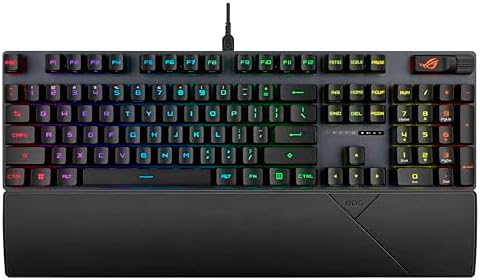

Pick by Your Need
- Best overall: Razer Huntsman Mini 60%. Its linear optical switches actuate at 1.0 mm, 15-30% shorter than other linear switches.
- Best wireless 60%: Logitech G PRO X 60% Wireless. It connects through LIGHTSPEED at 1 ms, Bluetooth, or USB.
- Best adjustable actuation: Razer Huntsman V2 Analog. Its analog optical switches let you set an actuation point and use Rapid Trigger Mode.
- Best streaming controls: ASUS ROG Strix Scope II. Its F1–F5 keys are pre-programmed for Xbox Game Bar and recording.
- Best replacement switches: Kingjinglo Purple Optical Switch Pack. A pack of hot-swap purple optical switches for a Razer Huntsman keyboard, not a complete keyboard.
Quick Answer
Choose the Razer Huntsman Mini 60% for a compact keyboard with a 1.0 mm actuation distance and an aluminum top frame. Choose the Logitech G PRO X 60% Wireless for a 60% layout without a cable, with tactile or linear GX optical switches. Choose the Razer Huntsman V2 to adjust actuation and add a wrist rest and media keys.
Comparison Table
| Keyboard | Switch type | Layout and size | Weight | Trade-off | Buy |
|---|---|---|---|---|---|
| Razer Huntsman Mini 60% | Linear Optical, 1.0 mm | 60%, 11.56 x 4.07 x 1.45 inches | 1.1 pounds | No number row or media keys | View on Amazon |
| Logitech G PRO X 60% Wireless | GX optical, tactile or linear | 60%, 15.2 x 5.9 x 0.9 inches | 3.04 pounds | Heaviest 60% option | View on Amazon |
| Razer Huntsman V2 Analog | Analog Optical, adjustable | Media keys and dial, 17.53 inches across | 3.95 pounds | Heaviest option here | View on Amazon |
| ASUS ROG Strix Scope II | ROG RX Red Linear, pre-lubed | No layout given; spec-table dimensions look implausible, so check the product page | 1.8 pounds | No actuation distance | View on Amazon |
| Kingjinglo Purple Switch Pack | Purple optical switches only | Pack only, not a keyboard; size not stated | 0.02 pounds | No keyboard included | View on Amazon |
Decision Guide
Start with layout. The Razer Huntsman Mini 60% measures 11.56 x 4.07 x 1.45 inches, and the Logitech G PRO X 60% Wireless is listed at 15.2 x 5.9 x 0.9 inches, so both leave more room for mouse movement than the Razer Huntsman V2 at 17.53 inches across. The Razer Huntsman Mini 60% lists no number row and no dedicated media keys, while the Logitech model lists media controls and a volume roller, so if you type numbers often, look for a model that lists a number row. The Razer Huntsman V2 has dedicated media keys and a dial, and the ASUS ROG Strix Scope II has a multifunction button, a three-way knob, and F1–F5 keys pre-programmed for Xbox Game Bar and recording.
Next, compare actuation. The Razer Huntsman Mini 60% gives the clearest number here: its linear optical switches actuate at 1.0 mm, presented as 15-30% shorter than other linear switches. The Razer Huntsman V2 gives no single distance, because its analog optical switches let you set a desired actuation point, and its Rapid Trigger Mode lets you release and repeatedly press keys at a faster rate. The Logitech model offers GX optical switches with zero debounce delay, in tactile or linear form, and the ASUS model uses pre-lubed ROG RX Red switches with near-zero debounce delay.
Then decide on connection and extras. Only the Logitech model offers wireless play, through LIGHTSPEED at 1 ms or Bluetooth, with optional USB, plus KEYCONTROL across 5 unique layers. The Razer Huntsman Mini 60% uses Chroma RGB with 16.8 million colors, plus Hypershift remapping and Snap Tap, which is OFF by default. The Razer Huntsman V2 adds a magnetic wrist rest, and the ASUS model has PBT doubleshot keycaps and an IP57 rating. The Kingjinglo pack weighs 0.02 pounds and is suitable for a Razer Huntsman Gaming Mechanical Keyboard, so it only makes sense if you already own a compatible Huntsman keyboard.
1. Razer Huntsman Mini 60% — Best Overall
This compact keyboard pairs the shortest stated actuation, 1.0 mm, with the smallest footprint, 11.56 x 4.07 x 1.45 inches, and the lightest weight among the four complete keyboards at 1.1 pounds. Its linear optical switches use optical beam-based actuation, and its Chroma RGB lighting supports 16.8 million colors.
| Spec | From the listing |
|---|---|
| Switch type | Linear Optical |
| Actuation distance | 1.0 mm |
| Layout | 60% |
| Size | 11.56 x 4.07 x 1.45 inches |
| Weight | 1.1 pounds |
2. Logitech G PRO X 60% Wireless — Best Wireless 60%
This keyboard is the only wireless option here, and the only one with a choice of tactile or linear GX optical switches. It connects through LIGHTSPEED with a 1 ms response rate, Bluetooth, or USB, and KEYCONTROL allows customization of every key across 5 unique layers. At 3.04 pounds it is heavier than the Razer Huntsman Mini 60% at 1.1 pounds.
| Spec | From the listing |
|---|---|
| Switch type | GX optical, tactile or linear |
| Connection | LIGHTSPEED, Bluetooth, USB |
| Response rate | 1 ms through LIGHTSPEED |
| Layout | 60% |
| Size | 15.2 x 5.9 x 0.9 inches |
| Weight | 3.04 pounds |
3. Razer Huntsman V2 Analog — Best Adjustable Actuation
This keyboard is the only model here with analog optical switches that let you set a desired actuation point, plus Rapid Trigger Mode. At 3.95 pounds it is the heaviest option here, against 1.1 pounds for the Razer Huntsman Mini 60%, and it measures 17.53 inches across. Its doubleshot PBT keycaps, Chroma RGB lighting with 16.8 million colors, dedicated media keys and dial, and magnetic wrist rest set it apart from the two 60% models.
| Spec | From the listing |
|---|---|
| Switch type | Analog Optical |
| Actuation | Adjustable actuation point |
| Special mode | Rapid Trigger Mode |
| Size | 17.53 inches across, 1.2 inches high |
| Weight | 3.95 pounds |
4. ASUS ROG Strix Scope II — Best Streaming Controls
This keyboard stands out here for streaming and media control, with F1–F5 keys pre-programmed for Xbox Game Bar and recording, plus a multifunction button and three-way knob. Its pre-lubed ROG RX Red linear optical switches feature centralized lighting and near-zero debounce delay, and its sound-dampening foam absorbs pinging noises and echoes. At 1.8 pounds it is lighter than the Razer Huntsman V2, and it carries an IP57 rating that no other option here names.
| Spec | From the listing |
|---|---|
| Switch type | ROG RX Red Linear Optical, pre-lubed |
| Rating | IP57-rated for water and dust resistance |
| Hotkeys | F1–F5 pre-programmed for Xbox Game Bar and recording |
| Controls | Multifunction button and three-way knob |
| Keycaps | PBT doubleshot |
| Weight | 1.8 pounds |
5. Kingjinglo Purple Optical Switch Pack — Best Replacement Switch Pack
This option is a pack of purple optical switches only, not a keyboard. It weighs 0.02 pounds, is made of plastic, and is suitable for a Razer Huntsman Gaming Mechanical Keyboard, with hot-swap fitting that lets you remake your own keyboard. Unlike the four complete keyboards, it has no case, no keycaps, no cable, and no lighting, so it only works with a compatible keyboard you already own. Skip it if you need a complete keyboard, because it cannot type on its own.
| Spec | From the listing |
|---|---|
| Product type | Pack of replacement switches only, not a keyboard |
| Switch type | Purple optical |
| Material | Plastic |
| Compatibility | Suitable for Razer Huntsman Gaming Mechanical Keyboard |
| Weight | 0.02 pounds |
| Dimensions | The listing does not state it |
Buying Checklist
- Measure your desk first, then compare the listed sizes: 11.56 inches for the Razer Huntsman Mini 60%, 15.2 inches for the Logitech model, and 17.53 inches across for the Razer Huntsman V2.
- Decide between 60% and a larger layout by checking whether you need a number row, dedicated media keys, or a dial in daily use.
- Check the switch type: linear, tactile, analog with adjustable actuation, or pre-lubed linear.
- Check the connection: only the Logitech model names LIGHTSPEED, Bluetooth, and USB here.
- Check the keycaps named, such as doubleshot PBT or dual-shot PBT, and whether a wrist rest is included.
- Verify on the product page whether the item is a complete keyboard or a pack of replacement switches, and check the return window there before you order.
FAQ
What is the difference between linear, tactile, and analog optical switches?
Linear optical switches, such as the Razer Huntsman Mini 60% at 1.0 mm actuation and the ASUS ROG Strix Scope II with pre-lubed ROG RX Red switches, press straight down, with linear actuation and no tactile bump in the listing. Tactile optical switches are one Logitech choice. Analog optical switches, such as those on the Razer Huntsman V2, let you set a desired actuation point.
Should I choose a 60% keyboard or a larger keyboard?
Choose a 60% keyboard, such as the Razer Huntsman Mini 60% at 11.56 x 4.07 x 1.45 inches or the Logitech model at 15.2 x 5.9 x 0.9 inches, if you want more room for mouse movement and can work without a number row. Choose the Razer Huntsman V2 or the ASUS model if you want media and streaming controls without a function layer.
Can I buy replacement switches instead of a new keyboard?
You can buy replacement switches only if you already own a compatible keyboard, and the Kingjinglo Purple Optical Switch Pack here is suitable for a Razer Huntsman Gaming Mechanical Keyboard. It is a pack of hot-swap purple optical switches made of plastic and weighing 0.02 pounds, with no keyboard, keycaps, cable, or case in the listing.
Final Verdict
The Razer Huntsman Mini 60% is the clearest overall pick here, with a 1.0 mm actuation distance, a 60% layout at 11.56 x 4.07 x 1.45 inches, and a weight of 1.1 pounds. The Logitech model is the pick for wireless play, with LIGHTSPEED at 1 ms, Bluetooth, and USB. The Razer Huntsman V2 is the pick for adjustable actuation, with analog switches and Rapid Trigger Mode. The ASUS model is the pick for streaming controls, with F1–F5 hotkeys and pre-lubed ROG RX Red switches. The Kingjinglo pack is not a keyboard, so buy it only to change switches in a compatible Razer Huntsman keyboard you already own.
Prime covers fast, free delivery on eligible items. See whether a Prime free trial is available for your account.
Check Prime on Amazon →Types of Gaming Keyboards
Gaming keyboards outside the dedicated mechanical/combo categories are grouped mainly by switch feel and by layout.
Membrane keyboards use a soft rubber dome under each key, generally quieter and cheaper than mechanical switches. Full-size layouts keep the number pad and function row; compact layouts drop them to save desk space. Backlit keyboards add per-key or zone lighting, a cosmetic feature layered on top of the base typing experience. Silent-switch keyboards dampen the keystroke sound without necessarily changing the tactile feel.
A keyboard's layout and switch feel matter more for comfort over long sessions than lighting or branding, so trying one in person, or checking layout-specific reviews, is usually worth it before buying.
Frequently Asked Questions
What's the difference between a membrane and a mechanical gaming keyboard?
A membrane keyboard uses a soft rubber dome under each key and is generally quieter and cheaper, while a mechanical keyboard uses individual mechanical switches with more consistent, often louder feedback.
Does a silent-switch keyboard feel different to type on?
It dampens the keystroke sound without necessarily changing the tactile feel, so typing feel and noise level can be adjusted somewhat independently.
Why would a compact layout help for gaming?
Dropping the numpad or arrow cluster saves desk space, which can give a mouse more room to move on the same desk.
Related Guides
 Best Compact 60% Mechanical Keyboard for Small DesksCompare five compact 60% keyboards by key count, switch type, lighting and size, then…Read next →
 Best Mechanical Keyboard Tactile Options for GamersCompare five tactile mechanical keyboards with hot-swap switches, PBT keycaps and gasket mounts, then…Read next →
 Best DSA Keycaps: 5 Sets for MX and Ortholinear BoardsCompare 5 DSA keycap sets for MX and ortholinear keyboards, from 24-piece blank sets…Read next →






Write Your Review
No reviews yet. Be the first to share your experience!