
If you want the smallest footprint with a separate arrow cluster and a full function row, the 68-key MageGee MK-Box is the direct pick, while competitive players who want magnetic switches and an 8000 Hz polling rate should look at the Aula WIN60 HE first. The other three boards cover a 61-key rainbow layout, a light membrane board with a mechanical feel, and a clicky blue-switch board, so the right choice depends on key count, switch type, lighting and size.
A 60% layout removes the number pad and moves navigation and function keys onto a function layer, saving desk space for mouse movement. Check how each board handles arrows, media keys and lighting before you settle on one: one has 68 keys, three have 61 keys, and one board’s key count is not stated, that board being the magnetic-switch Aula, while the membrane board is one of the three 61-key boards.
As an Amazon Associate, we earn from qualifying purchases.

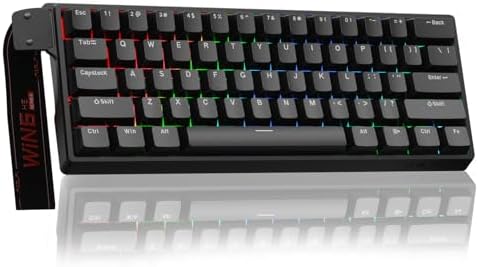


Pick by Your Need
- Best overall: MageGee MK-Box 68-Key Red Switch. The only board here with 68 keys, separate arrow keys and F1-F12 on a function layer.
- Best for competitive play: Aula WIN60 HE Magnetic Switch. It lists an 8000 Hz polling rate, magnetic switches and a 0.02 mm rapid trigger step.
- Best for lighting variety: Newmen GM611 61-Key Red Switch. It lists 19 LED rainbow effects with 4 brightness levels and 5 speed levels.
- Best lightest board: MageGee TS91 Membrane RGB 61-Key. It lists a weight of 0.58 pounds, the lowest stated weight here.
- Best for clicky blue switches: CACKBIRD 61-Key Blue Switch. The only board here with blue switches that list a click sound and tactile resistance.
Quick Answer
Choose the MageGee MK-Box for 68 keys with separate arrows and function keys. Choose the Aula WIN60 HE for rapid trigger, adjustable actuation and an 8000 Hz polling rate. Choose the Newmen GM611 or the CACKBIRD board for a 61-key layout, and choose the MageGee TS91 only if you accept a membrane board with a mechanical feel.
Comparison Table
| Keyboard | Keys | Switch Type | Lighting | Dimensions | Main Trade-Off | Buy |
|---|---|---|---|---|---|---|
| MageGee MK-Box | 68 | Red linear | Blue LED, about 16 modes | 12.13 x 3.98 x 1.54 inches | Blue lighting only | View on Amazon |
| Aula WIN60 HE | not stated | Magnetic Hall effect | RGB, 16.8 million colours | 11.0 x 5.0 x 1.1 inches | Keys and weight not stated | View on Amazon |
| Newmen GM611 | 61 | Red linear | LED rainbow, 19 effects | not stated | Size and weight not stated | View on Amazon |
| MageGee TS91 | 61 | Membrane, mechanical feel | RGB, breathing or permanent | 11.5 x 4.02 x 1.57 inches | Not a true mechanical board | View on Amazon |
| CACKBIRD | 61 | Blue mechanical | LED rainbow, 18 effects | 12.2 x 5.43 x 1.57 inches | Weight not stated; switches click |
Decision Guide
Start with key count. The MageGee MK-Box lists 68 keys, with separate arrow keys and F1-F12 through Fn, against 61 keys on the Newmen GM611, the MageGee TS91 and the CACKBIRD board. The Aula WIN60 HE has no key count stated, so compare it by its stated dimensions of 11.0 x 5.0 x 1.1 inches.
Next, sort by switch type. The MK-Box and the GM611 list red linear switches. The CACKBIRD board lists blue mechanical switches with a click sound and tactile resistance. The Aula WIN60 HE lists magnetic Hall effect switches, hot swappable, with magnetic actuation without physical contact. The TS91 lists a membrane design with a mechanical feel, so it does not belong in the same mechanical group as the other four.
For fast-paced games, only the Aula WIN60 HE states a polling rate, at up to 8000 Hz, and only it states a rapid trigger step of 0.02 mm. The GM611 states N-key rollover and anti-ghosting, the CACKBIRD board states full-key anti-ghosting only, with all keys able to work simultaneously, and the MK-Box states full anti-ghosting across all 68 keys. The TS91 states no N-key rollover or anti-ghosting.
On lighting, the MK-Box lists blue LED with about 16 modes, the Aula board lists RGB with 16.8 million colours, the GM611 lists 19 rainbow effects, the CACKBIRD board lists 18 rainbow effects, and the TS91 lists RGB with breathing or permanent modes. On size, the Aula board is shortest at 1.1 inches high and 11.0 inches long, while the CACKBIRD board is widest at 5.43 inches and longest at 12.2 inches. The MK-Box measures 12.13 x 3.98 x 1.54 inches and weighs 1.12 pounds, and the TS91 weighs 0.58 pounds. The GM611 states no dimensions or weight, and the CACKBIRD board states no weight. For cables, the MK-Box and the CACKBIRD board list plug-and-play use with no drivers required, and the Aula board lists a web-based driver.
1. MageGee MK-Box 68-Key Red Switch — Best for Arrow Keys and Function Row
This board stands apart on key count, with 68 keys against 61 keys on three of the other four boards, plus separate arrow keys, F1-F12 through Fn and full anti-ghosting across all 68 keys. It measures 12.13 x 3.98 x 1.54 inches and weighs 1.12 pounds, and its blue LED lists about 16 modes, fewer than the 19 effects on the Newmen GM611.
| Spec | From the listing |
|---|---|
| Keys | 68 keys |
| Switch type | Red linear switch |
| Lighting | Blue LED backlit, about 16 backlight modes |
| Dimensions | 12.13 x 3.98 x 1.54 inches |
| Weight | 1.12 pounds |
2. Aula WIN60 HE Magnetic Switch — Best for Competitive Play
This board is the only one of the five to state magnetic Hall effect switches, hot swappable switches, adjustable actuation, rapid trigger mode and a polling rate, with up to 8000 Hz and a rapid trigger step of just 0.02 mm. It measures 11.0 x 5.0 x 1.1 inches, the shortest in height and length among the boards that state dimensions, and its RGB lighting lists 16.8 million colours.
| Spec | From the listing |
|---|---|
| Switch type | Magnetic Hall effect, hot swappable |
| Polling rate | Up to 8000 Hz |
| Lighting | RGB, 16.8 million colours |
| Dimensions | 11.0 x 5.0 x 1.1 inches |
| Weight | The listing does not state it |
3. Newmen GM611 61-Key Red Switch — Best for Lighting Variety
This board lists 61 keys with red linear switches and the highest stated lighting effect count here, at 19 LED rainbow backlight effects, with 4 brightness levels and 5 speed levels, against 18 effects on the CACKBIRD board and about 16 modes on the MageGee MK-Box. It also states N-key rollover and anti-ghosting, multimedia keys and a detachable data cable, while its dimensions and weight are not stated.
| Spec | From the listing |
|---|---|
| Keys | 61 keys |
| Switch type | Red linear switches |
| Lighting | LED rainbow, 19 effects, 4 brightness levels, 5 speed levels |
| Dimensions | The listing does not state it |
| Weight | The listing does not state it |
4. MageGee TS91 Membrane RGB 61-Key — Best Lightest Board
This board needs a clear statement first: it is a membrane board with a mechanical feel, not a true mechanical keyboard, and the listing describes it as using imitation mechanical technology. It lists 61 keys, RGB backlighting with breathing or permanent modes, an IPX4-rated circuit board with the interface not waterproof, dimensions of 11.5 x 4.02 x 1.57 inches and a weight of 0.58 pounds, about half the 1.12-pound weight of the MageGee MK-Box.
| Spec | From the listing |
|---|---|
| Keys | 61 keys |
| Switch type | Membrane with mechanical feel |
| Lighting | RGB, breathing or permanent modes |
| Circuit board | IPX4 rated, interface not waterproof |
| Weight | 0.58 pounds |
Skip it if you want a true mechanical switch, because this board lists a membrane design with a mechanical feel rather than a mechanical switch.
5. CACKBIRD 61-Key Blue Switch — Best for Clicky Blue Switches
This board is the only one of the five to list blue mechanical switches, with a click sound and tactile resistance on each keystroke, against red linear switches on the MageGee MK-Box and the Newmen GM611 and magnetic switches on the Aula WIN60 HE. It lists 61 keys, 18 LED rainbow backlight effects, full-key anti-ghosting and a detachable Type-C cable, plus Fn plus Space to switch to direction keys. It measures 12.2 x 5.43 x 1.57 inches, the longest and widest board among the five, while its weight is not stated.
| Spec | From the listing |
|---|---|
| Keys | 61 keys |
| Switch type | Blue mechanical switches |
| Lighting | LED rainbow, 18 effects, 5 brightness levels and speeds, 1 customization mode |
| Dimensions | 12.2 x 5.43 x 1.57 inches |
| Weight | The listing does not state it |
Skip it if you want a silent press, because this board lists blue switches with a click sound on each keystroke.
Buying Checklist
- Measure your desk first, then compare stated lengths: 11.0 inches for the Aula board, 11.5 inches for the TS91, 12.13 inches for the MK-Box and 12.2 inches for the CACKBIRD board.
- Count the keys you need: 68 on the MK-Box, 61 on the GM611, TS91 and CACKBIRD boards, and no count stated for the Aula board.
- Check the switch type: red linear, blue mechanical with a click, magnetic Hall effect, or membrane with a mechanical feel on the TS91.
- Check the lighting: blue LED with about 16 modes, RGB with 16.8 million colours, 19 rainbow effects, RGB breathing modes, or 18 rainbow effects.
- Check cables and drivers: detachable USB, detachable Type-C, detachable data cable, web-based driver, or plug-and-play use with no drivers stated.
- Compare two or three finalists side by side on keys, switches, lighting, dimensions and weight before you pick one.
FAQ
How many keys do I need on a compact 60% keyboard?
The MageGee MK-Box lists 68 keys with separate arrow keys and F1-F12 through Fn, while the Newmen GM611, the MageGee TS91 and the CACKBIRD board each list 61 keys. The Aula WIN60 HE has no key count stated, so check its product page if a stated count matters to you.
Which switch type should I choose for gaming and typing?
Red linear switches are listed for the MageGee MK-Box and the Newmen GM611. Blue mechanical switches are listed only for the CACKBIRD board, with a click sound and tactile resistance. Magnetic Hall effect switches are listed only for the Aula WIN60 HE, with adjustable actuation and a 0.02 mm rapid trigger step. The MageGee TS91 lists a membrane design with a mechanical feel, so it is not a true mechanical switch option.
What should I check about lighting and size before I buy?
Check the lighting first: the MK-Box lists blue LED with about 16 modes, the Aula board lists RGB with 16.8 million colours, the GM611 lists 19 rainbow effects, the TS91 lists RGB breathing or permanent modes, and the CACKBIRD board lists 18 rainbow effects. Then check dimensions, from 11.0 x 5.0 x 1.1 inches for the Aula board to 12.2 x 5.43 x 1.57 inches for the CACKBIRD board.
Final Verdict
The MageGee MK-Box is the most direct pick for most buyers who want a compact board without giving up arrows and function keys, because it lists 68 keys, red linear switches, full anti-ghosting and a detachable cable. The Aula WIN60 HE is the pick for competitive play, because it is the only board here to state magnetic switches, adjustable actuation, rapid trigger at 0.02 mm and a polling rate of up to 8000 Hz. The GM611 and the CACKBIRD board are the 61-key alternatives for rainbow lighting. The TS91 is the lightest stated board at 0.58 pounds, but it is a membrane board with a mechanical feel, so pick it only if you accept that switch type.
Prime covers fast, free delivery on eligible items. See whether a Prime free trial is available for your account.
Check Prime on Amazon →Types of Mechanical Keyboards
Mechanical keyboards are grouped mainly by switch type and by form factor.
Linear switches move straight down with no bump or click, favored for fast, consistent presses. Tactile switches add a bump partway down without a click. Clicky switches add both a bump and a click, the loudest of the three. Hot-swappable boards let switches be changed without soldering, while full-size, TKL, and compact layouts trade number of keys for desk space.
Switch feel and sound vary enough between types that trying one in person, or checking switch-specific reviews, usually matters more than brand name alone, especially in shared rooms where clicky switches can bother others nearby.
Frequently Asked Questions
What's the difference between linear, tactile, and clicky switches?
Linear switches move straight down with no bump or click, tactile switches add a bump partway down without a click, and clicky switches add both a bump and an audible click, the loudest of the three.
What does hot-swappable mean on a mechanical keyboard?
It means switches can be changed without soldering, letting someone try different switch types on the same board over time.
Why does keyboard size vary so much?
Full-size, TKL, and compact layouts trade number of keys for desk space, from a full function row and numpad down to a smaller layout with no dedicated arrow keys.
Related Guides
 Best Keyboard Optical Switches for Fast, Precise PlayCompare four optical switch keyboards and one switch pack, from 60% layouts to a…Read next →
 Best Mechanical Keyboard Tactile Options for GamersCompare five tactile mechanical keyboards with hot-swap switches, PBT keycaps and gasket mounts, then…Read next →
 Best DSA Keycaps: 5 Sets for MX and Ortholinear BoardsCompare 5 DSA keycap sets for MX and ortholinear keyboards, from 24-piece blank sets…Read next →






Write Your Review
No reviews yet. Be the first to share your experience!