
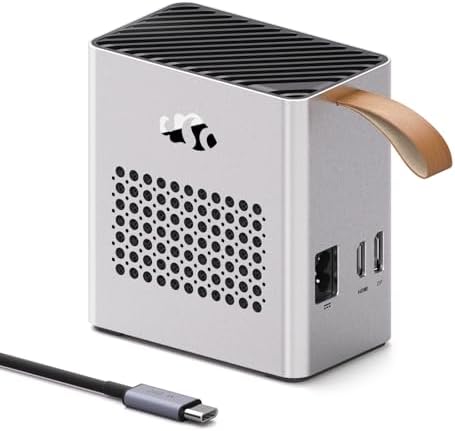
Only one of these five listings is dock hardware at all: the NIMO external GPU dock, and even it is a partial match because it docks graphics only. The other four listings are complete gaming laptops, strict type mismatches for this keyword. A buyer who needs a dock cannot use a laptop listing as one: a laptop is a host computer, not a dock accessory.
That split shapes every recommendation below. The NIMO suits a laptop owner whose machine has USB4 or OCuLink and who wants more graphics power. The four laptops suit someone replacing a computer, compared here on screens, memory and storage only. Read the type column first, because the strongest laptop here still gives your current machine nothing.
As an Amazon Associate, we earn from qualifying purchases.


Pick by Your Need
- Best actual dock: NIMO External GPU Docking Station. The only dock hardware here, and a partial match: it adds graphics over USB4 or OCuLink, with no downstream port list in its facts.
- Best 16-inch laptop instead: msi Crosshair 16 HX. A complete gaming laptop with a 240Hz QHD+ screen and 32GB of memory, not a dock.
- Most powerful laptop instead: Acer Predator 16 AI. RTX 5090 graphics and 64GB of RAM inside a full laptop, a strict type mismatch for dock shoppers.
- Biggest screen instead: HP Omen 17. A 17.3-inch laptop rather than a dock; its facts conflict on graphics, naming both RTX 5060 and RTX 5070.
- Best smaller laptop instead: Dell Alienware. A 15.3-inch WUXGA laptop with a 165Hz screen and 16GB of memory, still a full computer, not a dock.
Quick Answer
Only the NIMO External GPU Docking Station is a dock, a partial match that adds an RX 7600M XT over USB4 or OCuLink without a stated port-expansion list. The msi, Acer, HP and Dell listings are complete gaming laptops and strict mismatches, so none can dock a laptop you already own.
Comparison Table
| Product | What it actually is | Key figure | Graphics | Buy |
|---|---|---|---|---|
| NIMO External GPU Docking Station | External GPU dock (partial match) | USB4 80Gbps and OCuLink host links | AMD Radeon RX 7600M XT, 8GB GDDR6 | View on Amazon |
| msi Crosshair 16 HX | Gaming laptop (strict mismatch) | 16-inch QHD+ screen, 240Hz | NVIDIA GeForce RTX 5070 | View on Amazon |
| Acer Predator 16 AI | Gaming laptop (strict mismatch) | 16-inch WQXGA screen, 240Hz | NVIDIA GeForce RTX 5090 | View on Amazon |
| HP Omen 17 | Gaming laptop (strict mismatch) | 17.3-inch FHD screen, 144Hz | RTX 5060 and RTX 5070 both named (listing conflict) | View on Amazon |
| Dell Alienware | Gaming laptop (strict mismatch) | 15.3-inch WUXGA screen, 165Hz | NVIDIA GeForce RTX 5060 | View on Amazon |
Decision Guide
If you need a dock that adds graphics, the NIMO is the only candidate here. Its facts state an RX 7600M XT with 8GB of GDDR6 memory and up to 120W of graphics power, over USB4 at up to 80Gbps or OCuLink on PCIe 4.0 x4. Your machine must have one of those connections, since the listing’s compatibility statement covers only USB4 and OCuLink devices.
If you need a dock that adds ports or monitors, none of these five listings states that it does so. The NIMO’s facts name only its two host links and give no downstream port list, and the other four are computers with their own processors and screens. A laptop cannot sit between your laptop and your peripherals, so port shoppers should treat this set as the wrong shelf.
If you are actually replacing your laptop, compare the four machines as laptops. The Acer states the most memory at 64GB and the most internal storage at 4TB; the msi and Acer tie on stated refresh rate at 240Hz; the HP has the largest screen at 17.3 inches but a graphics conflict to resolve first; and the Dell states the least memory at 16GB.
1. NIMO External GPU Docking Station — Best actual dock, partial match
This is the only listing here that connects to a laptop instead of being one. It integrates an AMD Radeon RX 7600M XT with 8GB of GDDR6 memory and up to 120W of graphics power, links over USB4 at up to 80Gbps or OCuLink, and runs from a 240W power supply (product name), at 3.8 pounds in a small desktop box. The trade-off is scope: a partial match that docks graphics only, with no downstream port list in its facts.
| Spec | From the listing |
|---|---|
| Graphics processor | AMD Radeon RX 7600M XT |
| Graphics memory and power | 8GB GDDR6, up to 120W |
| Host connections | USB4 up to 80Gbps, OCuLink (PCIe 4.0 x4) |
| Downstream ports | The listing does not state it |
2. msi Crosshair 16 HX Gaming Laptop — Best 16-inch laptop instead, strict mism
This listing is a complete gaming laptop, a strict mismatch for dock shoppers: it cannot expand another machine’s ports or graphics. As a laptop it pairs a 16-inch QHD+ 240Hz screen with an Intel Core i9-14900HX, an RTX 5070, 32GB of DDR5 memory and a 2TB SSD. Its product name bundles an extra 1TB under a docking-station label (product name), but its facts describe no dock hardware. The trade-off is total: strong stated specs, zero use as a dock.
| Spec | From the listing |
|---|---|
| Processor | Intel Core i9-14900HX |
| Graphics | NVIDIA GeForce RTX 5070, 8GB GDDR7 |
| Memory | 32GB DDR5 |
| Storage | 2TB SSD |
3. Acer Predator 16 AI Gaming Laptop — Best most powerful laptop instead, stric
This is also a complete gaming laptop and a strict mismatch for anyone buying a dock. It states the strongest laptop figures in the set: a Core Ultra 9-275HX, RTX 5090 graphics, 64GB of DDR5 memory and a 4TB PCIe SSD behind a 16-inch WQXGA 240Hz screen. Its product name likewise bundles an extra 1TB under a docking-station label (product name), while its facts describe only the laptop. The trade-off mirrors the msi: top stated performance, nothing a dock buyer can plug into.
| Spec | From the listing |
|---|---|
| Processor | Intel Core Ultra 9-275HX |
| Graphics | NVIDIA GeForce RTX 5090 |
| Memory | 64GB DDR5 |
| Storage | 4TB PCIe SSD |
4. HP Omen 17 Gaming Laptop — Best biggest screen instead, strict mism
The HP is a 17.3-inch gaming laptop, the largest screen here, and still a strict mismatch because it is a computer, not a dock. Its facts state a Ryzen AI 9 365 with 10 cores and 20 threads, 32GB of DDR5-5600 memory and a 1TB PCIe Gen4 NVMe SSD. Its facts also name the graphics as RTX 5060 in one line and RTX 5070 in another, so re-check the product page before comparing its graphics. The trade-off is screen size against an unresolved graphics figure.
| Spec | From the listing |
|---|---|
| Processor | AMD Ryzen AI 9 365 |
| Graphics | RTX 5060 and RTX 5070 both named (listing conflict) |
| Memory | 32GB DDR5-5600 |
| Storage | 1TB PCIe Gen4 NVMe SSD |
5. Dell Alienware Gaming Laptop — Best smaller laptop instead, strict mism
The Dell is a 15.3-inch gaming laptop, the smallest screen here, and a strict mismatch like the other three machines. Its facts state a Ryzen 7 260, RTX 5060 graphics with 8GB of GDDR7 memory, 16GB of DDR5-5600 memory and a 1TB PCIe Gen4 SSD behind a WUXGA 165Hz screen. Its product name bundles an extra 1TB under a docking-station label (product name), but no dock appears in its facts. The trade-off is a smaller machine that still cannot do a dock’s job.
| Spec | From the listing |
|---|---|
| Processor | AMD Ryzen 7 260 |
| Graphics | NVIDIA GeForce RTX 5060, 8GB GDDR7 |
| Memory | 16GB DDR5-5600 |
| Storage | 1TB PCIe Gen4 SSD |
Shopping Checklist
- Confirm the product is actually a dock: four of these five listings are complete laptops; only the NIMO is dock hardware.
- Check your laptop’s connections first: the NIMO dock works only with USB4 or OCuLink machines.
- Check what the dock adds: this set’s one dock covers graphics, with no downstream port list in its facts.
- Re-check conflicting figures on the product page, including the HP graphics chip and the spec-table dimensions and weights.
- Check the return window on the product page before ordering.
- Compare finalists side by side on type first, then on stated graphics, memory and storage.
FAQ
Can a gaming laptop work as a docking station for another laptop?
A laptop is a host computer with its own processor, screen and keyboard, so it cannot sit between another laptop and its peripherals the way a dock does. Four of the five listings here are laptops, so treat them as possible replacement machines, never as docks.
What does an external GPU dock add that a regular dock does not?
An external GPU dock adds a separate graphics processor over a high-bandwidth link, here USB4 at up to 80Gbps or OCuLink, instead of mainly adding ports. In this set the one eGPU dock is a partial match: its facts give no downstream port list, so it answers a graphics need, not a connectivity need.
What should I check before buying a dock for a gaming laptop?
Check that the product is truly a dock, that your laptop carries the connection the dock uses, and the dock’s stated graphics power and power supply. Also confirm dimensions, weight and the return window on the product page, since several listings here carry conflicting figures.
Final Verdict
For a docking station for a gaming laptop, this set offers exactly one real option, the NIMO external GPU dock, a partial match that adds RX 7600M XT graphics over USB4 or OCuLink while stating no downstream ports. The msi, Acer, HP and Dell listings are strict mismatches: each is a complete gaming laptop, and none can dock a machine you already own. Laptop shoppers can still compare those four on screens, memory and storage, with the HP graphics conflict resolved on its product page first. Dock shoppers who need ports should look beyond this set.
Prime covers fast, free delivery on eligible items. See whether a Prime free trial is available for your account.
Check Prime on Amazon →Product and ASIN Reference
| Product | ASIN | Buy |
|---|---|---|
| NIMO External GPU Docking Station | B0HFWH22TC | View on Amazon |
| msi Crosshair 16 HX Gaming Laptop | B0HNVRCSZJ | View on Amazon |
| Acer Predator 16 AI Gaming Laptop | B0GWL4237Q | View on Amazon |
| HP Omen 17 Gaming Laptop | B0GN7MPMK6 | View on Amazon |
| Dell Alienware Gaming Laptop | B0HJ887ZNV | View on Amazon |
Types of Docking Stations and USB-C Hubs
Docking stations and USB-C hubs are grouped mainly by port variety and by power-delivery capability.
Basic USB-C hubs add extra ports from one host port, usually relying on the host's own power budget. Docking stations go further, often adding pass-through laptop charging alongside multiple display and peripheral connections from a single cable. Single-cable docks connect a laptop with one cord for power, data, and displays at once, replacing a desk full of separate cables. Multi-monitor docks are built to drive two or more external displays, which not every laptop's single port can do unassisted.
A dock's total bandwidth is shared across every connected device, so running multiple high-resolution monitors plus fast storage from one dock can hit a bandwidth ceiling well before any single device's own rated speed is reached.
Frequently Asked Questions
What's the benefit of a single-cable docking station?
It connects a laptop with one cord for power, data, and displays at once, replacing a desk full of separate cables with a single connection point.
Can a dock run out of bandwidth with multiple devices connected?
Yes - a dock's total bandwidth is shared across every connected device, so running multiple high-resolution monitors plus fast storage from one dock can hit a bandwidth ceiling before any single device's own rated speed is reached.
What's the difference between a basic USB-C hub and a full docking station?
A basic hub mainly adds extra ports from one host port, while a docking station typically goes further, often adding pass-through laptop charging alongside multiple display and peripheral connections.









Write Your Review
No reviews yet. Be the first to share your experience!