
If you move files between a USB-C phone and a USB-A computer, pick the Transcend ESD310 for the highest stated speeds, the SSK drive for the largest stated capacity, or a smaller-capacity drive below when 64GB or 256GB covers your files. All five products here are external SSDs with both a USB-C connector and a USB-A connector built in, so none needs a separate cable to switch between the two port types, based on the listing details.
The differences are stated capacity, stated speeds, stated size and weight, and the extras each listing names. We compared only what the listings state, so where a listing gives no weight or no write speed, we say so.
As an Amazon Associate, we earn from qualifying purchases.



Pick by Your Need
- Best overall: Transcend ESD310. It states the highest read and write speeds of the five listings.
- Largest capacity: SSK 2TB External SSD. Its stated 2TB capacity is the largest in this group.
- Best for phone photo backup: Lexar Dual Drive D500. Its listing names an app photo backup function for iOS and Android.
- Smallest stated capacity: Orlian 64GB External SSD. Its stated 64GB suits a small set of files.
- Best for a lanyard carry: MXZXSX 1TB Dual Drive. Its listing states a built-in lanyard hole.
Quick Answer
The Transcend ESD310 is the main pick for speed, with stated speeds up to 1050MB/s read and 950MB/s write at 1TB. The SSK drive is the main pick for capacity, with a stated 2TB. The Lexar D500 suits phone photo backup, because its listing names an app backup function.
Comparison Table
| Product | Best for | Key stated figure | Trade-off | Buy |
|---|---|---|---|---|
| SSK 2TB External SSD | Largest stated capacity | 2TB capacity | The listing does not state a weight | View on Amazon |
| Lexar Dual Drive D500 | Phone photo backup | 400MB/s stated read speed | The Lexar listing describes a compact design, yet its spec table lists 9.06 inches long, 5.91 inches wide and 4.53 inches high, so those stated dimensions do not match the compact description. | View on Amazon |
| Transcend ESD310 | Highest stated speeds | 1050MB/s stated read speed | Its stated 1TB capacity is half the SSK drive’s stated 2TB | View on Amazon |
| Orlian 64GB External SSD | A small file set | 64GB stated capacity | Its stated capacity is the smallest of the five listings | View on Amazon |
| MXZXSX 1TB Dual Drive | Carrying on a lanyard | 40g stated weight | The listing states usable capacity will be slightly lower than 1TB | View on Amazon |
Decision Guide
If you need the most room, choose the SSK drive, because its stated 2TB capacity is the largest here, ahead of the two stated 1TB drives, the stated 256GB Lexar, and the stated 64GB Orlian. If you need the fastest stated transfers, choose the Transcend ESD310, because its stated 1050MB/s read and 950MB/s write speeds are the highest figures in this group. If you need a stated backup tool for phone photos, choose the Lexar D500, because it is the only listing here that names an app photo backup function for iOS and Android.
If you need the lightest stated weight, the Transcend ESD310 states 0.02 pounds, lower than the stated 0.06 pounds for the Lexar and 0.09 pounds for the Orlian and MXZXSX; the SSK listing states no weight. The Lexar listing describes a compact design, yet its spec table lists 9.06 inches long, 5.91 inches wide and 4.53 inches high, so those stated dimensions do not match the compact description. If you need consoles and handhelds too, the Transcend listing names Steam Deck, ROG Ally, MSI Claw, PS5 and Xbox, the widest device list stated here. Check the product page for current details before ordering.
1. SSK 2TB External SSD — Best for capacity
The SSK drive is the capacity pick, with a stated 2TB size, stated read speeds up to 550MB/s and stated write speeds up to 500MB/s over USB 3.2 Gen 2. Its stated body measures 3.07 inches long, 0.81 inches wide and 0.34 inches high, and the listing states a zinc alloy shell with a double-head protective cover. The listing also states OTG support and plug and play use. Its angle is room first: it holds twice the stated capacity of the two 1TB drives, while its stated speeds sit below the Transcend figures. Skip it if a stated weight matters, because this listing gives no weight.
| Spec | From the listing |
|---|---|
| Capacity | 2TB |
| Connectors | USB-C and USB-A 3.2 |
| Read speed | Up to 550MB/s |
| Dimensions | 3.07 x 0.81 x 0.34 inches |
| Color | Grey |
| Weight | The listing does not state it |
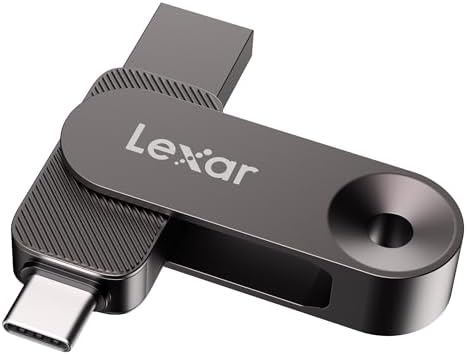
2. Lexar Dual Drive D500 — Best for phone photo backup
The Lexar D500 is the backup-tool pick, because its listing names a free Lexar app photo backup function for both iOS and Android, which none of the other four listings states. Its stated capacity is 256GB, its stated read speed is up to 400MB/s, and its stated weight is 0.06 pounds, with a metal housing that the listing states protects the USB-A and USB-C connectors. The Lexar listing describes a compact design, yet its spec table lists 9.06 inches long, 5.91 inches wide and 4.53 inches high, so those stated dimensions do not match the compact description. Its stated read speed is the lowest figure here, so its case rests on the backup app rather than on speed or room.
| Spec | From the listing |
|---|---|
| Capacity | 256GB |
| Connectors | USB-C and USB-A, USB 3.2 |
| Read speed | Up to 400MB/s |
| Dimensions | 9.06 x 5.91 x 4.53 inches |
| Color | Titanium |
| Weight | 0.06 pounds |
3. Transcend ESD310 Dual Portable SSD — Best for speed
The Transcend ESD310 is the speed pick, with stated read speeds up to 1050MB/s, stated write speeds up to 950MB/s, and a stated 10Gbps transfer rate over USB 3.2 Gen 2. Its stated capacity is 1TB, its stated weight is 0.02 pounds, and its stated form factor is 2.81 x 0.79 x 0.31 inches, the lightest stated weight of the four listings that state a weight. The listing names SLC Cache technology, states that the drive is pre-formatted as exFAT, and lists compatibility with Steam Deck, ROG Ally, MSI Claw, Windows, Mac, iPhone, iPad, Android, PS5 and Xbox. Versus the other four, it states the highest speeds and the widest named device list.
| Spec | From the listing |
|---|---|
| Capacity | 1TB |
| Connectors | USB-C and USB-A 3.2 |
| Read speed | Up to 1050MB/s |
| Write speed | Up to 950MB/s |
| Dimensions | 2.81 x 0.79 x 0.31 inches |
| Weight | 0.02 pounds |
4. Orlian 64GB External SSD — Best for a small file set
The Orlian drive is the small-capacity pick, with a stated 64GB size, stated read speeds up to 450MB/s and stated write speeds up to 400MB/s over USB 3.2 Gen 1. Its stated length is 2.75 inches, its stated height is 0.35 inches, and its stated weight is 0.09 pounds, with a metal swivel design stated in the listing. The listing states OTG support and names compatibility with iPhone 15, 16 and 17 series phones and Android devices. Versus the other four, its stated capacity is by far the smallest, at one quarter of the Lexar drive’s stated 256GB, and its Gen 1 interface is a step below the Gen 2 stated for the SSK, Transcend and MXZXSX drives. Skip it if you move large video libraries, because the stated 64GB figure sets a clear ceiling.
| Spec | From the listing |
|---|---|
| Capacity | 64 GB |
| Connectors | USB-C and USB-A, USB 3.2 Gen 1 |
| Read speed | Up to 450MB/s |
| Dimensions | 2.75 x 5.99 x 0.35 inches |
| Color | Black |
| Weight | 0.09 pounds |
5. MXZXSX 1TB Dual Drive — Best for lanyard carry
The MXZXSX drive is the carry pick, because its listing states a built-in lanyard hole, a stated weight of 40g, and a zinc alloy body in a cable-free integrated design. Its stated capacity is 1TB, its stated read speed is up to 500MB/s, and its stated write speed is up to 450MB/s through both connectors over USB 3.2 Gen 2. Its stated body measures 3.17 inches long, 0.76 inches wide and 0.36 inches high. The listing names iPhone 15, iPad, Mac, Windows PC and Android devices, and notes that usable capacity will be slightly lower than stated.
| Spec | From the listing |
|---|---|
| Capacity | 1TB |
| Connectors | USB-C and USB-A, USB 3.2 Gen 2 |
| Read speed | Up to 500MB/s |
| Dimensions | 3.17 x 0.76 x 0.36 inches |
| Color | Space Gray |
| Weight | 0.09 pounds |
Shopping Checklist
Before you order:
- Confirm both connectors are stated in the listing for the ports you use.
- Match the total size of your files against the stated capacity figures.
- Compare stated read and write speeds, and note any listing stating only a read speed.
- Check stated dimensions and weight against the pocket or bag slot you plan to use.
- Check the return window on the product page.
FAQ
Do all five drives work with both USB-C and USB-A ports?
Yes, based on the listing details. Each listing states both a USB-C connector and a USB-A connector on the same drive, so each one can plug into either port type without a separate cable.
Which stated capacity should I choose for photos and video?
Match the stated capacity to the size of your library. The listings state 64GB, 256GB, 1TB and 2TB options, and the MXZXSX listing notes that usable capacity will be slightly lower than its stated 1TB, so leave headroom above your current library size.
Does a higher stated speed always mean a faster transfer on my devices?
Not necessarily, because the stated figures are maximums given in each listing, and the listings name different interface generations. Three listings state USB 3.2 Gen 2 and the Orlian states Gen 1, so compare the stated interface and the stated speeds together rather than by one number alone.
Final Verdict
For most buyers who switch between a USB-C phone and a USB-A computer, the Transcend ESD310 is the strongest all-round choice here, because it states the highest speeds, the lightest stated weight at 0.02 pounds, and the widest named device list. Choose the SSK drive instead when stated capacity matters most, since its 2TB figure is the largest in the group. Choose the Lexar D500 for its stated app photo backup function, and the Orlian or MXZXSX drive when their stated 64GB size or lanyard hole matches a narrower need.
Prime covers fast, free delivery on eligible items. See whether a Prime free trial is available for your account.
Check Prime on Amazon →Types of External SSDs
External SSDs are grouped mainly by connection speed and by build durability.
USB 3.2 Gen 1 drives (up to roughly 5Gbps) are the most common, affordable tier. USB 3.2 Gen 2 and Gen 2x2 drives support higher transfer speeds, but only reach those speeds with a compatible port and cable on the host device. Rugged/water-resistant drives add a protective shell and IP rating for travel or outdoor use. NVMe-based enclosures use the same fast flash memory as internal NVMe drives, generally outperforming SATA-based external SSDs.
An external SSD's rated speed is a best-case figure - actual transfer speed is capped by the slowest link in the chain, including the host port, the cable, and the file sizes being moved.
Frequently Asked Questions
Why doesn't an external SSD always hit its rated speed?
Its rated speed is a best-case figure - actual transfer speed is capped by the slowest link in the chain, including the host port, the cable used, and the file sizes being moved.
What's the benefit of an NVMe-based external SSD enclosure?
It uses the same fast flash memory as internal NVMe drives, generally outperforming SATA-based external SSDs when paired with a fast enough port.
Do rugged external SSDs sacrifice performance for durability?
Not necessarily - rugged/water-resistant models add a protective shell and IP rating mainly for travel or outdoor use, which doesn't have to come at the cost of speed.
Related Guides
No internal links were supplied for this post, so this section lists none.
Product and ASIN Reference
| Product | ASIN | Buy |
|---|---|---|
| SSK 2TB External SSD | B0C9J4ZXN9 | View on Amazon |
| Lexar Dual Drive D500 | B0GPT3VJ9L | View on Amazon |
| Transcend ESD310 Dual Portable SSD | B0C3B32H9M | View on Amazon |
| Orlian 64GB External SSD | B0H4145WLZ | View on Amazon |
| MXZXSX 1TB Dual Drive | B0HCJHLD81 | View on Amazon |






Write Your Review
No reviews yet. Be the first to share your experience!