
Buyers who want a single-cable laptop dock should start with the three HP Thunderbolt listings, the only genuine port-replicating docks in this set of five. Those three carry identical facts and the same 4.76 by 4.76 by 1.95 inch footprint, differing only in spec-table details like color, weight and pack size. The other two need warnings: the NIMO is a partial match, an external GPU dock adding graphics power rather than ports, and the Lenovo listing is a strict mismatch, a laptop rather than a dock.
Two limits apply to every HP listing. Their 100W figure (product name) and Thunderbolt 4 version (product name) rest on the product names; the facts say only “high-speed Thunderbolt” and give no wattage. The facts never enumerate ports or display outputs either, so confirm the port layout on the product page.
As an Amazon Associate, we earn from qualifying purchases.



Pick by Your Need
- Best overall: HP G6 Thunderbolt 4 Dock. The HP-branded G6 listing, with the same facts and footprint as its siblings.
- Best stated weight: Dockztorm HP G6 Thunderbolt 4 Dock. The only HP listing stating a weight, 1.7 pounds, in black.
- Best grey finish: HP Thunderbolt 4 Dock Port Replicator. The only HP listing stating a grey finish.
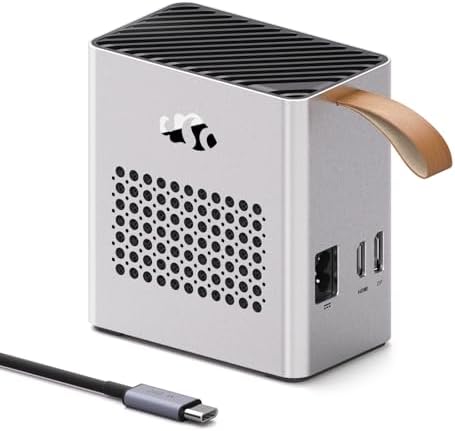
- Best for graphics expansion: NIMO External GPU Docking Station. A partial match that docks over USB4 to add a Radeon GPU, not ports.
- Best avoided as a dock: Lenovo IdeaPad Slim 3i 15.6 Laptop. A strict mismatch: a laptop whose facts give no dock specifications.
Quick Answer
Choose any of the three HP Thunderbolt docks for a single-cable docking station; their facts are identical, so decide on stated color, weight and bundle details. The NIMO is a partial match built for graphics expansion, and the Lenovo listing is a laptop, not a dock.
Comparison Table
| Product | Type | Connection | Stated size | Stated weight | Dock power delivery | Buy |
|---|---|---|---|---|---|---|
| HP Thunderbolt 4 Dock Port Replicator | Docking station | Thunderbolt 4 (product name), single cable | 4.76 x 4.76 x 1.95 inches | not stated | 100W (product name) | View on Amazon |
| Dockztorm HP G6 Thunderbolt 4 Dock | Docking station | Thunderbolt 4 (product name), single cable | 4.76 x 4.76 x 1.95 inches | 1.7 pounds | 100W (product name) | View on Amazon |
| NIMO External GPU Docking Station | GPU dock (partial match) | USB4 up to 80Gbps, OCuLink | 4.53 x 2.48 x 4.74 inches | 3.8 pounds | 65W (product name) | View on Amazon |
| Lenovo IdeaPad Slim 3i 15.6 Laptop | Laptop (strict mismatch) | Wi-Fi 6, USB-C with DisplayPort 1.2 | 14.14 x 9.21 x 0.7 inches | 1.0 pounds (re-check) | not stated | View on Amazon |
| HP G6 Thunderbolt 4 Dock | Docking station | Thunderbolt 4 (product name), single cable | 4.76 x 4.76 x 1.95 inches | not stated | 100W (product name) | View on Amazon |
Decision Guide
If you need one cable for everything, the three HP listings are interchangeable on their facts: each states the same single-cable feature set, including HP Quick Connect, Poly Lens manageability, HP Wolf Security and rear-facing ports. They differ only in spec-table fields: grey on the Port Replicator, black and 1.7 pounds on the Dockztorm listing, neither on the HP G6 listing.
If exact ports matter, be careful with all three: their facts never list port types, counts or display outputs, and the 100W figure (product name) is never confirmed in the facts, so check the product page. Each size field also reads like a bundle quantity, “10 Pack” twice and “5 Pack” once, so confirm the box contents.
For graphics power rather than ports, the NIMO is the relevant listing, a partial match whose facts state a Radeon RX 7600M XT with 8GB of GDDR6, up to 120W of graphics power and USB4 up to 80Gbps or OCuLink, with no peripheral expansion. If you need a dock and nothing else, skip the Lenovo listing: a 15.6-inch laptop whose product name alone mentions a docking station (product name).
1. HP Thunderbolt 4 Dock Port Replicator — Best grey finish
This is a genuine HP Thunderbolt dock in a 4.76 by 4.76 by 1.95 inch body, stating single-cable connectivity, rear-facing ports, HP Quick Connect, Poly Lens manageability and HP Wolf Security. Its spec table is the only HP one here stating a grey finish, while its size field reads “10 Pack”. The trade-off is documentation: no port list or weight figure, and a 100W figure (product name) resting on its name.
| Spec | From the listing |
|---|---|
| Color | Grey |
| Size field | 10 Pack |
| Dimensions | 4.76 x 4.76 x 1.95 inches |
| Connection | Thunderbolt 4 (product name), single cable |
| Power delivery | 100W (product name) |
| Weight | The listing does not state it |
2. Dockztorm HP G6 Thunderbolt 4 Dock — Best stated weight
This listing repeats the same HP dock facts in the same 4.76 by 4.76 by 1.95 inch body, but its spec table adds black and a stated 1.7 pound weight, and its size field reads “5 Pack” against its siblings’ “10 Pack”. The trade-off is the seller field: the brand field reads Dockztorm while the name and facts describe an HP dock, so confirm the bundle on the product page.
| Spec | From the listing |
|---|---|
| Color | Black |
| Size field | 5 Pack |
| Dimensions | 4.76 x 4.76 x 1.95 inches |
| Weight | 1.7 pounds |
| Connection | Thunderbolt 4 (product name), single cable |
| Power delivery | 100W (product name) |
3. NIMO External GPU Docking Station — Best for graphics expansion
This is a partial match: a dock in form, built for graphics expansion rather than port replication. Its facts state an AMD Radeon RX 7600M XT with 8GB of GDDR6 memory and up to 120W of graphics power, over USB4 at up to 80Gbps or OCuLink on PCIe 4.0 x4. At 3.8 pounds it is the heaviest stated product here, with no peripheral port list in its facts.
| Spec | From the listing |
|---|---|
| Color | Silver |
| Graphics | AMD Radeon RX 7600M XT, 8GB GDDR6 |
| Interface | USB4 up to 80Gbps, OCuLink PCIe 4.0 x4 |
| Dimensions | 4.53 x 2.48 x 4.74 inches |
| Weight | 3.8 pounds |
| Power supply | 240W (product name) |
4. Lenovo IdeaPad Slim 3i 15.6 Laptop — Best avoided as a dock
This is a strict mismatch: a Lenovo IdeaPad Slim 3i laptop whose product name alone lists a dock among bundle items (product name), while its facts describe the computer: an Intel N150 at up to 3.6GHz, 8GB of LPDDR5 memory, 128GB of UFS 2.2 storage and a 15.6-inch Full HD 1920×1080 anti-glare display at 250 nits with low blue light certification. Its spec table’s 1.0 pound weight reads implausibly light for its size and needs a product-page check.
| Spec | From the listing |
|---|---|
| Display | 15.6 inches, Full HD 1920×1080, 250 nits |
| Processor | Intel N150, up to 3.6GHz |
| Memory | 8GB LPDDR5 |
| Storage | 128GB UFS 2.2 |
| Dimensions | 14.14 x 9.21 x 0.7 inches |
| Weight | 1.0 pounds (reads implausible; re-check) |
5. HP G6 Thunderbolt 4 Dock — Best overall
This HP-branded G6 listing repeats the same dock facts and the same 4.76 by 4.76 by 1.95 inch body, with a “10 Pack” size field. The trade-off is the thinnest spec table of the three, giving no color where its siblings state grey and black, and no weight where the Dockztorm listing states 1.7 pounds.
| Spec | From the listing |
|---|---|
| Size field | 10 Pack |
| Dimensions | 4.76 x 4.76 x 1.95 inches |
| Connection | Thunderbolt 4 (product name), single cable |
| Power delivery | 100W (product name) |
| Color | The listing does not state it |
| Weight | The listing does not state it |
Shopping Checklist
- Confirm the listing is a docking station first: one of these five is a laptop, one a graphics dock.
- Check ports and display outputs on the product page, because the HP facts never enumerate them.
- Verify charging on the product page: the 100W figure (product name) rests on names, not facts.
- Read the size field: HP spec tables read “10 Pack” or “5 Pack”, so confirm bundle contents.
- Compare stated dimensions and weight side by side.
- Check the return window on the product page in case the bundle differs.
FAQ
Are the three HP listings the same docking station?
Their facts are identical, and all three state the same dimensions, so the dock appears to be one unit in different listings. They differ in stated color, weight, pack-size field and one brand field reading Dockztorm, so confirm the bundle on the product page.
Is the NIMO unit a regular laptop docking station?
It is a partial match rather than a regular dock. Its facts describe an external graphics dock with a Radeon RX 7600M XT and 8GB of memory, connected over USB4 or OCuLink to raise graphics power, with no peripheral port expansion given.
Does the Lenovo listing include a docking station?
Its product name lists a docking station among bundle items (product name), but its facts and spec table describe only the laptop, with no dock model, ports or dimensions given. Treat the dock as unconfirmed and check the product page before counting on one.
Final Verdict
The three HP Thunderbolt listings are the genuine docking stations here, and with identical facts the choice comes down to stated color, weight and bundle details, plus a product-page check of ports and the 100W figure (product name). The NIMO earns a partial match as a graphics dock adding a Radeon GPU over USB4 rather than replicating ports. The Lenovo listing is a strict mismatch, a laptop whose name mentions a dock its facts never describe. Buy one of the HP three for docking and the NIMO for graphics.
Prime covers fast, free delivery on eligible items. See whether a Prime free trial is available for your account.
Check Prime on Amazon →Product and ASIN Reference
| Product | ASIN | Buy |
|---|---|---|
| HP Thunderbolt 4 Dock Port Replicator | B0FNPS62TH | View on Amazon |
| Dockztorm HP G6 Thunderbolt 4 Dock | B0G2PLWBWN | View on Amazon |
| NIMO External GPU Docking Station | B0HFWH22TC | View on Amazon |
| Lenovo IdeaPad Slim 3i 15.6 Laptop | B0HM13ZFK3 | View on Amazon |
| HP G6 Thunderbolt 4 Dock | B0FNQ5P5HH | View on Amazon |
Types of Docking Stations and USB-C Hubs
Docking stations and USB-C hubs are grouped mainly by port variety and by power-delivery capability.
Basic USB-C hubs add extra ports from one host port, usually relying on the host's own power budget. Docking stations go further, often adding pass-through laptop charging alongside multiple display and peripheral connections from a single cable. Single-cable docks connect a laptop with one cord for power, data, and displays at once, replacing a desk full of separate cables. Multi-monitor docks are built to drive two or more external displays, which not every laptop's single port can do unassisted.
A dock's total bandwidth is shared across every connected device, so running multiple high-resolution monitors plus fast storage from one dock can hit a bandwidth ceiling well before any single device's own rated speed is reached.
Frequently Asked Questions
What's the benefit of a single-cable docking station?
It connects a laptop with one cord for power, data, and displays at once, replacing a desk full of separate cables with a single connection point.
Can a dock run out of bandwidth with multiple devices connected?
Yes - a dock's total bandwidth is shared across every connected device, so running multiple high-resolution monitors plus fast storage from one dock can hit a bandwidth ceiling before any single device's own rated speed is reached.
What's the difference between a basic USB-C hub and a full docking station?
A basic hub mainly adds extra ports from one host port, while a docking station typically goes further, often adding pass-through laptop charging alongside multiple display and peripheral connections.









Write Your Review
No reviews yet. Be the first to share your experience!