
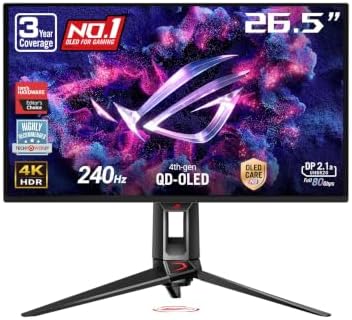
Every monitor here is a 27-inch class OLED that meets the 240Hz target on its stated figures, so the real choice is resolution and panel care: three picks state 4K panels, one states QHD, and the LG carries a QHD panel in its product name (product name), and the Alienware trades resolution for a stated 360Hz. The MSI MAG 272UP is the most complete 4K spec sheet here, while the ASUS adds the strongest stated burn-in protection.
Two size figures need care. The ASUS and MSI each state a 26.5-inch viewable diagonal in their facts, the standard viewable size for this class, and the Alienware states 26.7 inches in its facts while its spec table lists 27.0 inches, a conflict flagged in its section below.
As an Amazon Associate, we earn from qualifying purchases.


Pick by Your Need
- Best overall: MSI MAG 272UP QD-OLED X24. Stated 4K, 240Hz, 99 percent DCI-P3 and the only stated adjustable stand here.
- Best for the highest frame rates: Alienware AW2725DF. The only pick stating 360Hz, and the lightest stated at 13.89 pounds.
- Best for burn-in protection: ASUS ROG PG27UCDM. A proximity sensor that switches to a black screen when you step away.
- Best for a narrow desk: LG 27GS95QE UltraGear. The narrowest stated width here at 23.8 inches and a full stated 27-inch diagonal.
- Best for included coverage: Samsung Odyssey OLED 4K. A bundled protection plan extension on top of the stated manufacturer warranty.
Quick Answer
All five picks are 27-inch class OLEDs stating at least 240Hz: the ASUS, MSI, LG and Samsung state 240Hz in their facts, and the Alienware states 360Hz. Choose the MSI or ASUS for a stated 4K panel, the Alienware for the highest stated refresh at QHD, the LG for a full stated 27-inch QHD (product name) panel, and the Samsung for its glare-free screen and bundled coverage.
Comparison Table
| Product | Stated size | Resolution | Refresh rate (stated) | Response | HDR | Weight | Buy |
|---|---|---|---|---|---|---|---|
| ASUS ROG PG27UCDM | 26.5 inches | 4K (3840 x 2160) | 240Hz | 0.03ms | not stated | 16.8 lb | View on Amazon |
| MSI MAG 272UP QD-OLED X24 | 26.5 inches | 4K UHD (3840 x 2160) | 240Hz | 0.03ms (GtG) | DisplayHDR True Black 400 | 22.6 lb | View on Amazon |
| Alienware AW2725DF | 26.7 inches (facts); 27.0 (spec table) | WQHD (2560 x 1440) | 360Hz | 0.03ms (GtG) | DisplayHDR True Black 400 | 13.89 lb | View on Amazon |
| LG 27GS95QE UltraGear | 27 inches | QHD 1440p (product name) | 240Hz | 0.03ms (GtG) | DisplayHDR True Black 400 | 16.2 lb | View on Amazon |
| Samsung Odyssey OLED 4K | 27 inches | 4K | 240Hz | 0.03ms | DisplayHDR 400 | 15.2 lb | View on Amazon |
Decision Guide
Start with resolution. The ASUS, MSI and Samsung state 4K panels; the ASUS and MSI state the full 3840 x 2160 count in their facts. The Alienware states a WQHD 2560 x 1440 panel in its facts, and the LG’s QHD 1440p resolution rests on its product name (product name). For the sharpest stated image, choose a 4K pick.
Refresh rate is the second split. Four picks state 240Hz in their facts. The Alienware states 360Hz, half again that figure. If the highest stated refresh matters most, choose the Alienware; it cannot match the 4K picks on stated resolution.
Panel care separates the 4K picks. The ASUS states a Neo Proximity Sensor that switches to a black screen when the user is away, plus OLED Care Pro and a custom heatsink. The MSI states OLED Care 2.0 and a fanless graphene heatsink; the Samsung states a Dynamic Cooling System. For static-screen work, the ASUS states the most direct away-from-desk protection.
Finally, the physical figures: the MSI is the heaviest stated pick at 22.6 pounds but the only one stating a 4-way adjustable stand and VESA 100mm mounting, and stated widths run from 23.8 inches (LG) to 24.1 inches (Samsung). Hold every pick to its stated diagonal, and confirm the Alienware’s conflicting figures (26.7 inches in facts, 27.0 in its spec table) on its product page.
1. ASUS ROG PG27UCDM 4K OLED — Best for burn-in protection
The ASUS states a 26.5-inch viewable 4K QD-OLED panel at 3840 x 2160, with a 240Hz refresh rate and a 0.03ms response time, matching the size class and the refresh target. Its distinguishing feature is the Neo Proximity Sensor inside OLED Care Pro, which switches to a black screen when the user is away to reduce burn-in risk. The trade-off: its listing gives no HDR certification, where three rivals state DisplayHDR True Black 400.
| Spec | From the listing |
|---|---|
| Size | 26.5 inches (27-inch class) |
| Resolution | 4K (3840 x 2160) |
| Refresh | 240Hz |
| Response | 0.03ms |
| HDR | The listing does not state it |
| Weight | 16.8 lb |
2. MSI MAG 272UP QD-OLED X24 — Best overall
The MSI states the fullest 4K sheet here: a 26.5-inch viewable UHD panel at 3840 x 2160, a 240Hz refresh rate and a 0.03ms GtG response time, matching the class and the target on stated figures. It is also the only pick stating 10-bit color with 99 percent DCI-P3 coverage and Delta E of 2 or less. The trade-off is mass: at 22.6 pounds it is the heaviest stated monitor here by a wide margin.
| Spec | From the listing |
|---|---|
| Size | 26.5 inches (27-inch class) |
| Resolution | 4K UHD (3840 x 2160) |
| Refresh | 240Hz |
| Response | 0.03ms (GtG) |
| Gamut | 99 percent DCI-P3 |
| Weight | 22.6 lb |
3. Alienware AW2725DF OLED — Best for the highest frame rates
The Alienware is the refresh outlier: its facts state a 360Hz refresh rate and a 0.03ms gray-to-gray response time on a WQHD 2560 x 1440 QD-OLED panel, well past the 240Hz target. One figure conflicts inside its own listing: the facts state a 26.7-inch diagonal while the spec table lists 27.0 inches, so confirm the diagonal on the product page. The trade-off is resolution, balanced against the lightest stated weight here at 13.89 pounds.
| Spec | From the listing |
|---|---|
| Size | 26.7 inches (facts); 27.0 (spec table) |
| Resolution | WQHD (2560 x 1440) |
| Refresh | 360Hz |
| Response | 0.03ms (GtG) |
| HDR | DisplayHDR True Black 400 |
| Weight | 13.89 lb |
4. LG 27GS95QE UltraGear OLED — Best for a narrow desk
The LG states a full 27-inch diagonal in its listing, the joint largest stated figure here, with a 240Hz refresh rate and a 0.03ms GtG response time, matching that target. Its QHD 1440p resolution rests on the product name (product name), and its stated 1,500,000:1 contrast ratio ties the MSI’s figure. The trade-off: it matches the 240Hz group rather than beating it, while the Alienware states 360Hz.
| Spec | From the listing |
|---|---|
| Size | 27 inches |
| Resolution | QHD 1440p (product name) |
| Refresh | 240Hz |
| Response | 0.03ms (GtG) |
| Contrast | 1,500,000:1 |
| Weight | 16.2 lb |
5. Samsung Odyssey OLED 4K — Best for included coverage
The Samsung states a 27-inch QD-OLED panel in 4K with a 240Hz refresh rate and a 0.03ms response time, matching the size class and that target. Its facts give no pixel count for the 4K panel, where the ASUS and MSI state theirs. The trade-off is paperwork versus extras: its HDR certification is listed as DisplayHDR 400 rather than the True Black 400 three rivals state, but the bundle adds a protection plan extension alongside the stated manufacturer warranty.
| Spec | From the listing |
|---|---|
| Size | 27 inches |
| Resolution | 4K |
| Refresh | 240Hz |
| Response | 0.03ms |
| HDR | DisplayHDR 400 |
| Weight | 15.2 lb |
Shopping Checklist
- Confirm the exact diagonal on the product page: ASUS and MSI state 26.5 inches; the Alienware states 26.7 in facts against 27.0 in its spec table.
- Measure your desk first: stated widths run from 23.8 to 24.1 inches and stated weights from 13.89 to 22.6 pounds, so check your stand or arm rating.
- Check HDR wording on the product page: one pick lists DisplayHDR 400, three state True Black 400.
- Verify the ports and sync support you need on the product page, because the listings state these unevenly.
- Check the return window on the product page before ordering.
- Compare finalists side by side on stated refresh, resolution and weight.
FAQ
Is a monitor stating 26.5 inches really a 27-inch monitor?
Yes: in this class the stated viewable diagonal is what differs. The ASUS and MSI state 26.5 inches, the Alienware states 26.7 inches in its facts, and the LG and Samsung state 27 inches, and all five sit in the 27-inch class. Compare the exact stated figure, not the class label.
Should I choose the 360Hz monitor or a 240Hz 4K monitor?
It depends on which stated figure you value more: the Alienware states 360Hz on a WQHD 2560 x 1440 panel, while the ASUS, MSI and Samsung state 240Hz on 4K panels. Competitive players get the highest stated refresh from the Alienware; those who want the highest stated pixel count at 240Hz should take a 4K pick.
What should I check on the product page before buying an OLED gaming monitor?
Check the exact stated diagonal, the HDR certification wording and the burn-in care features, since each listing states a different protection package, from the ASUS proximity sensor to the Samsung cooling system. Also confirm the return window on the product page.
Final Verdict
All five picks meet the target on stated figures, each stating 240Hz or, for the Alienware, 360Hz, and a 0.03ms response time. The MSI MAG 272UP is the default recommendation for its stated 4K panel, 99 percent DCI-P3 coverage and adjustable stand, with the ASUS ROG PG27UCDM close behind for its proximity-sensor burn-in protection. The Alienware is the frame-rate pick, the LG suits narrower desks, and the Samsung adds bundled coverage. Confirm the Alienware’s diagonal and each finalist’s HDR wording on the product page.
Prime covers fast, free delivery on eligible items. See whether a Prime free trial is available for your account.
Check Prime on Amazon →Product and ASIN Reference
| Product | ASIN | Buy |
|---|---|---|
| ASUS ROG PG27UCDM | B0DM6SHQTN | View on Amazon |
| MSI MAG 272UP QD-OLED X24 | B0FTZVBX84 | View on Amazon |
| Alienware AW2725DF | B0CZSGWLD5 | View on Amazon |
| LG 27GS95QE UltraGear | B0CSGWXVBN | View on Amazon |
| Samsung Odyssey OLED 4K | B0FG3HMG9V | View on Amazon |
Types of Gaming Monitors
Gaming monitors are grouped mainly by refresh rate and by panel technology, both of which affect motion clarity more than resolution alone.
Standard refresh (60-75Hz) monitors are the baseline, fine for less fast-paced games. High-refresh (144Hz+) monitors show noticeably smoother motion, assuming the PC can actually render frames that fast. OLED gaming monitors offer near-instant pixel response and strong contrast, with some risk of static-image burn-in over long-term use. IPS and VA panels trade off viewing angle, contrast, and response time differently, with no single type winning on every metric.
A monitor's adaptive sync feature (commonly branded G-Sync or FreeSync) only helps when the graphics card is compatible with that specific standard, so checking GPU compatibility matters as much as the monitor's own spec sheet.
Frequently Asked Questions
Does a higher refresh rate always mean smoother gameplay?
Only if the PC can render frames fast enough to use it - a high-refresh monitor paired with a PC that can't hit those frame rates won't show the full benefit.
What's the risk with OLED gaming monitors?
OLED offers near-instant pixel response and strong contrast but carries some risk of static-image burn-in over long-term use, more so than LED/LCD panels.
Does G-Sync or FreeSync work with any graphics card?
No - adaptive sync only helps when the graphics card is compatible with that specific standard, so checking GPU compatibility matters as much as the monitor's own spec sheet.






Write Your Review
No reviews yet. Be the first to share your experience!