
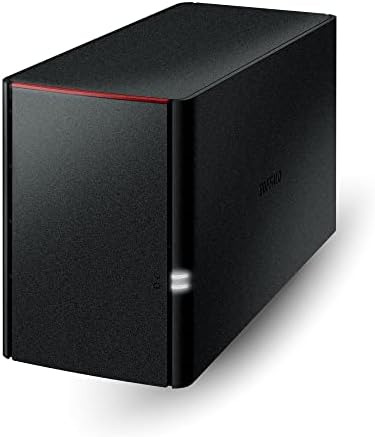
All five picks are Buffalo NAS systems with hard drives installed, for buyers who want network storage without picking drives. That makes every pick a partial match on type: each delivers hard-drive storage for a home network, but none is a bare hard drive for an enclosure. The three TeraStation Essentials systems state 256-bit drive encryption, a 2.5GbE port and pre-configured RAID, while the two LinkStation SoHo systems trade encryption for personal-cloud features and stated dimensions.
Total capacities run from 8TB to 32TB, and the same 16TB total arrives in two layouts: four drives (product name) in the TeraStation 16TB and two 8TB drives in the SoHo 720. No listing states drive-level specifications such as rotational speed, cache size or recording technology, so those details need a product-page check. The TeraStation spec tables give no dimensions or weight, while both LinkStations state both.
As an Amazon Associate, we earn from qualifying purchases.


Pick by Your Need
- Best overall: BUFFALO TeraStation Essentials 16TB. A mid-size complete system with drives included, a partial match on type, with 256-bit encryption and pre-configured RAID.
- Best for most capacity: BUFFALO TeraStation Essentials 32TB. The largest stated total, 32TB, in a complete system with drives included, a partial match on type, with the same encryption and 2.5GbE port.
- Best for stated speed and weight: BUFFALO LinkStation SoHo 720. A complete system with drives included, a partial match on type, stating a 2.5 GbE port and the lighter stated weight, 5.1 pounds, in an 8.1 by 3.6 by 5.0 inch case.
- Best for personal cloud: BUFFALO LinkStation SoHo 220. A complete system with drives included, a partial match on type, whose facts lead with subscription-free personal cloud and stated RAID but give no network speed figure.
- Best for a smaller library: BUFFALO TeraStation Essentials 8TB. The smallest stated total at 8TB, in a complete system with drives included, a partial match on type, with the same 256-bit encryption and pre-configured RAID.
Quick Answer
All five picks are Buffalo NAS systems with hard drives included, which makes each a partial match on type for bare-drive shoppers. Choose a TeraStation for stated 256-bit encryption, a 2.5GbE port and pre-configured RAID at 8TB, 16TB or 32TB, or a LinkStation for personal-cloud features and stated dimensions at 12TB or 16TB.
Comparison Table
| Product | What it is | Total capacity | Drive layout | Network port | Encryption | Buy |
|---|---|---|---|---|---|---|
| BUFFALO TeraStation Essentials 16TB | NAS system, drives included (partial match on type) | 16TB | 4 x 4TB (product name) | 2.5GbE | 256-bit drive encryption | View on Amazon |
| BUFFALO LinkStation SoHo 720 | NAS system, drives included (partial match on type) | 16TB | 2 x 8TB | 2.5 GbE | not stated | View on Amazon |
| BUFFALO TeraStation Essentials 32TB | NAS system, drives included (partial match on type) | 32TB | 4 x 8TB (product name) | 2.5GbE | 256-bit drive encryption | View on Amazon |
| BUFFALO TeraStation Essentials 8TB | NAS system, drives included (partial match on type) | 8TB | 4 x 2TB (product name) | 2.5GbE | 256-bit drive encryption | View on Amazon |
| BUFFALO LinkStation SoHo 220 | NAS system, drives included (partial match on type) | 12TB | 2 x 6TB | not stated | not stated | View on Amazon |
Decision Guide
If you need bare drives for a NAS you own, none of these five listings is that product. Each is a complete Buffalo NAS system with drives included, a partial match on type. If a ready-to-run system works, the choice turns on capacity layout, protection features and network speed.
If total capacity decides it, the TeraStation 32TB states the largest total and the 8TB TeraStation the smallest. Compare layouts on the same basis: the TeraStation 16TB reaches its total with four drives (product name), while the SoHo 720 reaches the same 16TB with two 8TB drives. The 32TB TeraStation’s 8TB per-drive figure (product name) ties the SoHo 720’s spec-stated 8TB per-drive size, so totals alone do not separate them.
If encryption matters, only the three TeraStation systems state a figure, 256-bit drive encryption, inside a closed system with replication and backup. If network speed matters, four listings state a 2.5GbE-class port; the SoHo 220 gives no speed figure in its facts, so confirm its port on the product page. If shelf space matters, only the LinkStation listings state dimensions and weight, and their facts name Windows and Mac compatibility and 24/7 support.
1. BUFFALO TeraStation Essentials 16TB — Best overall NAS system
The TeraStation Essentials 16TB states a 16TB total across four drives (product name), a native 2.5GbE port and 256-bit drive encryption. Its RAID arrives pre-configured with changeable modes, unlike the LinkStation pair, whose facts give no encryption. The trade-off is type: a complete NAS system with drives included, a partial match for bare-drive shoppers, whose spec table gives no dimensions or weight.
| Spec | From the listing |
|---|---|
| Total capacity | 16TB |
| Drive layout | 4 x 4TB (product name) |
| Network port | 2.5GbE |
| Encryption | 256-bit drive encryption |
| RAID | Pre-configured, modes changeable |
| Dimensions | The listing does not state it |
2. BUFFALO LinkStation SoHo 720 16TB — Best LinkStation for stated speed
The LinkStation SoHo 720 states the same 16TB total as the TeraStation above but reaches it with two 8TB drives, and it is the lighter of the two weight-stating listings, at 5.1 pounds against 5.52 pounds. Its facts state 2.5 GbE connectivity and MacOS 26 compatibility. The trade-off is protection detail: its facts give no RAID statement and no encryption, and the system is a partial match on type for a bare-drive search.
| Spec | From the listing |
|---|---|
| Total capacity | 16TB |
| Drive layout | 2 x 8TB |
| Network port | 2.5 GbE |
| Dimensions | 8.1 x 3.6 x 5.0 inches |
| Weight | 5.1 pounds |
| RAID | The listing does not state it |
3. BUFFALO TeraStation Essentials 32TB — Best for the largest stated capacity
The TeraStation Essentials 32TB states the largest total capacity at 32TB, double the 16TB pair, across four drives (product name) of 8TB each, a per-drive size that ties the LinkStation SoHo 720. It carries the same stated feature set as its siblings: 256-bit drive encryption, a 2.5GbE port and pre-configured RAID. The trade-off matches its siblings: a complete system rather than bare drives, a partial match on type, with no dimensions or weight in its spec table.
| Spec | From the listing |
|---|---|
| Total capacity | 32TB |
| Drive layout | 4 x 8TB (product name) |
| Network port | 2.5GbE |
| Encryption | 256-bit drive encryption |
| RAID | Pre-configured, modes changeable |
| Dimensions | The listing does not state it |
4. BUFFALO TeraStation Essentials 8TB — Best for the smallest stated capacity
The TeraStation Essentials 8TB states the smallest total here at 8TB, across four drives (product name) of 2TB each, the smallest per-drive figure in the set. It keeps the family feature set: 256-bit drive encryption, a 2.5GbE port and pre-configured RAID. The trade-off is headroom: its per-drive and total figures sit at the bottom of this set, and like its siblings it is a complete system, a partial match on type.
| Spec | From the listing |
|---|---|
| Total capacity | 8TB |
| Drive layout | 4 x 2TB (product name) |
| Network port | 2.5GbE |
| Encryption | 256-bit drive encryption |
| RAID | Pre-configured, modes changeable |
| Dimensions | The listing does not state it |
5. BUFFALO LinkStation SoHo 220 12TB — Best for personal cloud features
The LinkStation SoHo 220 states a 12TB total from two 6TB drives, with RAID and subscription-free cloud access in its facts, plus Windows and macOS compatibility. It is the narrower of the two dimensioned listings at 3.4 inches wide, but the heavier stated weight at 5.52 pounds. The trade-off is connectivity detail: its facts give no network speed figure, pointing to the SoHo 720 for 2.5 GbE, and the system is a partial match on type for a bare-drive search.
| Spec | From the listing |
|---|---|
| Total capacity | 12TB |
| Drive layout | 2 x 6TB |
| Network speed | The listing does not state it |
| Dimensions | 8.1 x 3.4 x 5.0 inches |
| Weight | 5.52 pounds |
| RAID | Stated in its facts |
Shopping Checklist
- Decide first whether you need bare hard drives or a complete system, since all five picks are NAS systems with drives included, a partial match on type.
- Compare total and per-drive capacity separately, because the same 16TB total comes in two layouts.
- Check your finalist’s stated network port speed, and confirm it on the product page where a listing gives no figure.
- Confirm drive-level details such as rotational speed and cache size on the product page, because those figures are missing from all five listings.
- Measure shelf space against the stated dimensions, and check the return window on the product page.
FAQ
Can I install these drives in my own NAS enclosure?
No. All five picks are complete Buffalo NAS systems with hard drives included, and the TeraStation models arrive with RAID configured, so each is a partial match on type for bare-drive shoppers. If you own an enclosure, treat these systems as an alternative route.
How much capacity should I choose for home storage?
Stated totals run from 8TB to 32TB, and layout matters: one 16TB pick uses two 8TB drives while another reaches 16TB with four drives (product name). Pick a total that covers your library with room to grow, then check the per-drive layout.
What should I verify on the product page before buying?
Check drive-level specifications first, because rotational speed, cache size and recording technology are missing from all five listings. Confirm network port speed where a listing gives no figure, and review the return window before ordering.
Final Verdict
Every pick is a partial match on type: five Buffalo NAS systems with hard drives included rather than the bare drives the keyword names. The TeraStation Essentials 16TB is the balanced choice, pairing a mid-size total with stated 256-bit encryption, a 2.5GbE port and pre-configured RAID. Step up to the 32TB TeraStation for the largest stated total, or pick the LinkStation SoHo 720 when stated dimensions and a 5.1-pound weight matter more than encryption. Whichever you choose, confirm drive-level specifications on the product page, because no listing states them.
Prime covers fast, free delivery on eligible items. See whether a Prime free trial is available for your account.
Check Prime on Amazon →Product and ASIN Reference
| Product | ASIN | Buy |
|---|---|---|
| BUFFALO TeraStation Essentials 16TB | B0F411DWLH | View on Amazon |
| BUFFALO LinkStation SoHo 720 16TB | B08V5KCC47 | View on Amazon |
| BUFFALO TeraStation Essentials 32TB | B0F416M63H | View on Amazon |
| BUFFALO TeraStation Essentials 8TB | B0F414DYP6 | View on Amazon |
| BUFFALO LinkStation SoHo 220 12TB | B08DZS415W | View on Amazon |
Types of Hard Drives
Hard drives (HDDs) are grouped mainly by physical size and by what workload they're built for.
3.5-inch (desktop) drives spin faster and hold more capacity per drive, needing power beyond USB alone. 2.5-inch (portable) drives are smaller and often run entirely on USB power. NAS-rated drives are built for 24/7 operation and multi-drive arrays, typically with a longer warranty and more vibration tolerance than a standard desktop drive. Higher-RPM drives (7200 vs 5400) trade some noise and heat for faster read/write speeds.
A hard drive is still meaningfully cheaper per terabyte than an SSD at high capacities, which is why it remains common for bulk or archival storage even though SSDs are faster for an OS or actively-used files.
Frequently Asked Questions
Why would someone still buy a hard drive instead of an SSD?
A hard drive is still meaningfully cheaper per terabyte at high capacities, which is why it remains common for bulk or archival storage even though SSDs are faster for an OS or actively-used files.
What's the difference between a 3.5-inch and a 2.5-inch hard drive?
3.5-inch (desktop) drives spin faster and hold more capacity but need power beyond USB alone, while 2.5-inch (portable) drives are smaller and often run entirely on USB power.
What makes a NAS-rated drive different from a standard desktop drive?
NAS-rated drives are built for 24/7 operation and multi-drive arrays, typically with a longer warranty and more vibration tolerance than a standard desktop drive.







Write Your Review
No reviews yet. Be the first to share your experience!