
Four of these five listings are complete PCIe Wi-Fi cards with their own radios, and the OKN Wi-Fi 6E card states the widest band coverage. The fifth, the GLOTRENDS WA01, is a partial match: an M.2-to-PCIe carrier board with no Wi-Fi radio of its own, so it works only once a separate M.2 module is fitted. Anyone shortlisting recommended pcie wi-fi adapters for small offices should treat it as a different kind of purchase.
The stated speeds split the set sharply. The FebSmart card is a single-band 2.4GHz adapter rated at 300Mbps, while the tri-band OKN gives channel widths, not a headline speed, and the BZIZU and TP-Link state four-figure 5GHz speeds. Its listing also gives no weight figure.
As an Amazon Associate, we earn from qualifying purchases.



Pick by Your Need
- Best for the newest band coverage: OKN Wi-Fi 6E card. Tri-band with a stated 6GHz band.
- Best for a documented Intel chipset: BZIZU Wi-Fi 6 card. Intel AX200, stated speeds on both bands, Bluetooth 5.2.
- Best for older Windows systems: FebSmart FS-N300. Plug and play across a long stated list of Windows versions.
- Best for range on a Wi-Fi 6 card: TP-Link AX1800 card. Two stated high-gain, signal-boost antennas.
- Best for builders with a spare module: GLOTRENDS WA01 carrier. A partial match: a carrier board, not a complete adapter.
Quick Answer
For a finished card, the OKN, BZIZU and TP-Link listings are the recommended pcie wi-fi adapters for small offices here, with the OKN adding a 6GHz band the other two leave out. The FebSmart suits a desktop needing only a basic 2.4GHz link. The GLOTRENDS WA01 is a partial match: a carrier for an M.2 module you supply, so confirm on the product page which module you plan to fit.
Comparison Table
| Product | Bands stated | Top stated speed | Bluetooth | Grade | Buy |
|---|---|---|---|---|---|
| FebSmart FS-N300 | 2.4GHz only | 300Mbps on 2.4GHz | not stated | Match | View on Amazon |
| BZIZU Wi-Fi 6 PCIe Card | 2.4GHz and 5GHz | 2400Mbps on 5GHz | 5.2, stated in facts | Match | View on Amazon |
| TP-Link AX1800 PCIe Card | 2.4GHz and 5GHz | 1201Mbps on 5GHz | 5.2 (product name) | Match | View on Amazon |
| OKN Wi-Fi 6E AX5400 Card | 2.4GHz, 5GHz and 6GHz | AX5400 class (product name) | 5.3, stated in facts | Match | View on Amazon |
| GLOTRENDS WA01 Carrier | Antenna covers 2.4GHz, 5GHz and 6GHz | not stated | Via USB cable | Partial match | View on Amazon |
Decision Guide
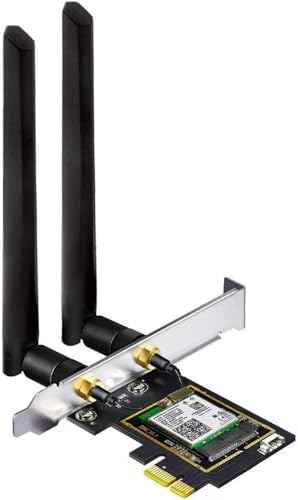
Start with the form. Four listings are self-contained cards carrying their own Wi-Fi radio. The GLOTRENDS WA01 is a partial match on form: an M.2 E Key to PCIe X1 adapter that works with an NGFF M.2 Wi-Fi module, the radio lives in that module, and the listing gives no module as included. The part that joins a network is a separate purchase.
Bands come next. The OKN is the only listing stating a 6GHz band, with 7 channels at 160MHz and 14 at 80MHz. The BZIZU and TP-Link cards are dual-band Wi-Fi 6, and the FebSmart is 2.4GHz only. On stated 5GHz speeds, the BZIZU lists 2400Mbps and the TP-Link 1201Mbps; the OKN gives channel widths rather than a headline speed.
Bluetooth splits the set as well. The BZIZU states Bluetooth 5.2 in its facts and the OKN states Bluetooth 5.3, while the TP-Link’s Bluetooth 5.2 sits in its product name (product name) and its facts leave Bluetooth out. The FebSmart gives no Bluetooth, and the GLOTRENDS routes it through a USB cable.
Fit and weight matter when ordering several. The BZIZU states a fit for x1, x4, x8 or x16 slots and includes both bracket sizes. Stated weights run from 0.2 pounds (OKN) to 0.33 pounds (GLOTRENDS), the heaviest here.
1. FebSmart FS-N300 Wireless N Adapter — Best for Older Windows Desktops
The FebSmart FS-N300 is a complete PCIe wireless adapter on a Qualcomm Atheros AR928X chipset, and it matches the keyword on type. Its stated job is narrow: a 2.4GHz Wireless N connection at up to 300Mbps, with plug and play stated across current Windows and Server versions and a driver needed for the oldest releases it covers. One quirk to check on the product page: the listing describes its two detachable antennas as dual band, while the stated radio is 2.4GHz only.
| Spec | From the listing |
|---|---|
| Chipset | Qualcomm Atheros AR928X |
| Wi-Fi standard | IEEE 802.11N, 2.4GHz |
| Max speed | 300Mbps on 2.4GHz |
| Antennas | 2 x 3dBi external detachable |
| Dimensions | 0.72 x 2.55 x 4.72 inches |
| Weight | The listing does not state it |
2. BZIZU Wi-Fi 6 Card With Intel AX200 — Best Documented Intel Chipset Card
The BZIZU card is a complete PCIe Wi-Fi 6 adapter and a full match, built around a genuine Intel AX200 chipset. Its facts state 2400Mbps on 5GHz and 574Mbps on 2.4GHz under 802.11ax, with OFDMA and MU-MIMO for shared networks. Bluetooth 5.2 is built in for controllers, headsets and mice, and WPA3 encryption is stated in its facts.
| Spec | From the listing |
|---|---|
| Chipset | Intel AX200 |
| Wi-Fi standard | 802.11ax, dual band |
| Stated speeds | 2400Mbps on 5GHz, 574Mbps on 2.4GHz |
| Bluetooth | 5.2, built in |
| Slot fit | PCIe x1, x4, x8 or x16 |
| Weight | 0.26 pounds |
3. TP-Link AX1800 Wi-Fi 6 PCIe Card — Best for Stated Antenna Range
The TP-Link card is a complete dual-band Wi-Fi 6 PCIe adapter and a full match on type. Its facts state up to 1.8 Gbps in total, split as 1201Mbps on 5GHz and 574Mbps on 2.4GHz, with OFDMA and MU-MIMO to reduce lag. Two high-gain, signal-boost antennas are its stated range feature. Two headline details sit in its product name rather than its facts: Bluetooth 5.2 (product name) and WPA3 (product name), so confirm both on the product page.
| Spec | From the listing |
|---|---|
| Wi-Fi class | AX1800, dual band |
| Stated speeds | 1201Mbps on 5GHz, 574Mbps on 2.4GHz |
| Antennas | 2 high-gain, signal-boost |
| Bluetooth | 5.2 (product name) |
| Dimensions | 4.72 x 3.09 x 0.83 inches |
| Weight | 0.22 pounds |
4. OKN Wi-Fi 6E AX5400 PCIe Card — Best for 6GHz Band Coverage
The OKN card is a complete tri-band PCIe adapter and a full match, built on the Intel AX210 chipset with Wi-Fi 6E support. Its facts describe the 6GHz band, including 7 channels at 160MHz and 14 at 80MHz, plus Target Wake Time. Bluetooth 5.3 is stated in its facts, a step past the 5.2 figures elsewhere here. At a stated 0.2 pounds it is also the lightest card with a weight figure.
| Spec | From the listing |
|---|---|
| Chipset | Intel AX210 |
| Wi-Fi standard | 802.11ax Wi-Fi 6E, tri band |
| Bands | 2.4GHz, 5GHz and 6GHz |
| Bluetooth | 5.3 |
| Dimensions | 4.72 x 3.15 x 0.79 inches |
| Weight | 0.2 pounds |
5. GLOTRENDS WA01 M.2 to PCIe Carrier Board — Best for Builders With a Spare Module
The GLOTRENDS WA01 is a partial match, and the reason is its form: an M.2 E Key to PCIe X1 adapter board that carries a separate NGFF M.2 Wi-Fi module, so it has no Wi-Fi radio of its own stated. Its listing specifies a long run of compatible modules, from the AX200NGW to the BE200NGW, and includes 6 dBi SMA antenna kits with two pigtail cables. Its Bluetooth signal travels over a USB cable to a motherboard port. With a spare module in hand it is a workable carrier; alone it is incomplete, so check the product page first.
| Spec | From the listing |
|---|---|
| Form | M.2 E Key to PCIe X1 carrier board |
| Wi-Fi radio | The listing does not state it |
| Antennas | 6 dBi RP-SMA, 2 pigtail cables |
| Bluetooth path | USB cable to motherboard port |
| Dimensions | The listing does not state it |
| Weight | 0.33 pounds |
Shopping Checklist
- Measure first: confirm each desktop has a free PCIe slot before ordering.
- Check stated dimensions against slim cases, and whether a low-profile bracket is included.
- Check whether the listing states a complete card, or a carrier needing a module.
- Check the stated bands against your office router, especially a 6GHz band.
- Check the return window on the product page before bulk ordering.
- Compare two or three finalists on stated speeds and Bluetooth.
FAQ
What should a small office check first in a PCIe Wi-Fi card listing?
Check the form and the bands. A complete card states its own chipset and radio, while a carrier board needs a separate module. Then compare the stated bands and speeds with your office router, since a 6GHz card only helps on a 6GHz network.
Does every desktop in the office need the same adapter?
No. Desks near the router can run a simpler dual-band card, while a desk doing large transfers may justify the tri-band option among the recommended pcie wi-fi adapters for small offices. Match the card to each desk’s workload.
What else should be confirmed on the product page before ordering?
Confirm bracket contents for slim cases, stated operating system support, and any detail that appears only in a product name, such as a Bluetooth version. For a carrier board, confirm which M.2 module you will fit.
Final Verdict
For most desks, the finished cards are the recommended pcie wi-fi adapters for small offices here: the OKN for its stated 6GHz band and Bluetooth 5.3, the BZIZU for its documented AX200 figures, and the TP-Link for its stated high-gain antennas, with its Bluetooth and WPA3 figures resting on its product name (product name). The FebSmart remains the single-band option for older Windows desktops. The GLOTRENDS WA01 stays a partial match: a capable carrier, but incomplete until you add a module, so verify that pairing on the product page first.
Prime covers fast, free delivery on eligible items. See whether a Prime free trial is available for your account.
Check Prime on Amazon →Product and ASIN Reference
| Product | ASIN | Grade | Buy |
|---|---|---|---|
| FebSmart FS-N300 Wireless N Adapter | B07MHB2R2V | Match | View on Amazon |
| BZIZU Wi-Fi 6 PCIe Card, Intel AX200 | B0F13F1SXZ | Match | View on Amazon |
| TP-Link AX1800 Wi-Fi 6 PCIe Card | B0BZJQ3WNT | Match | View on Amazon |
| OKN Wi-Fi 6E AX5400 PCIe Card | B07X462KRK | Match | View on Amazon |
| GLOTRENDS WA01 M.2 to PCIe Carrier | B09ZDPP43X | Partial match — carrier board, no own radio | View on Amazon |
Types of Routers and WiFi Adapters
Routers and WiFi adapters are grouped mainly by coverage approach and by connection type.
Single-unit routers broadcast from one central point, simplest to set up but with coverage that fades with distance and walls. Mesh WiFi systems use multiple linked units spread through a space to extend consistent coverage further than a single router can reach alone. Travel routers are compact and often battery-powered, meant to create a personal network from a hotel or public connection rather than cover a whole home. PCIe and USB WiFi adapters add or upgrade wireless capability on a desktop PC that lacks it built in.
WiFi band and standard (like dual-band or newer generations) affect both speed and how well a signal handles interference from other nearby networks, so checking what a router or adapter supports matters as much as its advertised maximum speed.
Frequently Asked Questions
What's the benefit of a mesh WiFi system over a single router?
A mesh system uses multiple linked units spread through a space to extend consistent coverage further than a single router can reach alone, which helps in larger homes or ones with thick walls.
What's a travel router used for?
It's a compact, often battery-powered router meant to create a personal network from a hotel or public connection, rather than cover a whole home like a standard router.
Does WiFi standard matter as much as advertised speed?
Yes - the band and standard a router or adapter supports affect both speed and how well the signal handles interference from nearby networks, which matters as much as the advertised maximum speed.








Write Your Review
No reviews yet. Be the first to share your experience!