
If you run Windows and want the highest single-display refresh rate, start with the WAVLINK dock and its DisplayPort output, and if you use a MacBook with a native single-display limit, start with one of the two Plugable docks that use DisplayLink for two of the three screens. Readers with a mix of Windows, Mac, and ChromeOS laptops at shared desks should compare the first Plugable model closely, because its listing covers all three systems and six USB-A ports. Readers who need a third screen but still have a VGA monitor should look at the Anker model, which reaches three displays through two HDMI ports plus VGA rather than through three HDMI ports.
Charging power and Ethernet speed separate these five models as clearly as display outputs do. Laptop charging ranges from 80W pass-through on the Anker hub to 100W on the other four docks, Ethernet ranges from 1 Gbps on the Anker listing to 2.5G on the WAVLINK listing, and total port counts range from 12-in-1 and 13-in-1 on the Plugable models to 18-in-1 on the TobenONE model. Those numbers matter only after operating system support is confirmed, because one dock here is Windows only, one is not recommended for Mac use, and the Mac-compatible models handle external displays in different ways.
As an Amazon Associate, we earn from qualifying purchases.


Pick by Your Need
- Best overall: Plugable USB C Triple Display Docking Station. Three HDMI outputs, 100W charging, six USB-A ports, and support for Windows, macOS, and ChromeOS cover the widest mix of laptops in this group.
- Best for Mac multi-display expansion: Plugable USB-C Triple Monitor Docking Station 13-in-1. DisplayLink support for HDMI 2 and 3 addresses MacBooks that are normally limited to a single external display.
- Best for many USB peripherals: TobenONE 18 in 1 Laptop Docking Station. Nine USB ports and 18 ports in total give this model the highest port counts in the comparison.
- Best for high-refresh DisplayPort: WAVLINK Triple Monitor Dock With DisplayPort. A single DisplayPort output listed at 4K at 144Hz and 2.5G Ethernet set it apart from the four HDMI-focused alternatives.
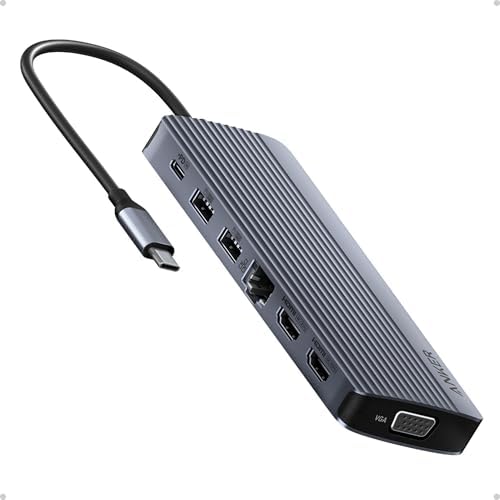
- Best for a VGA third screen: Anker Laptop Docking Station Triple Display. Two HDMI ports plus a 1080p VGA port allow a three-monitor setup that includes an older VGA display.
Quick Answer
For most mixed Windows and Mac desks, the first Plugable dock is the balanced choice, with three HDMI outputs, 100W charging, six USB-A ports, and Gigabit Ethernet. Windows users who need DisplayPort, 2.5G Ethernet, or a 4K at 144Hz single-display mode should choose the WAVLINK dock instead. The Anker hub fits a different desk, one where the third display connects by VGA and where macOS mirroring across external monitors is acceptable.
Comparison Table
| Product | Laptop charging | Display outputs | USB ports listed | Ethernet | Weight | Buy |
|---|---|---|---|---|---|---|
| Plugable USB C Triple Display Docking Station | 100W | 3 HDMI: 1 at 4K 30Hz, 2 at 1080p 60Hz | 6 USB-A | Gigabit | 0.73 pounds | View on Amazon |
| Plugable USB-C Triple Monitor Docking Station 13-in-1 | 100W, plus 20W front USB-C | 3 HDMI: 1 at 4K 30Hz, 2 up to 1920×1200 60Hz | 4 USB-A plus 1 USB-C | Gigabit | 0.88 pounds | View on Amazon |
| TobenONE 18 in 1 Laptop Docking Station | 100W PD | 3 HDMI, triple display at 4K 60Hz as listed | 9 USB ports | RJ45 | 0.68 pounds | View on Amazon |
| WAVLINK Triple Monitor Dock With DisplayPort | 100W from included 130W adapter | 2 HDMI plus 1 DisplayPort, single DP at 4K 144Hz | 2 USB-C 10Gbps plus 4 USB-A 5Gbps | 2.5G | 0.73 pounds | View on Amazon |
| Anker Laptop Docking Station Triple Display | 80W pass-through | 2 HDMI at 4K plus 1 VGA at 1080p | 5 USB-A plus USB-C data ports | 1 Gbps | 0.3 pounds | View on Amazon |
Decision Guide
Start the decision with the operating system, because that step removes models before port counts are compared. The WAVLINK listing states Windows only and states that the dock is not compatible with any Mac OS computer, so a MacBook owner should remove it from the shortlist at once. The TobenONE listing states that the dock is designed for Windows and Chrome OS laptops and is not recommended for Mac users, which makes it a Windows-first or ChromeOS-first choice rather than a shared-desk choice. The two Plugable listings and the Anker listing each cover more than one system, but they treat Mac displays differently, and that difference is covered below.
Next, match the display connectors on the desk to the connectors on the dock. Three of the five models provide three HDMI outputs: both Plugable docks and the TobenONE dock. The WAVLINK dock provides two HDMI outputs and one DisplayPort output, so a desk with three HDMI-only monitors would need an adapter path that the listing does not describe, or a monitor change. The Anker hub provides two HDMI outputs and one VGA output at 1080p, so it reaches three external displays only when one display accepts VGA. A reader counting HDMI cables alone would miscount both the WAVLINK and Anker setups, so the connector list should be checked monitor by monitor.
Then compare how the three displays are driven, because identical connector counts can hide different resolution limits. On the first Plugable dock, HDMI 1 runs at 4K at 30Hz through Alt Mode and the other two HDMI outputs run at 1080p at 60Hz through DisplayLink. On the second Plugable dock, HDMI 1 runs at 4K at 30Hz and HDMI 2 and 3 run up to 1920×1200 at 60Hz. The TobenONE listing describes triple and dual display support at 4K at 60Hz, which is a higher stated refresh rate at 4K than either Plugable model lists for its main output. The WAVLINK listing states a single DisplayPort output at up to 4K at 144Hz under a DP1.4 source and dual monitors at 4K at 60Hz. The Anker listing states two 4K HDMI ports and a 1080p VGA port, so its third screen runs at a lower resolution than its first two screens by design.
Mac owners need one more check before choosing. Both Plugable listings describe DisplayLink as the route to multiple extended displays on MacBooks, including models normally limited to a single external display, and both require driver or software installation for that function. The Anker listing gives a different result on macOS: the display on external monitors will be identical, which means mirrored content rather than separate extended content on each screen. A Mac user who needs three different documents on three screens should therefore compare the Plugable models first, while a Mac user who presents the same screen in two places may find the Anker arrangement sufficient.
After displays, count the peripherals that stay on the desk. The TobenONE model lists 9 USB ports, the first Plugable model lists 6 USB-A ports, the Anker model lists five USB-A ports plus USB-C data ports, and both the second Plugable model and the WAVLINK model list 4 USB-A ports. Speed also differs: the WAVLINK listing states 10Gbps for its two USB-C ports and 5Gbps for its four USB-A ports, the second Plugable listing states 5Gbps for its four USB-A ports, and the Anker listing states 5 Gbps transfer speeds for its USB-A and USB-C ports. A desk with several external drives benefits from the WAVLINK USB-C speed figure, while a desk with many low-speed peripherals such as keyboards, mice, and receivers benefits more from a higher port count.
Card readers and wired networking narrow the field further. The second Plugable model lists an SD card reader, the TobenONE model lists SD and microSD slots, and the Anker model lists an SD and micro SD slot. The first Plugable listing and the WAVLINK listing do not name a card reader in their port lists, so photographers should confirm the product page before assuming a slot is present. For networking, the WAVLINK model lists 2.5G Ethernet, the Plugable models list Gigabit Ethernet, and the Anker model lists 1 Gbps Ethernet. The TobenONE model lists an RJ45 port, and its networking speed should be confirmed on the product page rather than assumed to match the 2.5G model.
Finally, check what must be supplied separately. The TobenONE listing states that no power adapter is included and that a power supply over 65W should be connected for stable usage, even though the dock supports 100W PD charging. The Anker listing states that a wall charger is not included and that pass-through charging reaches 80W from a 100W USB-C PD-IN port. The WAVLINK listing, by contrast, includes a 130W charger adapter, and the second Plugable listing includes a power adapter with an AC power cord and a 1 meter USB-C host cable. A comparison that ignores included adapters will understate the extra parts needed for the TobenONE and Anker setups.
1. Plugable USB C Triple Display Docking Station — Best Overall
This 12-in-1 dock connects three HDMI displays through one USB-C cable, with 1 display at 4K at 30Hz through Alt Mode and 2 displays at 1080p at 60Hz through DisplayLink. It also provides 100W laptop charging, Gigabit Ethernet, 6 USB-A ports for peripherals, and audio, across Windows, macOS, and ChromeOS laptops. Its footprint is listed as 7.9 x 3.3 x 1.2 inches, which is wider than the Anker and TobenONE bodies compared here.
| Spec | From the listing |
|---|---|
| Display outputs | 3 HDMI: 1 at 4K 30Hz, 2 at 1080p 60Hz |
| Laptop charging | 100W USB-C Power Delivery |
| USB ports | 6 USB-A ports, USB 3.0 |
| Ethernet | Gigabit Ethernet |
| Dimensions | 7.9 x 3.3 x 1.2 inches |
| Weight | 0.73 pounds |
2. Plugable USB-C Triple Monitor Docking Station 13-in-1 — Best for Mac Expansion
This 13-in-1 dock also provides three HDMI outputs, but it raises the second and third displays to up to 1920×1200 at 60Hz while HDMI 1 stays at 4K at 30Hz. It adds an SD card reader and a front USB-C port with 20W charging for phones and accessories, alongside 100W laptop charging through the rear USB-C port. A DisplayLink driver or DisplayLink Manager installation is required for the extra displays, with Mac guidance called out in the listing.
| Spec | From the listing |
|---|---|
| Display outputs | 3 HDMI: 1 at 4K 30Hz, 2 up to 1920×1200 60Hz |
| Laptop charging | 100W through rear USB-C port |
| Device charging | 20W through front USB-C port |
| USB ports | 4 USB-A at 5Gbps |
| Card reader | SD card reader |
| Weight | 0.88 pounds |
3. TobenONE 18 in 1 Laptop Docking Station — Best for Port Count
With 18 ports in total and 9 USB ports, this dock lists the largest expansion count in the group, plus three HDMI outputs with triple display support described at 4K at 60Hz. It also lists SD and microSD slots, an RJ45 Ethernet port, an audio port, and 100W PD charging through a PD 3.0 connection. The trade-off is in the box contents and system fit: no power adapter is included, a supply over 65W is needed for stable usage, and the listing states the dock is not recommended for Mac users. Skip it if your desk is built around a MacBook.
| Spec | From the listing |
|---|---|
| Total ports | 18-in-1 expansion |
| Display outputs | 3 HDMI, triple display at 4K 60Hz as listed |
| USB ports | 9 USB ports |
| Laptop charging | 100W PD, power adapter not included |
| Dimensions | 4.9 x 3.5 x 1.6 inches |
| Weight | 0.68 pounds |
4. WAVLINK Triple Monitor Dock With DisplayPort — Best for High Refresh Rates
This Windows-only dock uses two HDMI outputs and one DisplayPort output instead of three HDMI outputs, and the single DisplayPort output is listed at up to 4K at 144Hz under a DP1.4 source, with dual monitors at 4K at 60Hz. It pairs those outputs with 2.5G Ethernet, two USB-C ports at 10Gbps, four USB-A ports at 5Gbps, and a 3.5mm audio jack. The included 130W adapter supports 100W charging to the laptop and 7.5W for other Type-C devices. Skip it if you use a Mac, because the listing states it is not compatible with any Mac OS computer.
| Spec | From the listing |
|---|---|
| Display outputs | 2 HDMI plus 1 DisplayPort, single DP at 4K 144Hz |
| Laptop charging | 100W from included 130W adapter |
| USB ports | 2 USB-C at 10Gbps, 4 USB-A at 5Gbps |
| Ethernet | 2.5G Ethernet |
| Dimensions | 8.1 x 3.3 x 0.7 inches |
| Weight | 0.73 pounds |
5. Anker Laptop Docking Station Triple Display — Best for VGA Monitors
This 14-in-1 hub reaches three displays in a different way, through two 4K HDMI ports and one 1080p VGA port, so the third screen depends on a VGA connection rather than a third HDMI cable. It lists five USB-A ports, USB-C data ports at 5 Gbps, 1 Gbps Ethernet, SD and micro SD slots, and an AUX port, in a body listed at 5.91 x 2.13 x 0.67 inches and 0.3 pounds. Charging is pass-through at 80W from a 100W USB-C PD-IN port, and the wall charger is not included. On macOS, the listing states that external monitors show identical content, so this model does not provide the separate extended Mac displays that the Plugable DisplayLink models describe.
| Spec | From the listing |
|---|---|
| Display outputs | 2 HDMI at 4K plus 1 VGA at 1080p |
| Laptop charging | 80W pass-through, charger not included |
| USB ports | 5 USB-A ports plus USB-C data ports at 5 Gbps |
| Ethernet | 1 Gbps Ethernet |
| Dimensions | 5.91 x 2.13 x 0.67 inches |
| Weight | 0.3 pounds |
Buying Checklist
- Confirm that your laptop has a USB-C, USB4, or Thunderbolt port with DisplayPort Alt Mode and Power Delivery if the dock you choose requires them for video and charging.
- List each monitor by connector and resolution, then match that list to HDMI, DisplayPort, or VGA outputs and to the stated refresh rate for each output.
- Check operating system support and any driver step, including DisplayLink installation for Mac multi-display use and Windows-only limits where stated.
- Count the USB peripherals, drives, and card formats you use, and compare port counts, USB speeds in Gbps, and SD or microSD slots against that count.
- Verify what is included in the box, in particular a power adapter, a host cable, and the wattage of any separate charger you must supply.
- Measure the desk space against the listed dimensions and weight, especially for shared desks where the dock is moved or stored between sessions.
FAQ
How many monitors can each dock drive at 4K?
The answer depends on the model and on which output is used. The first Plugable dock lists one HDMI output at 4K at 30Hz and two at 1080p, the TobenONE dock describes triple display support at 4K at 60Hz, and the WAVLINK dock lists a single DisplayPort output at up to 4K at 144Hz with dual monitors at 4K at 60Hz. The Anker hub lists two 4K HDMI ports and one VGA port at 1080p, so its third display is not a 4K display.
Which dock should a MacBook owner choose for three separate screens?
Based on the listing details, a MacBook owner who needs separate extended content should compare the two Plugable docks first, because both describe DisplayLink as the method for multiple displays on MacBooks that are otherwise limited to one external display. The Anker listing states that external monitors show identical content on macOS, and the WAVLINK listing states that the dock is not compatible with Mac OS computers. The TobenONE listing states that its dock is not recommended for Mac users.
What should be checked about charging before ordering?
Check both the wattage delivered to the laptop and the adapter that supplies it. Four models list 100W laptop charging, while the Anker hub lists 80W pass-through charging from a 100W PD-IN port. The TobenONE and Anker listings state that a charger or power adapter is not included, while the WAVLINK listing includes a 130W adapter and the second Plugable listing includes a power adapter with an AC power cord.
Final Verdict
We compared these five docks on display connectors, resolution and refresh figures, charging wattage, USB counts and speeds, Ethernet speed, and operating system support, and no single model leads on every measure. The first Plugable dock is the most balanced choice for a mixed fleet of Windows, Mac, and ChromeOS laptops, while the second Plugable dock suits Mac users who also want an SD reader and a 20W front USB-C charging port. Windows users gain the most from the other two high-output models, the TobenONE dock for port count and the WAVLINK dock for DisplayPort refresh rate and 2.5G Ethernet. The Anker hub remains the specific fit for a desk where the third monitor connects by VGA and where 80W pass-through charging is enough.
Prime covers fast, free delivery on eligible items. See whether a Prime free trial is available for your account.
Check Prime on Amazon →Types of Docking Stations and USB-C Hubs
Docking stations and USB-C hubs are grouped mainly by port variety and by power-delivery capability.
Basic USB-C hubs add extra ports from one host port, usually relying on the host's own power budget. Docking stations go further, often adding pass-through laptop charging alongside multiple display and peripheral connections from a single cable. Single-cable docks connect a laptop with one cord for power, data, and displays at once, replacing a desk full of separate cables. Multi-monitor docks are built to drive two or more external displays, which not every laptop's single port can do unassisted.
A dock's total bandwidth is shared across every connected device, so running multiple high-resolution monitors plus fast storage from one dock can hit a bandwidth ceiling well before any single device's own rated speed is reached.
Frequently Asked Questions
What's the benefit of a single-cable docking station?
It connects a laptop with one cord for power, data, and displays at once, replacing a desk full of separate cables with a single connection point.
Can a dock run out of bandwidth with multiple devices connected?
Yes - a dock's total bandwidth is shared across every connected device, so running multiple high-resolution monitors plus fast storage from one dock can hit a bandwidth ceiling before any single device's own rated speed is reached.
What's the difference between a basic USB-C hub and a full docking station?
A basic hub mainly adds extra ports from one host port, while a docking station typically goes further, often adding pass-through laptop charging alongside multiple display and peripheral connections.
Related Guides
- Best USB-C Docking Station for Dual Monitors
- Best Thunderbolt Dock for a Home Office Desk
- Best USB-C Hub With Ethernet and Card Reader
- How to Connect Three Monitors to a Laptop
Product and ASIN Reference
| Product | ASIN | Buy |
|---|---|---|
| Plugable USB C Triple Display Docking Station | B08DDH5CPW | View on Amazon |
| Plugable USB-C Triple Monitor Docking Station 13-in-1 | B01FKTZLBS | View on Amazon |
| TobenONE 18 in 1 Laptop Docking Station | B0FRXGDPL5 | View on Amazon |
| WAVLINK Triple Monitor Dock With DisplayPort | B0HDN32Q45 | View on Amazon |
| Anker Laptop Docking Station Triple Display | B0CF52HF6D | View on Amazon |










Write Your Review
No reviews yet. Be the first to share your experience!